







Question: Consider the RAH Waiting Times Table, and in particular, the Waiting for a Bed category. (a) Using Excel, build an appropriate histogram with this data.
Consider the “RAH Waiting Times” Table, and in particular, the “Waiting for a Bed” category.
(a) Using Excel, build an appropriate histogram with this data. Include graph titles and labels on the axis. Make sure the labels on your graph match those in the Table.
(b) Using Excel, graph the cumulative distribution function for the data. Again, make sure that the chart is correctly labeled and titled.
If you cannot create an Excel chart that reflects all aspects of the histogram or cumulative distribution function correctly, either because of the constraints of Excel or because of the way the data is given, then add an explanation of what details of your chart need to be corrected or improved and why.
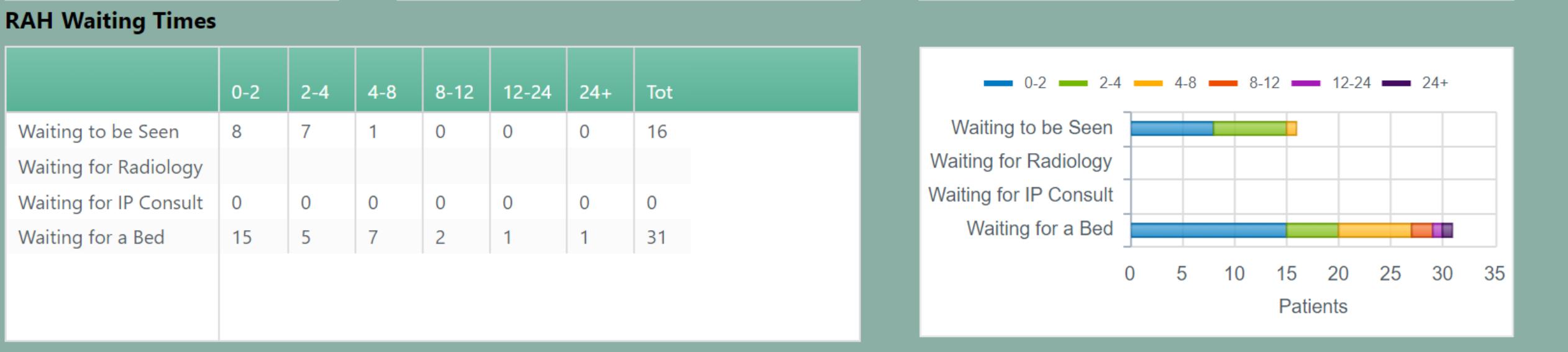
RAH Waiting Times Waiting to be Seen Waiting for Radiology Waiting for IP Consult Waiting for a Bed 0-2 8 0 15 2-4 7 0 5 U 4-8 8-12 1 O 7 0 0 2 12-24 0 0 1 24+ 0 0 1 Tot 16 0 31 0-2
Step by Step Solution
3.59 Rating (149 Votes )
There are 3 Steps involved in it
Answer 1 Explanation The detailed solution to the gi... View full answer

Get step-by-step solutions from verified subject matter experts
 Study Help