







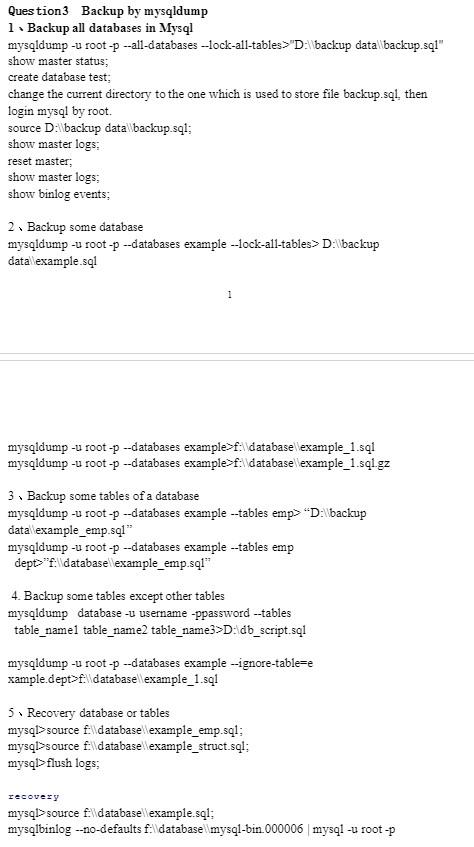
Question: please, answer the question 3 Question 3 Backup by mysqldump 1. Backup all databases in Mysql show master status; create database test; change the current
 please, answer the question 3
Question 3 Backup by mysqldump 1. Backup all databases in Mysql show master status; create database test; change the current directory to the one which is used to store file backup.sq1, then login mysql by root. source D: backup datal backup.sql; show master logs; reset master; show master logs; show binlog events; 2Backup some database mysqldump -u root-p -databases example -lock-all-tables > D:lbackup datallexample.sq1 mysqldump -u root-p -databases example>f:idatabasellexample_1.sql mysqldump -u root-p -databases example>f:idatabasellexample_1.sql.gz 3. Backup some tables of a database mysqldump -u root-p -databases example -tables emp>" "D:Wbackup datal example_emp.sq1" mysqldump -u root-p -databases example -tables emp dept" "f:lidatabasellexample_emp.sq1" 4. Backup some tables except other tables mysqldump database -u username -ppassword -tables table_name1 table_name2 table_name3>D: db_script.sql mysqldump -u root-p -databases example -ignore-table=e xample.dept > fildatabasellexample_1.sql 5 Recovery database or tables mysql>source flldatabasellexample_emp.sql; mysql>source fildatabasellexample_struct.sql; mysql>flush logs; recovery mysql>source fildatabasellexample.sql; mysqlbinlog -no-defaults f:llatabasellmysql-bin 000006 mysql -u root p
Step by Step Solution
There are 3 Steps involved in it

Get step-by-step solutions from verified subject matter experts
 Study Help