







Question: Please answer the section about scaling. I keep getting a recycled answer for just the first part. a EXERCISE 5 (5 points) Difficulty: Hard Theory:
Please answer the section about scaling. I keep getting a recycled answer for just the first part.
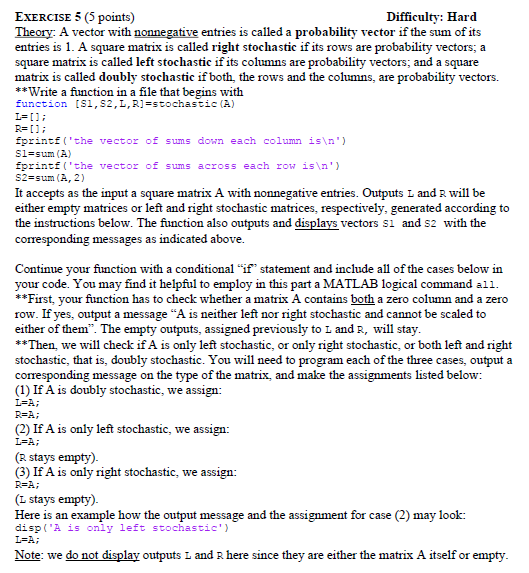
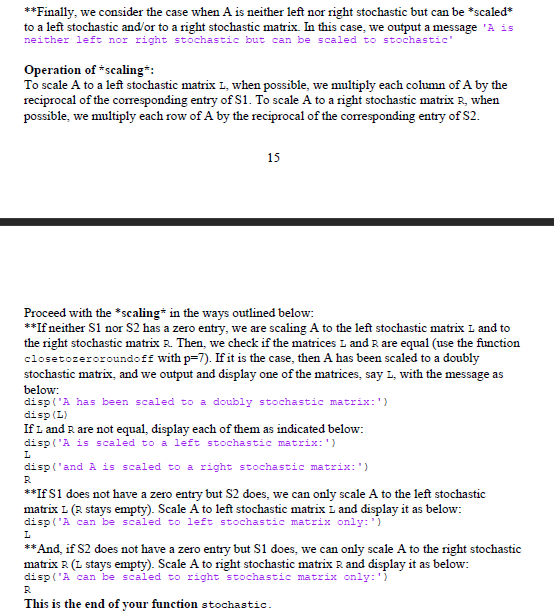
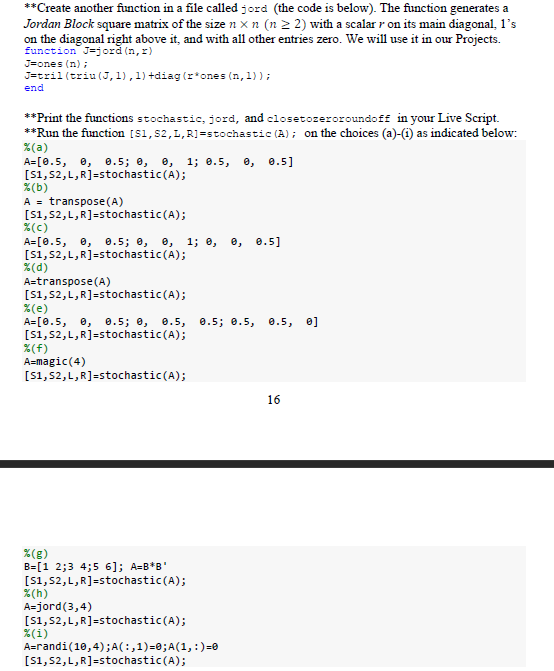
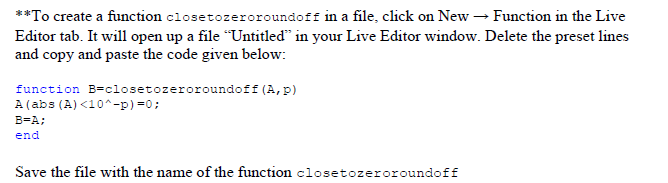
a EXERCISE 5 (5 points) Difficulty: Hard Theory: A vector with nonnegative entries is called a probability vector if the sum of its entries is 1. A square matrix is called right stochastic if its rows are probability vectors; a square matrix is called left stochastic if its columns are probability vectors; and a square matrix is called doubly stochastic if both the rows and the columns, are probability vectors. **Write a function in a file that begins with function [51, 52, L, R]=stochastic (A) I=[]; R= []; fprintf('the vector of sums down each column is ') Sl=sum (A) fprintf('the vector of sums across each row is ') S2=sum (A, 2) It accepts as the input a square matrix A with nonnegative entries. Outputs L and R will be either empty matrices or left and right stochastic matrices, respectively, generated according to the instructions below. The function also outputs and displays vectors si and s2 with the corresponding messages as indicated above. Continue your function with a conditional "it" statement and include all of the cases below in your code. You may find it helpful to employ in this part a MATLAB logical command all. **First, your function has to check whether a matrix A contains both a zero column and a zero row. If yes, output a message "A is neither left nor right stochastic and cannot be scaled to either of them. The empty outputs, assigned previously to L and R, will stay. **Then, we will check if A is only left stochastic, or only right stochastic, or both left and right stochastic, that is, doubly stochastic. You will need to program each of the three cases, output a corresponding message on the type of the matrix, and make the assignments listed below: (1) If A is doubly stochastic, we assign: ISA; (2) If A is only left stochastic, we assign: L=A; ( stays empty). (3) If A is only right stochastic, we assign: R=A; (L stays empty). Here is an example how the output message and the assignment for case (2) may look: disp('A is oniy left stochastic') L=A; Note: we do not display outputs I and R here since they are either the matrix A itself or empty. REA; **Finally, we consider the case when A is neither left nor right stochastic but can be *scaled* to a left stochastic and/or to a right stochastic matrix. In this case, we output a message 'A is neither left nor right stochastic but can be scaled to stochastic Operation of scaling*: To scale A to a left stochastic matrix L, when possible, we multiply each column of A by the reciprocal of the corresponding entry of S1. To scale A to a right stochastic matrix R, when possible, we multiply each row of A by the reciprocal of the corresponding entry of S2. 15 L Proceed with the scaling* in the ways outlined below: **If neither S1 nor S2 has a zero entry, we are scaling A to the left stochastic matrix L and to the right stochastic matrix R. Then, we check if the matrices L and R are equal (use the function closetozeroroundoff with p=7). If it is the case, then A has been scaled to a doubly stochastic matrix, and we output and display one of the matrices, say L, with the message as below: disp('A has been scaled to a doubly stochastic matrix:') disp(L) If L and R are not equal display each of them as indicated below: disp('A is scaled to a left stochastic matrix:') displ'and A is scaled to a right stochastic matrix:') **If S1 does not have a zero entry but S2 does, we can only scale A to the left stochastic matrix L (R stays empty). Scale A to left stochastic matrix i and display it as below: disp('A can be scaled to left stochastic matrix only:') **And, if S2 does not have a zero entry but Si does, we can only scale A to the right stochastic matrix R (I stays empty). Scale A to right stochastic matrix R and display it as below: disp('A can be sealed to right stochastic matrix only: '1 This is the end of your function stochastic. R I R ** Create another function in a file called jord (the code is below). The function generates a Jordan Block square matrix of the size n x n (n > 2) with a scalar r on its main diagonal, l's on the diagonal right above it, and with all other entries zero. We will use it in our Projects. function J=jord (1,2) J=ones (n); Jetril(triu (J,1),1)+diag (r*ones (n,1)); end **Print the functions stochastic, jord, and closetozeroroundoff in your Live Script. **Run the function (S1,S2, L, R]=stochastic (A); on the choices (a)-(1) as indicated below: %(a) A=[0.5, 0, 0.5; 0, 0, 1; 0.5, e, 0.5] [51,52,L,R]=stochastic(A); %(b) A = transpose(A) [51, 52, L, R]=stochastic(A); %(C) A=[0.5, 0, 0.5; , 0, 1; 0, e, 0.5] [51, 52, L, R]=stochastic(A); %(d) A=transpose(A) [51, 52, L, R]=stochastic(A); %(e) A=[0.5, , 0.5; 0, 0.5, 0.5; 0.5, 0.5, 0] [S1,S2, L, R]=stochastic(A); %(f) A=magic(4) [51, 52, L, R]=stochastic(A); 16 %(8) B=(1 2;3 4;5 6); A=B*B' [51,52,L,R]=stochastic(A); %(h) A=jord(3,4) [51, 52, L, R]=stochastic(A); %(i) A=randi(10,4); A(:,1)=0;A(1,:)=0 [51, 52, L, R]=stochastic(A); **To create a function closetozeroroundoff in a file, click on New Function in the Live Editor tab. It will open up a file "Untitled in your Live Editor window. Delete the preset lines and copy and paste the code given below: function B-closetozeroroundoff (A,p) A(abs (A)
Step by Step Solution
There are 3 Steps involved in it

Get step-by-step solutions from verified subject matter experts
 Study Help