







Question: Please answer this based on the instructions as soon as possible Create VB code simulates ratings. E F G H Nm Rating Satisfaction Generate Ratings
Please answer this based on the instructions as soon as possible
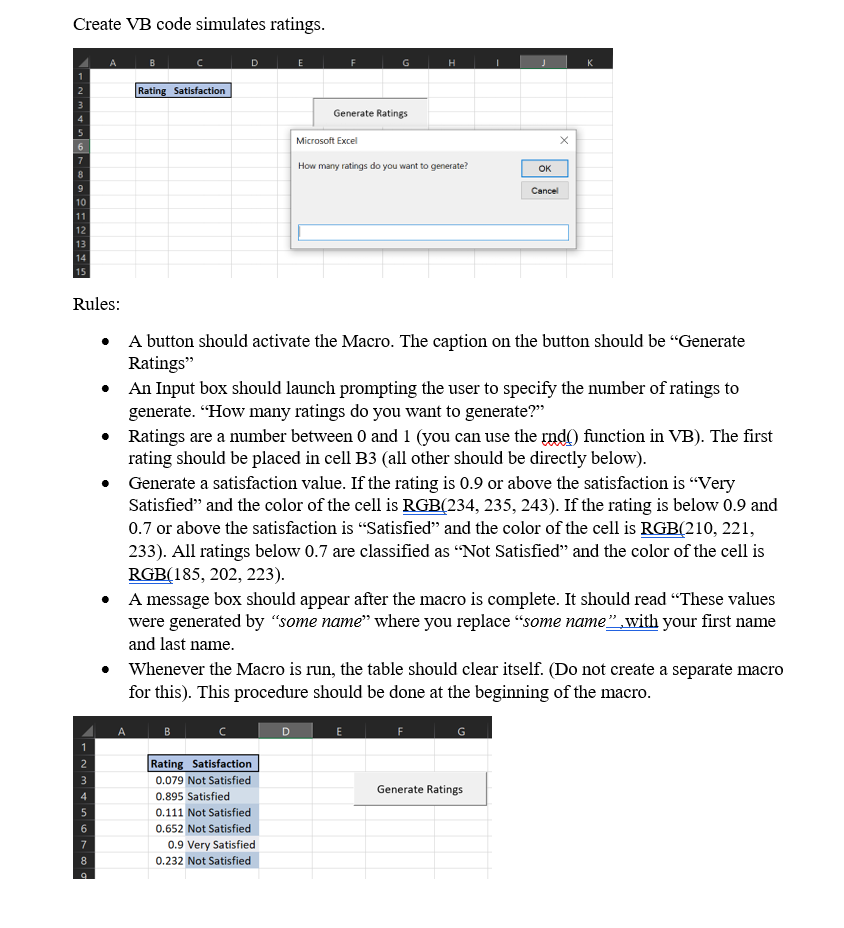
Create VB code simulates ratings. E F G H Nm Rating Satisfaction Generate Ratings Microsoft Excel How many ratings do you want to generate? OK NO 8 Cancel 10 11 12 13 14 15 Rules: . A button should activate the Macro. The caption on the button should be Generate Ratings" An Input box should launch prompting the user to specify the number of ratings to generate. How many ratings do you want to generate? Ratings are a number between 0 and 1 (you can use the rndo function in VB). The first rating should be placed in cell B3 (all other should be directly below). Generate a satisfaction value. If the rating is 0.9 or above the satisfaction is Very Satisfied and the color of the cell is RGB(234, 235, 243). If the rating is below 0.9 and 0.7 or above the satisfaction is Satisfied and the color of the cell is RGB(210, 221, 233). All ratings below 0.7 are classified as Not Satisfied and the color of the cell is RGB(185, 202, 223). A message box should appear after the macro is complete. It should read These values were generated by some name where you replace some name, with your first name and last name. Whenever the Macro is run, the table should clear itself. (Do not create a separate macro for this). This procedure should be done at the beginning of the macro. B Generate Ratings NM N 00 Rating Satisfaction 0.079 Not Satisfied 0.895 Satisfied 0.111 Not Satisfied 0.652 Not Satisfied 0.9 Very Satisfied 0.232 Not Satisfied 7 9Step by Step Solution
There are 3 Steps involved in it
1 Expert Approved Answer
Step: 1 Unlock

Question Has Been Solved by an Expert!
Get step-by-step solutions from verified subject matter experts
Step: 2 Unlock
Step: 3 Unlock
 Study Help