







Question: please answer this question with the entire code (using java language) In this exercise, you'll write an application that uses arrays and loops to work
please answer this question with the entire code (using java language)
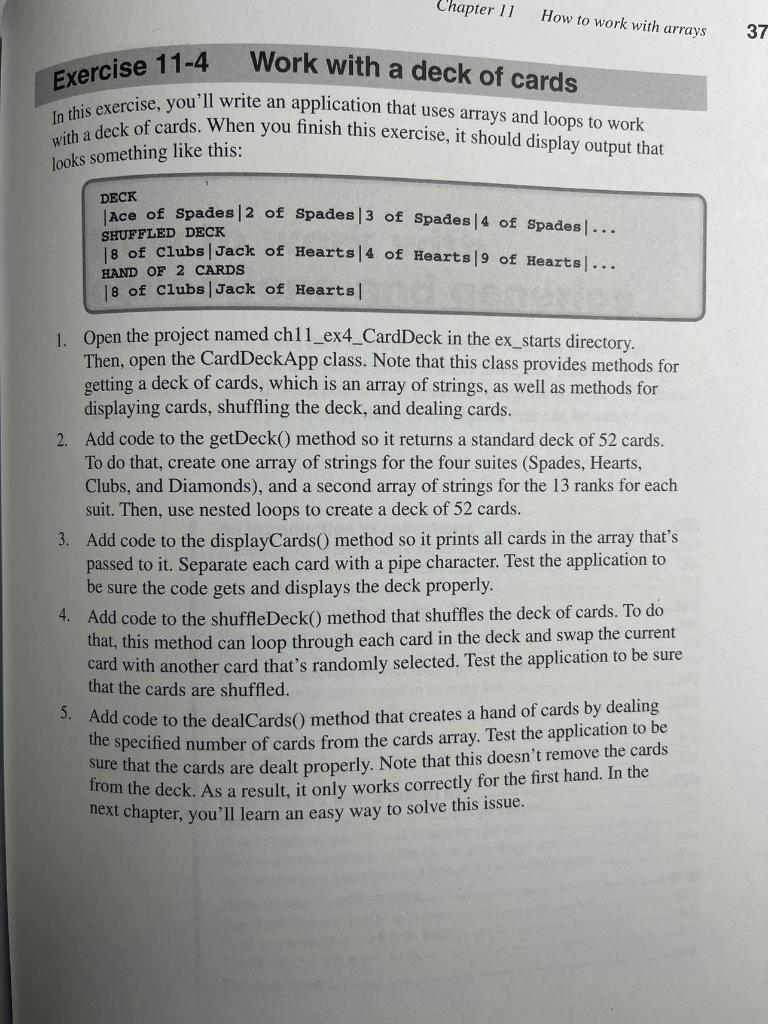
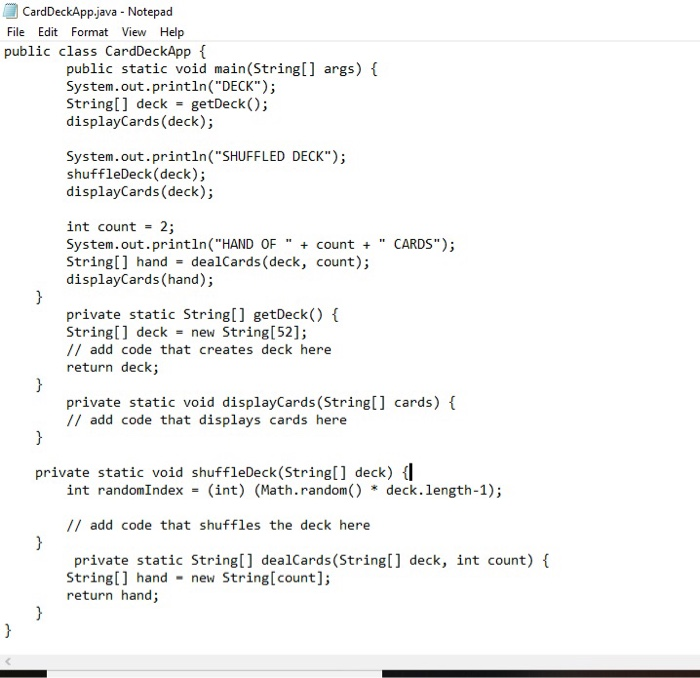
In this exercise, you'll write an application that uses arrays and loops to work with a deck of cards. When you finish this exercise, it should display output that Chapter 11 How to work with arrays 37 Work with a deck of cards Exercise 11-4 looks something like this: DECK SHUFFLED DECK Ace of Spades | 2 of Spades|3 of Spades|4 of Spades... 18 of Clubs | Jack of Hearts14 of Hearts | 9 of Hearts... 18 of clubs Jack of Hearts HAND OF 2 CARDS 1. Open the project named chll_ex4_CardDeck in the ex_starts directory. Then, open the CardDeckApp class. Note that this class provides methods for getting a deck of cards, which is an array of strings, as well as methods for displaying cards, shuffling the deck, and dealing cards. 2. Add code to the getDeck() method so it returns a standard deck of 52 cards. To do that, create one array of strings for the four suites (Spades, Hearts, Clubs, and Diamonds), and a second array of strings for the 13 ranks for each suit. Then, use nested loops to create a deck of 52 cards. 3. Add code to the displayCards() method so it prints all cards in the array that's passed to it. Separate each card with a pipe character. Test the application to be sure the code gets and displays the deck properly. 4. Add code to the shuffle Deck() method that shuffles the deck of cards. To do that, this method can loop through each card in the deck and swap the current card with another card that's randomly selected. Test the application to be sure that the cards are shuffled. 5. Add code to the dealCards() method that creates a hand of cards by dealing the specified number of cards from the cards array. Test the application to be sure that the cards are dealt properly. Note that this doesn't remove the cards from the deck. As a result, it only works correctly for the first hand. In the next chapter, you'll learn an easy way to solve this issue. CardDeckApp.java - Notepad File Edit Format View Help public class CardDeckApp { public static void main(String[] args) { System.out.println("DECK"); String[] deck = getDeck(); displayCards (deck); System.out.println("SHUFFLED DECK"); shuffleDeck(deck); displayCards (deck); } int count = 2; System.out.println("HAND OF " + count + CARDS"); String[] hand - dealCards (deck, count); displayCards (hand); private static String[] getDeck() { String[] deck = new String[52]; // add code that creates deck here return deck; private static void displayCards (String[] cards) { // add code that displays cards here } } private static void shuffleDeck(String[] deck) { int randomIndex = (int) (Math.random() * deck.length-1); // add code that shuffles the deck here } private static String[] dealCards (String[] deck, int count) { String[] hand - new String[count]; return hand; } } In this exercise, you'll write an application that uses arrays and loops to work with a deck of cards. When you finish this exercise, it should display output that Chapter 11 How to work with arrays 37 Work with a deck of cards Exercise 11-4 looks something like this: DECK SHUFFLED DECK Ace of Spades | 2 of Spades|3 of Spades|4 of Spades... 18 of Clubs | Jack of Hearts14 of Hearts | 9 of Hearts... 18 of clubs Jack of Hearts HAND OF 2 CARDS 1. Open the project named chll_ex4_CardDeck in the ex_starts directory. Then, open the CardDeckApp class. Note that this class provides methods for getting a deck of cards, which is an array of strings, as well as methods for displaying cards, shuffling the deck, and dealing cards. 2. Add code to the getDeck() method so it returns a standard deck of 52 cards. To do that, create one array of strings for the four suites (Spades, Hearts, Clubs, and Diamonds), and a second array of strings for the 13 ranks for each suit. Then, use nested loops to create a deck of 52 cards. 3. Add code to the displayCards() method so it prints all cards in the array that's passed to it. Separate each card with a pipe character. Test the application to be sure the code gets and displays the deck properly. 4. Add code to the shuffle Deck() method that shuffles the deck of cards. To do that, this method can loop through each card in the deck and swap the current card with another card that's randomly selected. Test the application to be sure that the cards are shuffled. 5. Add code to the dealCards() method that creates a hand of cards by dealing the specified number of cards from the cards array. Test the application to be sure that the cards are dealt properly. Note that this doesn't remove the cards from the deck. As a result, it only works correctly for the first hand. In the next chapter, you'll learn an easy way to solve this issue. CardDeckApp.java - Notepad File Edit Format View Help public class CardDeckApp { public static void main(String[] args) { System.out.println("DECK"); String[] deck = getDeck(); displayCards (deck); System.out.println("SHUFFLED DECK"); shuffleDeck(deck); displayCards (deck); } int count = 2; System.out.println("HAND OF " + count + CARDS"); String[] hand - dealCards (deck, count); displayCards (hand); private static String[] getDeck() { String[] deck = new String[52]; // add code that creates deck here return deck; private static void displayCards (String[] cards) { // add code that displays cards here } } private static void shuffleDeck(String[] deck) { int randomIndex = (int) (Math.random() * deck.length-1); // add code that shuffles the deck here } private static String[] dealCards (String[] deck, int count) { String[] hand - new String[count]; return hand; } }
Step by Step Solution
There are 3 Steps involved in it

Get step-by-step solutions from verified subject matter experts
 Study Help