







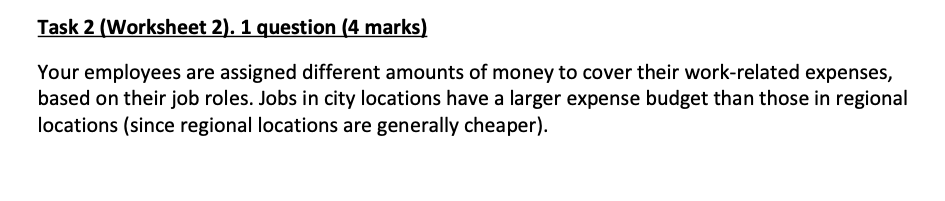
Question: Please answer using the following: Please PROVIDE EXACT formulas. Not just the standard formula. Thankyou Task 2 (Worksheet 2). 1 question (4 marks) Your employees
Please answer using the following:
Please PROVIDE EXACT formulas. Not just the standard formula. Thankyou
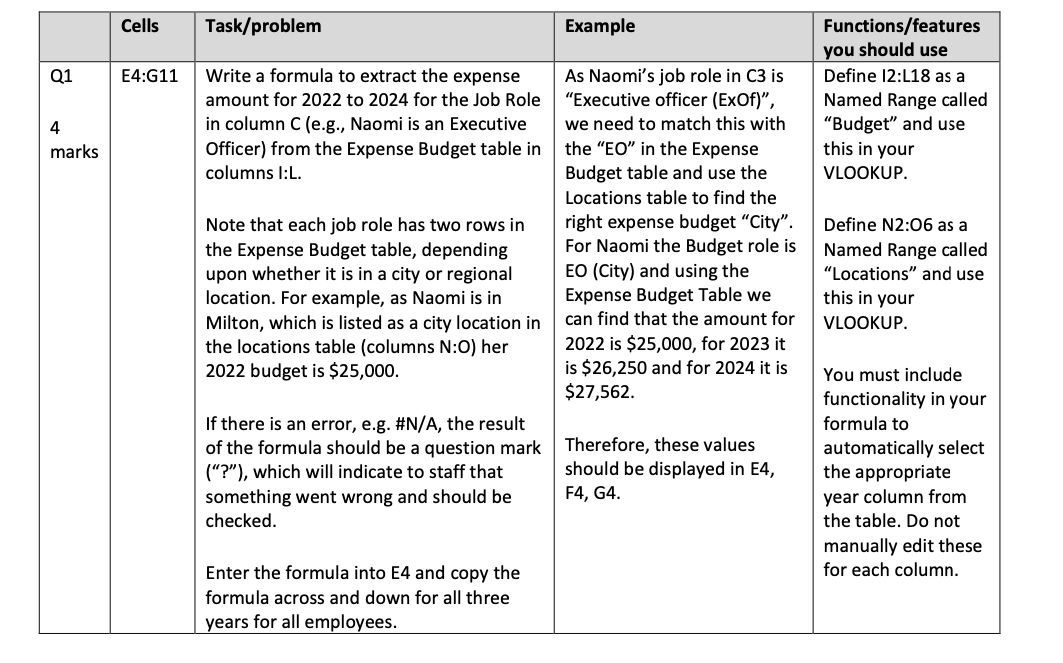
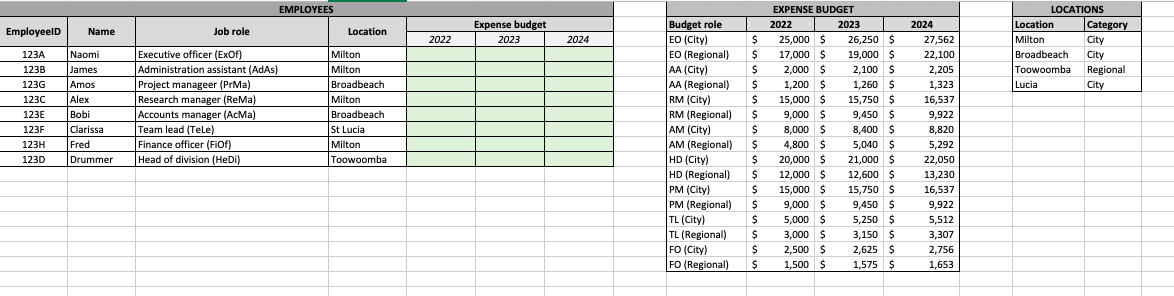
Task 2 (Worksheet 2). 1 question (4 marks) Your employees are assigned different amounts of money to cover their work-related expenses, based on their job roles. Jobs in city locations have a larger expense budget than those in regional locations (since regional locations are generally cheaper). Q1 4 marks Cells E4:G11 Task/problem Write a formula to extract the expense amount for 2022 to 2024 for the Job Role in column C (e.g., Naomi is an Executive Officer) from the Expense Budget table in columns I:L. Note that each job role has two rows in the Expense Budget table, depending upon whether it is in a city or regional location. For example, as Naomi is in Milton, which is listed as a city location in the locations table (columns N:O) her 2022 budget is $25,000. If there is an error, e.g. #N/A, the result of the formula should be a question mark ("?"), which will indicate to staff that something went wrong and should be checked. Enter the formula into E4 and copy the formula across and down for all three years for all employees. Example As Naomi's job role in C3 is "Executive officer (ExOf)", we need to match this with the "EO" in the Expense Budget table and use the Locations table to find the right expense budget "City". For Naomi the Budget role is EO (City) and using the Expense Budget Table we can find that the amount for 2022 is $25,000, for 2023 it is $26,250 and for 2024 it is $27,562. Therefore, these values should be displayed in E4, F4, G4. Functions/features you should use Define 12:L18 as a Named Range called "Budget" and use this in your VLOOKUP. Define N2:06 as a Named Range called "Locations" and use this in your VLOOKUP. You must include functionality in your formula to automatically select the appropriate year column from the table. Do not manually edit these for each column. EmployeelD Name 123A Naomi 123B James 123G Amos 123C Alex 123E Bobi 123F Clarissa 123H Fred 123D Drummer Job role Executive officer (ExOf) Administration assistant (AdAs) Project manageer (PrMa) Research manager (ReMa) Accounts manager (AcMa) Team lead (Tele) Finance officer (FiOf) Head of division (HeDi) EMPLOYEES Location Milton Milton Broadbeach Milton Broadbeach St Lucia Milton Toowoomba 2022 Expense budget 2023 2024 Budget role EO (City) EO (Regional) AA (City) AA (Regional) RM (City) RM (Regional) AM (City) AM (Regional) HD (City) HD (Regional) PM (City) PM (Regional) TL (City) TL (Regional) FO (City) FO (Regional) $ $ $ $ $ $ $ $ $ $ $ $ $ $ $ $ EXPENSE BUDGET 2022 2023 25,000 $ 26,250 $ 17,000 $ 19,000 $ 2,000 $ 2,100 $ 1,200 $ 1,260 $ 15,000 $ 15,750 $ 9,000 $ 9,450 $ 8,000 $ 8,400 $ 4,800 $ 5,040 $ 20,000 $ 21,000 $ 12,000 $ 12,600 $ 15,000 $ 15,750 $ 9,000 $ 9,450 $ 5,000 $ 5,250 $ 3,000 $ 2,500 $ 3,150 $ 2,625 $ 1,500 $ 1,575 $ 2024 27,562 22,100 2,205 1.323 16,537 9,922 8.820 5,292 22,050 13,230 16,537 9,922 5,512 3,307 2,756 1,653 LOCATIONS Location Category Milton City Broadbeach City Toowoomba Regional Lucia CityStep by Step Solution
There are 3 Steps involved in it
1 Expert Approved Answer
Step: 1 Unlock

Question Has Been Solved by an Expert!
Get step-by-step solutions from verified subject matter experts
Step: 2 Unlock
Step: 3 Unlock
 Study Help