







Question: Please answer with the MATLAB Code. Thank You! 1. For loops - matrix multiplication Matrix multiplication is handled elegantly by Matlab, but it is a
 Please answer with the MATLAB Code. Thank You!
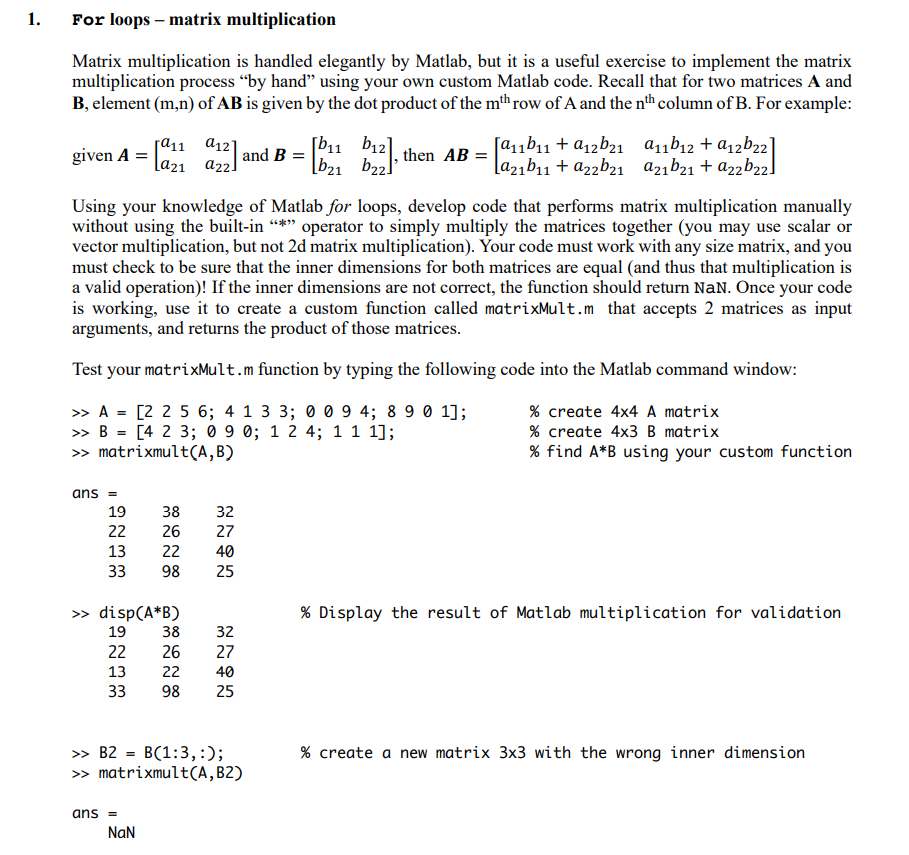
1. For loops - matrix multiplication Matrix multiplication is handled elegantly by Matlab, but it is a useful exercise to implement the matrix multiplication process by hand using your own custom Matlab code. Recall that for two matrices A and B, element (m,n) of AB is given by the dot product of the mth row of A and the nth column of B. For example: 1211 212 [611 612) given A = and B = La21 422) |b21 622) Buz], then AB fau1b11 + 12b21 au1b12 +212622 Lazb11 + a22b21 azb21 + a22b22] Using your knowledge of Matlab for loops, develop code that performs matrix multiplication manually without using the built-in * operator to simply multiply the matrices together (you may use scalar or vector multiplication, but not 2d matrix multiplication). Your code must work with any size matrix, and you must check to be sure that the inner dimensions for both matrices are equal (and thus that multiplication is a valid operation)! If the inner dimensions are not correct, the function should return Nan. Once your code is working, use it to create a custom function called matrixMult.m that accepts 2 matrices as input arguments, and returns the product of those matrices. Test your matrixMult.m function by typing the following code into the Matlab command window: >> A = [2 2 5 6; 4 1 3 3; 0 0 9 4; 8 9 0 1]; >> B = [4 2 3; 0 9 0; 1 2 4; 1 1 1]; >> matrixmult(A,B) % create 4x4 A matrix % create 4x3 B matrix % find A*B using your custom function ans = 19 22 38 32 27 26 22 98 13 33 40 25 % Display the result of Matlab multiplication for validation >> disp(A*B) 19 38 22 26 13 22 33 98 32 27 40 25 >> B2 = B(1:3,:); >> matrixmult(A, B2) % create a new matrix 3x3 with the wrong inner dimension ans = NaN
Step by Step Solution
There are 3 Steps involved in it

Get step-by-step solutions from verified subject matter experts
 Study Help