







Question: Please assist me in developing the initial model - specifically the PPP column formula as im a bit stuck on getting the correct formula. Thank
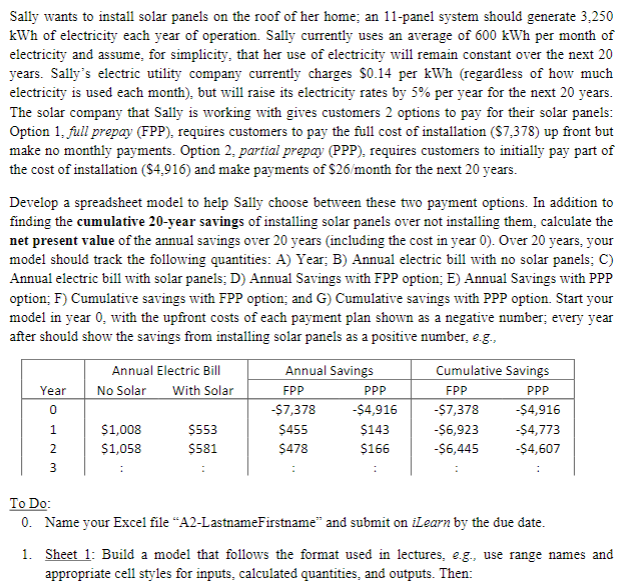
Please assist me in developing the initial model - specifically the PPP column formula as im a bit stuck on getting the correct formula. Thank you!
Sally wants to install solar panels on the roof of her home; an 11-panel system should generate 3,250 kWh of electricity each year of operation. Sally currently uses an average of 600kWh per month of electricity and assume, for simplicity, that her use of electricity will remain constant over the next 20 years. Sally's electric utility company currently charges $0.14 per kWh (regardless of how much electricity is used each month), but will raise its electricity rates by 5% per year for the next 20 years. The solar company that Sally is working with gives customers 2 options to pay for their solar panels: Option 1, full prepay (FPP), requires customers to pay the full cost of installation ($7,378) up front but make no monthly payments. Option 2, partial prepay (PPP), requires customers to initially pay part of the cost of installation ($4,916) and make payments of $26/ month for the next 20 years. Develop a spreadsheet model to help Sally choose between these two payment options. In addition to finding the cumulative 20-year savings of installing solar panels over not installing them, calculate the net present value of the annual savings over 20 years (including the cost in year 0 ). Over 20 years, your model should track the following quantities: A) Year; B) Annual electric bill with no solar panels; C) Annual electric bill with solar panels; D) Annual Savings with FPP option; E) Annual Savings with PPP option; F) Cumulative savings with FPP option; and G) Cumulative savings with PPP option. Start your model in year 0 , with the upfront costs of each payment plan shown as a negative number; every year after should show the savings from installing solar panels as a positive number, e.g., To Do: 0 . Name your Excel file "A2-LastnameFirstname" and submit on iLearn by the due date. 1. Sheet 1: Build a model that follows the format used in lectures, e.g., use range names and appropriate cell styles for inputs, calculated quantities, and outputs. Then: Sally wants to install solar panels on the roof of her home; an 11-panel system should generate 3,250 kWh of electricity each year of operation. Sally currently uses an average of 600kWh per month of electricity and assume, for simplicity, that her use of electricity will remain constant over the next 20 years. Sally's electric utility company currently charges $0.14 per kWh (regardless of how much electricity is used each month), but will raise its electricity rates by 5% per year for the next 20 years. The solar company that Sally is working with gives customers 2 options to pay for their solar panels: Option 1, full prepay (FPP), requires customers to pay the full cost of installation ($7,378) up front but make no monthly payments. Option 2, partial prepay (PPP), requires customers to initially pay part of the cost of installation ($4,916) and make payments of $26/ month for the next 20 years. Develop a spreadsheet model to help Sally choose between these two payment options. In addition to finding the cumulative 20-year savings of installing solar panels over not installing them, calculate the net present value of the annual savings over 20 years (including the cost in year 0 ). Over 20 years, your model should track the following quantities: A) Year; B) Annual electric bill with no solar panels; C) Annual electric bill with solar panels; D) Annual Savings with FPP option; E) Annual Savings with PPP option; F) Cumulative savings with FPP option; and G) Cumulative savings with PPP option. Start your model in year 0 , with the upfront costs of each payment plan shown as a negative number; every year after should show the savings from installing solar panels as a positive number, e.g., To Do: 0 . Name your Excel file "A2-LastnameFirstname" and submit on iLearn by the due date. 1. Sheet 1: Build a model that follows the format used in lectures, e.g., use range names and appropriate cell styles for inputs, calculated quantities, and outputs. Then
Step by Step Solution
There are 3 Steps involved in it

Get step-by-step solutions from verified subject matter experts
 Study Help