







Question: PLEASE BE QUICK AS YOU CAN Consider the Bakery Database described in class and answer the following questions based on this database. How many fields
PLEASE BE QUICK AS YOU CAN
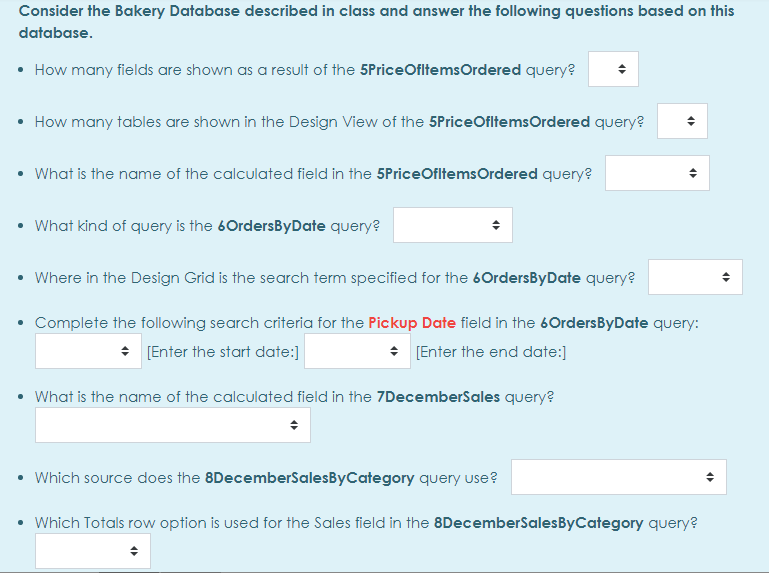
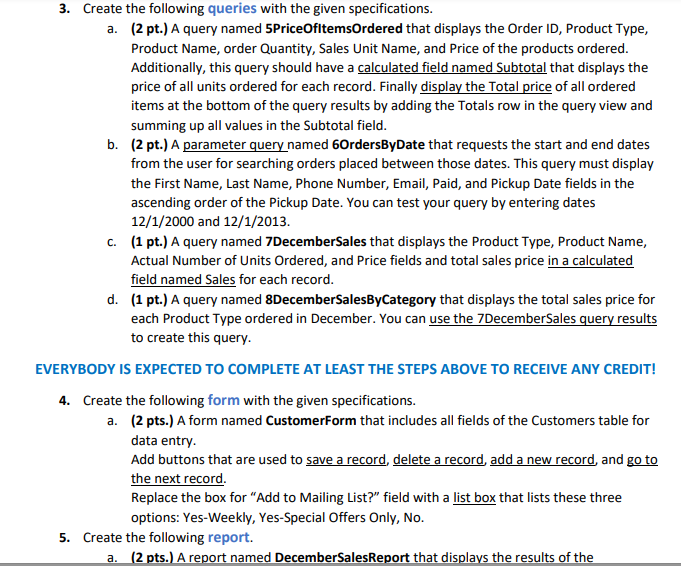
Consider the Bakery Database described in class and answer the following questions based on this database. How many fields are shown as a result of the 5Price OfitemsOrdered query? How many tables are shown in the Design View of the 5Price OfitemsOrdered query? What is the name of the calculated field in the 5Price Ofitems Ordered query? What kind of query is the 6OrdersByDate query? Where in the Design Grid is the search term specified for the bordersByDate query? Complete the following search criteria for the Pickup Date field in the OrdersByDate query: [Enter the start date:] * [Enter the end date:] What is the name of the calculated field in the 7DecemberSales query? Which source does the 8DecemberSalesBy Category query use? Which Totals row option is used for the Sales field in the 8DecemberSalesByCategory query? 3. Create the following queries with the given specifications. a. (2 pt.) A query named 5Price OfitemsOrdered that displays the Order ID, Product Type, Product Name, order Quantity, Sales Unit Name, and Price of the products ordered. Additionally, this query should have a calculated field named Subtotal that displays the price of all units ordered for each record. Finally display the Total price of all ordered items at the bottom of the query results by adding the Totals row in the query view and summing up all values in the Subtotal field. b. (2 pt.) A parameter query named 6OrdersByDate that requests the start and end dates from the user for searching orders placed between those dates. This query must display the First Name, Last Name, Phone Number, Email, Paid, and Pickup Date fields in the ascending order of the Pickup Date. You can test your query by entering dates 12/1/2000 and 12/1/2013. C. (1 pt.) A query named 7DecemberSales that displays the Product Type, Product Name, Actual Number of Units Ordered, and Price fields and total sales price in a calculated field named Sales for each record. d. (1 pt.) A query named 8DecemberSalesByCategory that displays the total sales price for each Product Type ordered in December. You can use the 7DecemberSales query results to create this query. EVERYBODY IS EXPECTED TO COMPLETE AT LEAST THE STEPS ABOVE TO RECEIVE ANY CREDIT! 4. Create the following form with the given specifications. a. (2 pts.) A form named Customerform that includes all fields of the Customers table for data entry. Add buttons that are used to save a record, delete a record add a new record, and go to the next record. Replace the box for "Add to Mailing List?" field with a list box that lists these three options: Yes-Weekly, Yes-Special Offers Only, No. 5. Create the following report. a. (2 pts.) A report named December Sales Report that displays the results of the Consider the Bakery Database described in class and answer the following questions based on this database. How many fields are shown as a result of the 5Price OfitemsOrdered query? How many tables are shown in the Design View of the 5Price OfitemsOrdered query? What is the name of the calculated field in the 5Price Ofitems Ordered query? What kind of query is the 6OrdersByDate query? Where in the Design Grid is the search term specified for the bordersByDate query? Complete the following search criteria for the Pickup Date field in the OrdersByDate query: [Enter the start date:] * [Enter the end date:] What is the name of the calculated field in the 7DecemberSales query? Which source does the 8DecemberSalesBy Category query use? Which Totals row option is used for the Sales field in the 8DecemberSalesByCategory query? 3. Create the following queries with the given specifications. a. (2 pt.) A query named 5Price OfitemsOrdered that displays the Order ID, Product Type, Product Name, order Quantity, Sales Unit Name, and Price of the products ordered. Additionally, this query should have a calculated field named Subtotal that displays the price of all units ordered for each record. Finally display the Total price of all ordered items at the bottom of the query results by adding the Totals row in the query view and summing up all values in the Subtotal field. b. (2 pt.) A parameter query named 6OrdersByDate that requests the start and end dates from the user for searching orders placed between those dates. This query must display the First Name, Last Name, Phone Number, Email, Paid, and Pickup Date fields in the ascending order of the Pickup Date. You can test your query by entering dates 12/1/2000 and 12/1/2013. C. (1 pt.) A query named 7DecemberSales that displays the Product Type, Product Name, Actual Number of Units Ordered, and Price fields and total sales price in a calculated field named Sales for each record. d. (1 pt.) A query named 8DecemberSalesByCategory that displays the total sales price for each Product Type ordered in December. You can use the 7DecemberSales query results to create this query. EVERYBODY IS EXPECTED TO COMPLETE AT LEAST THE STEPS ABOVE TO RECEIVE ANY CREDIT! 4. Create the following form with the given specifications. a. (2 pts.) A form named Customerform that includes all fields of the Customers table for data entry. Add buttons that are used to save a record, delete a record add a new record, and go to the next record. Replace the box for "Add to Mailing List?" field with a list box that lists these three options: Yes-Weekly, Yes-Special Offers Only, No. 5. Create the following report. a. (2 pts.) A report named December Sales Report that displays the results of the
Step by Step Solution
There are 3 Steps involved in it

Get step-by-step solutions from verified subject matter experts
 Study Help