







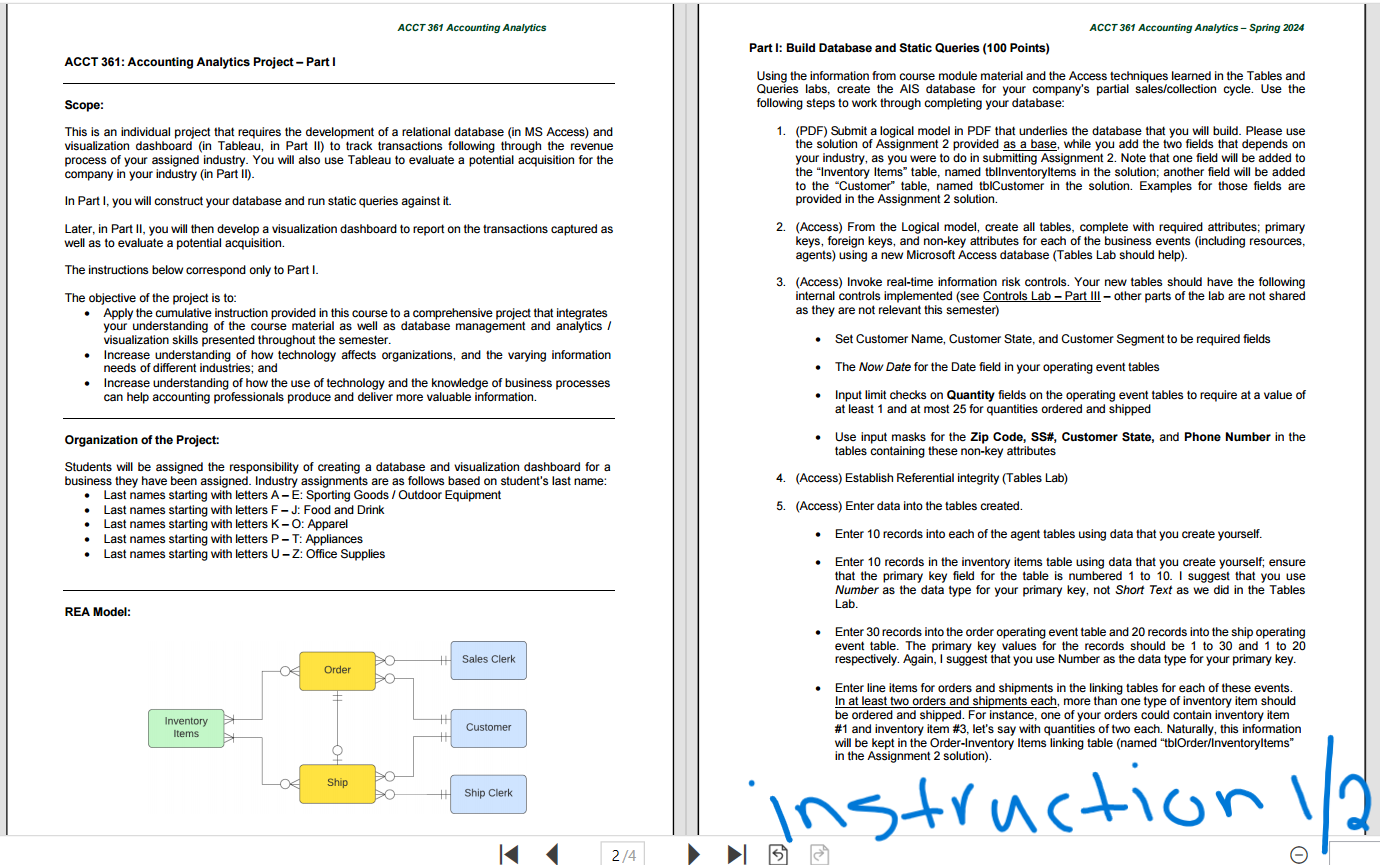
Question: Please Build Database and Static Queries. MY LAST NAME STARTS WITH R , SO MY INDUSTRY IS APPLIANCES. Two of the images are the instruction
Please Build Database and Static Queries. MY LAST NAME STARTS WITH R SO MY INDUSTRY IS APPLIANCES. Two of the images are the instruction for this project and one image is the assignment that I completed before this project, which you have to use for reference for this project. PLEASE READ THE INSTRUCTION, THERE SHOULD BE STEPS TO COMEPPlease Build Database and Static Queries. MY LAST NAME STARTS WITH R SO MY INDUSTRY IS APPLIANCES. Two of the images are the instruction for this project and one image is the assignment that I completed before this project, which you have to use for reference for this project. PLEASE READ THE INSTRUCTION, THERE SHOULD BE STEPS TO COMEPLETE. THANK YOU SO MUCH. ACCT Accounting Analytics Spring
Access Create static queries to summarize the results of transactions executed:
Total Sales in Dollars by Customer:
Fields: Customer Name, Count of Sales, Total Sales $
Sort: Alphabetically by Customer Last Name or simply by Customer Name if you do not have First and Last Name fields separately
Gross Profit in Dollars by Inventory Item
Fields: Item # Item Description, Total Quantity Sold, Total Gross Profit
Sort: High to Low by Total Gross Profit
EQOH Ending Quantity on Hand Report
Fields: Item # Item Description, Count of Items on Hand, Value of Items on Hand
Sort: High to Low by Value of Items on Hand
Unshipped Inventory Report
Fields: Order # Item Description, Quantity Unshipped
Sort: High to Low by Order #
Detailed Sales Report for Visualization
Fields: Ship # Ship Date, Order # Order Date, Customer # Customer Name, Street Address, Customer City, Customer State, Customer Zip, Customer Phone # Customer Segment, Sales Clerk # Sales Clerk Name, Ship Clerk # Ship Clerk Name, Total Inventory Cost for Order, Total Gross Profit for Order, SH Fee, Invoice Total
ACCT Accounting Analytics
Submission Required at Time of Completion:
For the submission link provided in the AIS Project tab on Blackboard:
a The Logical Model of your company in PDF with the file name: "YourLastNameFirstNameSpringLMpdf
b Your completed and populated project Access database with the file name: "YourLastNameFirstNameSpringDBaccdb"
Grading Rubric Based on Points: Solution for
Assignment # Converting from the REA Model to the Logical Model
Master Tables
tblInventoryItems: Item# Item Description, Price, BQOH, BQOH Date, Standard Cost, example for the extra field: "Reorder Point" or "Maximum Storage in Days" etc.
tblSalesClerk: SalesClerk# Sales Clerk Name, Sales Clerk, SSN#
tblShipClerk: ShipClerk# Ship Clerk Name, Ship Clerk SSN#
tblCustomer: Customer# Customer Name, Customer Street Address, Customer City, Customer State, Customer Zip, Customer Phone # Customer Segment, example for the extra field: "Loyalty Card Membership" or "Privileged Customer" etc.
Event Tables
tblOrder: underlinetext Order#SalesClerk#Cust# Order Date
tblOrderInventoryItems: Order#Item# Qty Sold Note: If you only underlined the primary key, or only put in brackets, it is okay for the linking tables. tblShip: Shipment#Order#Cust#ShipClerk# Shipment Date, SH Fee
tblShipInventoryItems: Shipment#Item# Qty Shipped Note: If you only underlined the primary key, or only put in brackets, it is okay for the linking tables.
Step by Step Solution
There are 3 Steps involved in it
1 Expert Approved Answer
Step: 1 Unlock

Question Has Been Solved by an Expert!
Get step-by-step solutions from verified subject matter experts
Step: 2 Unlock
Step: 3 Unlock
 Study Help