







Question: Please code in C language! Please make sure they're no bugs or errors or recycled answers in your code This should be the output: $
Please code in C language! Please make sure they're no bugs or errors or recycled answers in your code
This should be the output:
$ ./diffusion 10 1000000 radius density 0.05 0.019415 0.10 0.019415 0.15 0.196635 0.20 0.263900 0.25 0.465962 0.30 0.542348 0.35 0.686846 0.40 0.826187 0.45 0.908716 0.50 0.938628 0.55 0.982609 0.60 0.991070 0.65 0.997860 0.70 0.999031 0.75 0.999883 0.80 0.999959 0.85 0.999996 0.90 0.999996 0.95 1.000000 1.00 1.000000 $ ./diffusion 20 1000000 radius density 0.05 0.007120 0.10 0.113322 0.15 0.272127 0.20 0.517046 0.25 0.690763 0.30 0.857808 2 0.35 0.934197 0.40 0.979449 0.45 0.994164 0.50 0.998872 0.55 0.999802 0.60 0.999970 0.65 0.999999 0.70 1.000000 0.75 1.000000 0.80 1.000000 0.85 1.000000 0.90 1.000000 0.95 1.000000 1.00 1.000000
Here is the starter code:
#include#include #include //TODO //Implement the below function //Simulate one particle moving n steps in random directions //Use a random number generator to decide which way to go at every step //When the particle stops at a final location, use the memory pointed to by grid to //record the number of particles that stop at this final location //Feel free to declare, implement and use other functions when needed void one_particle(int *grid, int n) { } //TODO //Implement the following function //This function returns the fraction of particles that lie within the distance //r*n from the origin (including particles exactly r*n away) //The distance used here is Euclidean distance //Note: you will not have access to math.h when submitting on Mimir double density(int *grid, int n, double r) { } //use this function to print results void print_result(int *grid, int n) { printf("radius density "); for(int k = 1; k = 1 && n = 1 && m
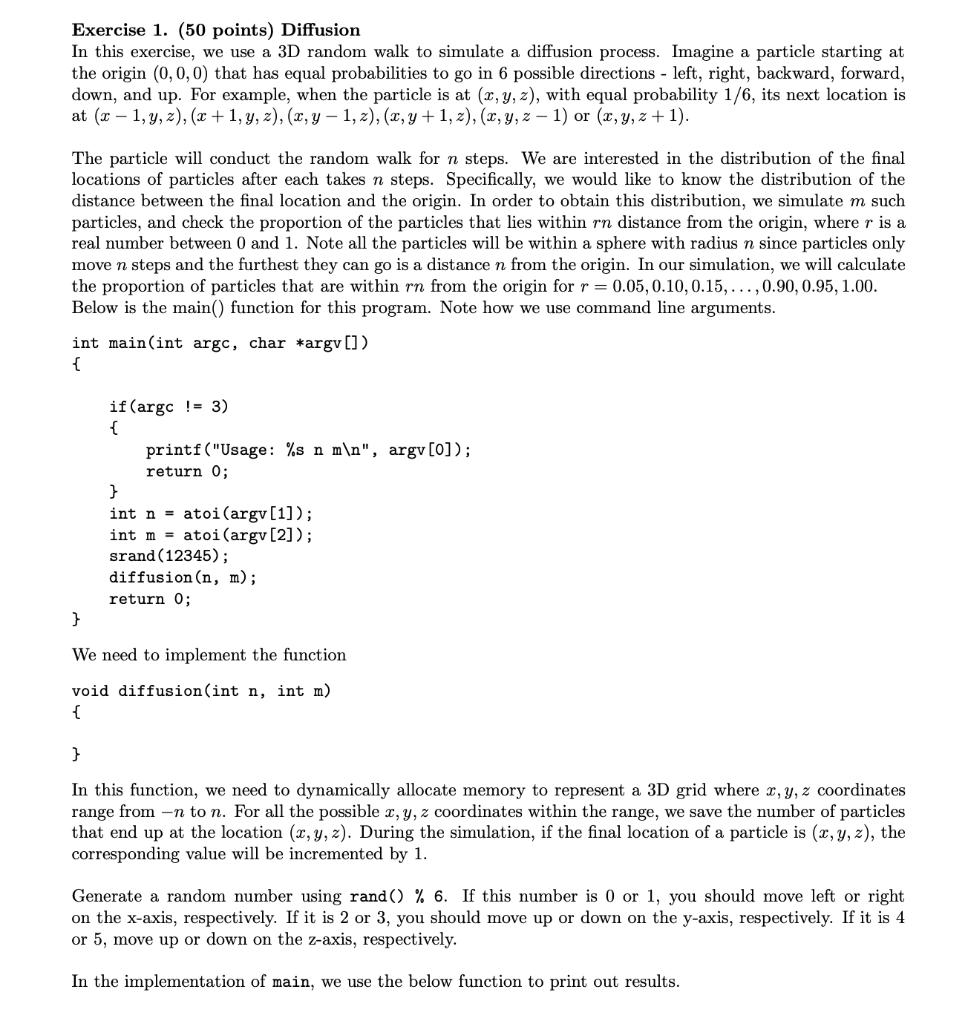
Exercise 1. (50 points) Diffusion In this exercise, we use a 3D random walk to simulate a diffusion process. Imagine a particle starting at the origin (0,0,0) that has equal probabilities to go in 6 possible directions - left, right, backward, forward, down, and up. For example, when the particle is at (x,y,z), with equal probability 1/6, its next location is at (x1,y,z),(x+1,y,z),(x,y1,z),(x,y+1,z),(x,y,z1) or (x,y,z+1). The particle will conduct the random walk for n steps. We are interested in the distribution of the final locations of particles after each takes n steps. Specifically, we would like to know the distribution of the distance between the final location and the origin. In order to obtain this distribution, we simulate m such particles, and check the proportion of the particles that lies within rn distance from the origin, where r is a real number between 0 and 1 . Note all the particles will be within a sphere with radius n since particles only move n steps and the furthest they can go is a distance n from the origin. In our simulation, we will calculate the proportion of particles that are within rn from the origin for r=0.05,0.10,0.15,,0.90,0.95,1.00. Below is the main() function for this program. Note how we use command line arguments. We need to implement the function void diffusion(int n, int m ) \{ \} In this function, we need to dynamically allocate memory to represent a 3D grid where x,y,z coordinates range from n to n. For all the possible x,y,z coordinates within the range, we save the number of particles that end up at the location (x,y,z). During the simulation, if the final location of a particle is (x,y,z), the corresponding value will be incremented by 1 . Generate a random number using rand() \% 6. If this number is 0 or 1 , you should move left or right on the x-axis, respectively. If it is 2 or 3 , you should move up or down on the y-axis, respectively. If it is 4 or 5 , move up or down on the z-axis, respectively. In the implementation of main, we use the below function to print out results
Step by Step Solution
There are 3 Steps involved in it

Get step-by-step solutions from verified subject matter experts
 Study Help