







Question: please code in java, here is a portion of the code if possible please include all functions of the program: import java.io.*; import java.net.*; import
please code in java, here is a portion of the code if possible please include all functions of the program:
import java.io.*; import java.net.*; import java.util.*;
public class Chat { private static final int PORT = 4322; private static ArrayList
public static void main(String[] args) throws IOException { ServerSocket server = new ServerSocket(PORT); System.out.println("Server running on port " + PORT); System.out.println("Type 'help' for a list of available commands");
while (true) { Socket client = server.accept(); Connection connection = new Connection(client); connections.add(connection); connection.start(); } }
private static class Connection extends Thread { Socket socket; BufferedReader in; PrintWriter out; String name;
public Connection(Socket socket) { this.socket = socket; }
public void run() { try { in = new BufferedReader(new InputStreamReader(socket.getInputStream())); out = new PrintWriter(new OutputStreamWriter(socket.getOutputStream()));
while (true) { out.println("Enter your name:"); out.flush(); name = in.readLine();
if (name == null) { return; }
synchronized (connections) { for (Connection connection : connections) { if (connection != this) { connection.out.println("*** A new user " + name + " entered the chat room !!! ***"); } } }
out.println("Welcome " + name + " to our chat room!"); break; }
while (true) { String message = in.readLine();
if (message == null) { return; }
synchronized (connections) { for (Connection connection : connections) { if (connection != this) { connection.out.println("[" + name + "]: " + message); } } } } } catch (IOException e) { System.out.println(e); } finally { try { socket.close(); } catch (IOException e) { System.out.println(e); } } } } }
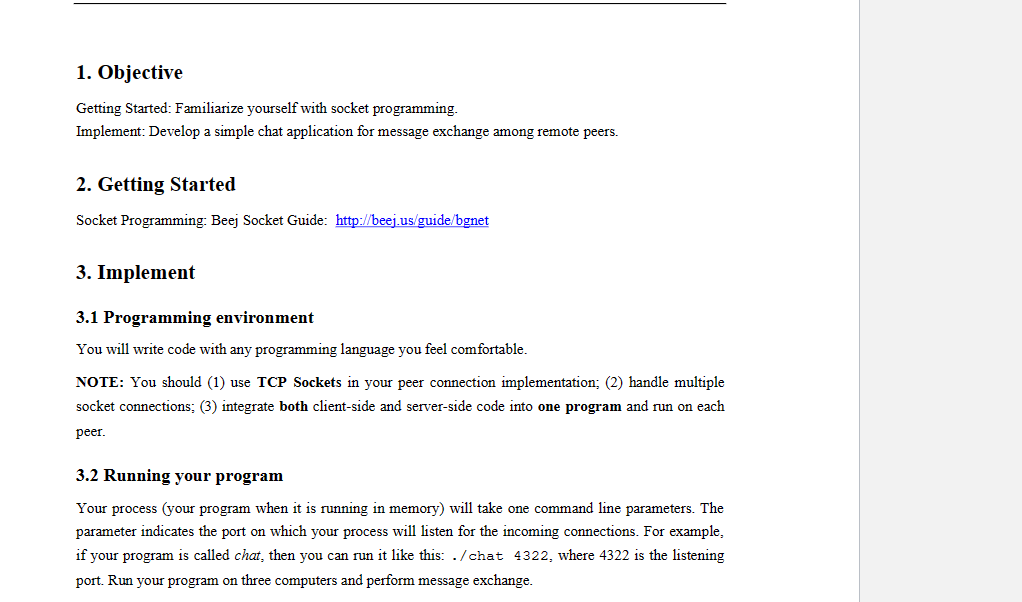
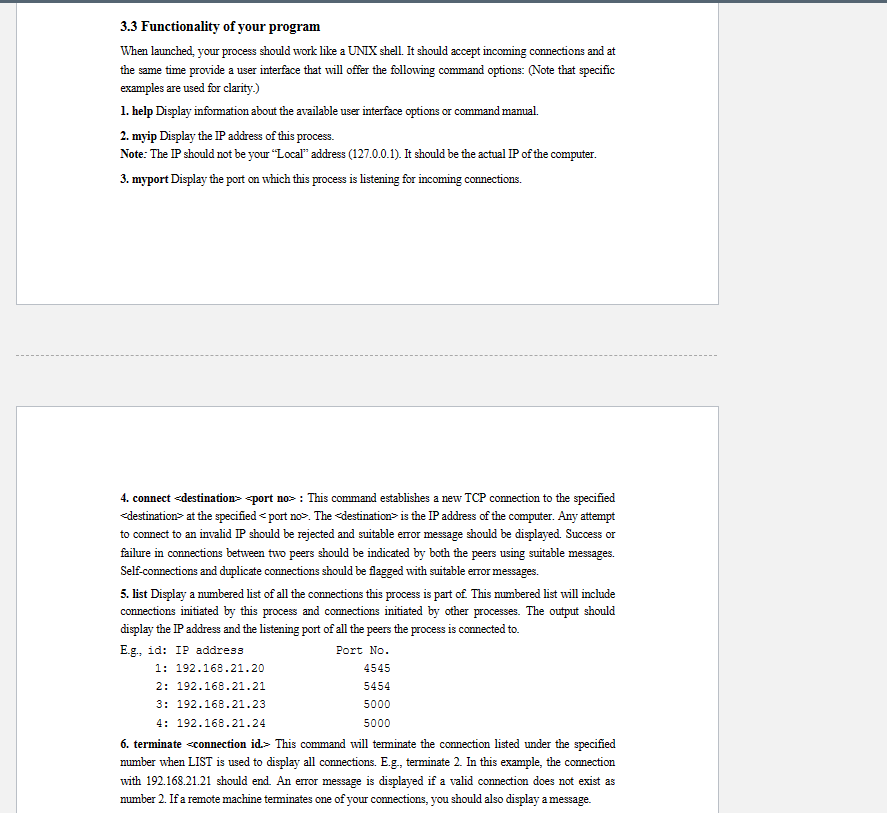
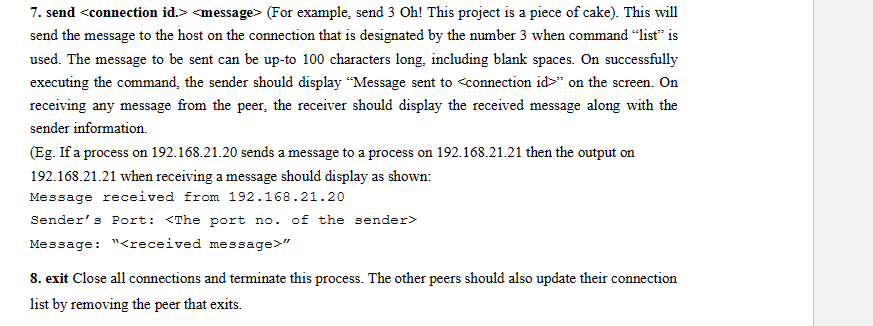
1. Objective Getting Started: Familiarize yourself with socket programming. Implement: Develop a simple chat application for message exchange among remote peers. 2. Getting Started Socket Programming: Beej Socket Guide: http://beej.us/guide/bgnet 3. Implement 3.1 Programming environment You will write code with any programming language you feel comfortable. NOTE: You should (1) use TCP Sockets in your peer connection implementation; (2) handle multiple socket connections; (3) integrate both client-side and server-side code into one program and run on each peer. 3.2 Running your program Your process (your program when it is running in memory) will take one command line parameters. The parameter indicates the port on which your process will listen for the incoming connections. For example, if your program is called chat, then you can run it like this: ./chat 4322 , where 4322 is the listening port. Run your program on three computers and perform message exchange. 3.3 Functionality of your program When launched, your process should work like a UNIX shell. It should accept incoming connections and at the same time provide a user interface that will offer the following command options: (Note that specific examples are used for clarity.) 1. help Display information about the available user interface options or command manual. 2. myip Display the IP address of this process. Note: The IP should not be your "Local" address (127.0.0.1). It should be the actual IP of the computer. 3. myport Display the port on which this process is listening for incoming connections. 4. connect \&destination = at the specified . The edestination > is the IP address of the computer. Any attempt to connect to an invalid P should be rejected and suitable error message should be displayed. Success or failure in connections between two peers should be indicated by both the peers using suitable messages. Self-connections and duplicate connections should be flagged with suitable error messages. 5. list Display a numbered list of all the connections this process is part of This numbered list will include connections initiated by this process and connections initiated by other processes. The output should display the I address and the listening port of all the peers the process is connected to. F 6. terminate This command will terminate the connection listed under the specified number when LIST is used to display all connections. E.g., terminate 2. In this example, the conmection with 192.168.21.21 should end. An error message is displayed if a valid connection does not exist as number 2 . If a remote machine terminates one of your comnections, you should also display a message. 7. send (For example, send 3 Oh! This project is a piece of cake). This will send the message to the host on the connection that is designated by the number 3 when command "list" is used. The message to be sent can be up-to 100 characters long, including blank spaces. On successfully executing the command, the sender should display "Message sent to connection id " on the screen. On receiving any message from the peer, the receiver should display the received message along with the sender information. (Eg. If a process on 192.168.21.20 sends a message to a process on 192.168.21.21 then the output on 192.168.21.21 when receiving a message should display as shown: Message received from 192.168 .21 .20 Sender's Port: Message: "" 8. exit Close all connections and terminate this process. The other peers should also update their connection list by removing the peer that exits
Step by Step Solution
There are 3 Steps involved in it

Get step-by-step solutions from verified subject matter experts
 Study Help