







Question: Please code this in MatLab. Solve a Sudoku game. Sudoku is a popular number placement puzzle game. The objective of the game is to fill
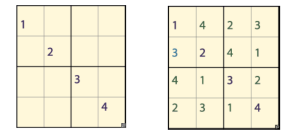
Please code this in MatLab. Solve a Sudoku game. Sudoku is a popular number placement puzzle game. The objective of the game is to fill a x grid with sets of the numbers from to such that each number from to occurs only once every row, column and x subblock.In this exercise we will write a simple matlab function that receives a x matrix input representing an incomplete Sudoku game and returns the correctly solved board. There are several approaches for solving such a problem; we will implement a simple backtracking algorithm. The concept of backtracking involves guessing a certain solution which does not violate the game rules and proceeding until we reach a point where we cannot satisfy the rules. At this point we reverse our steps backtrack to the last known working solution and make a difference choice among the available possibilities until the entire game is solved. Download the file sudoku.mat from the class website and load it into your workspace. You will now have an example for an unsolved sudoku board in your workspace named unsolved board. Write a function with the declaration safe checkSudoku board row, col, num board is a x matrix which contains the Sudoku board to check. Unfilled board cells are indicated by a NaN value. row and col are index to the check if the number num between and can be inserted without causing a violation. ie does num already exist in the given row, column or x subblock. Note that we do not need to check the entire board's validity although you could try to do so as practice since we will be filling our board one element at a time. The function returns a logical true or false value in the output safe depending on the outcome of the check. There are several ways to accomplish this functionality. Possible functions you may want to use are sort, unique, is member, any, all. Note that NaN values are unequal to one another! Test your function with various inputs to see it is operating as expected!. For example: checkSudokuunsolvedBoard answer Write a function with the declaration solvedBoard solveSudokuboard The input to this function will be an incomplete Sudoku board and the output will be the solved board. Below are hints and suggestions for steps to help you implement this function: i Find the indices of all the missing values in the table and store them in the variable emptyInd find isnan ii Create a variable called ind which will indicate our current location within the emptyInd array iii. Write a loop that will traverse the emptyInd array. At each location check what number can be placed in that location using your function from part bWhich numbers do you need to check? If its not valid, try a different number, if none work, replace it with a NaN, and go back to the previous empty index and try a different number than before. Which loop type would be most suitable for this scenario?indsub, checkSudoku d Test your function with the given example unsolvedBoard and compare the result to the image shown above. e Optional: Write a function displaySudokuboard for displaying the Sudoku game board in a more human friendly form. See an example for such a display below. load sudoku displaySudokuunsolvedBoard Please code this in matlab and comment as you go Assume that the file is loaded and just create the commands to accept the file as stated.
Step by Step Solution
There are 3 Steps involved in it
1 Expert Approved Answer
Step: 1 Unlock

Question Has Been Solved by an Expert!
Get step-by-step solutions from verified subject matter experts
Step: 2 Unlock
Step: 3 Unlock
 Study Help