







Question: please comment and explain 2. Input Each program you write should read from standard input using input redirection Input files for this assignment will contain
 please comment and explain
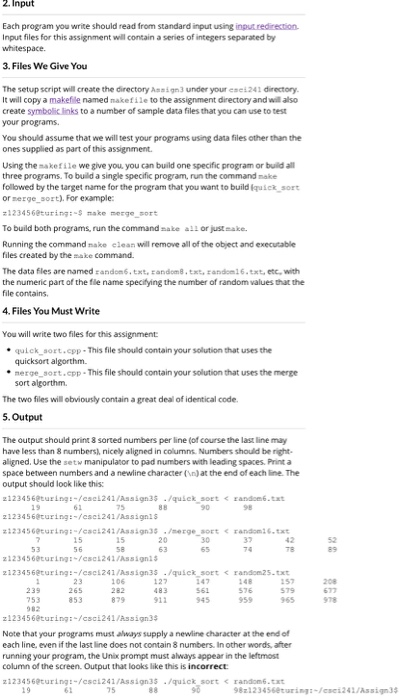
2. Input Each program you write should read from standard input using input redirection Input files for this assignment will contain a series of integers separated by whitespace. 3. Files We Give You The setup script will create the directory Assign3 under your eses 241 directory It will copy a makefile named nakefile to the assignment directory and will also create symbolic links to a number of sample data files that you can use to test your programs. You should assume that we will test your programs using data files other than the ones supplied as part of this assignment. Using the sakefile we give you, you can build one specific program or build all three programs. To build a single specific program, run the command make followed by the target name for the program that you want to build quick_sort or merge_sort). For example: 2123456eturing:- make merge_sort To build both programs, run the command make all or just wake. Running the command make clean will remove all of the object and executable files created by the make command. The data fles are named randon.txt, random 8.txt, candelt.txt, etc, with the numeric part of the file name specifying the number of random values that the file contains 4.Files You Must Write You will write two files for this assignment quick_sort.cpp - This file should contain your solution that uses the quicksort algorthm. merge sort.cpp - This file should contain your solution that uses the merge sort algorthm The two files will obviously contain a great deal of identical code. 5. Output The output should print 8 sorted numbers per line (of course the last line may have less than 8 numbers), nicely aligned in columns, Numbers should be right- aligned. Use the set manipulator to pad numbers with leading spaces. Print a space between numbers and a newline character ( ) at the end of each line. The output should look like this: 2123456@turing:-/cac241/Assign 35 ./quick sort
Step by Step Solution
There are 3 Steps involved in it

Get step-by-step solutions from verified subject matter experts
 Study Help