







Question: Please complete the excel file. (a) Navigate to the Quarterly Data worksheet and enter a column title Gal Billed (cell G1). In cell G2 enter
Please complete the excel file.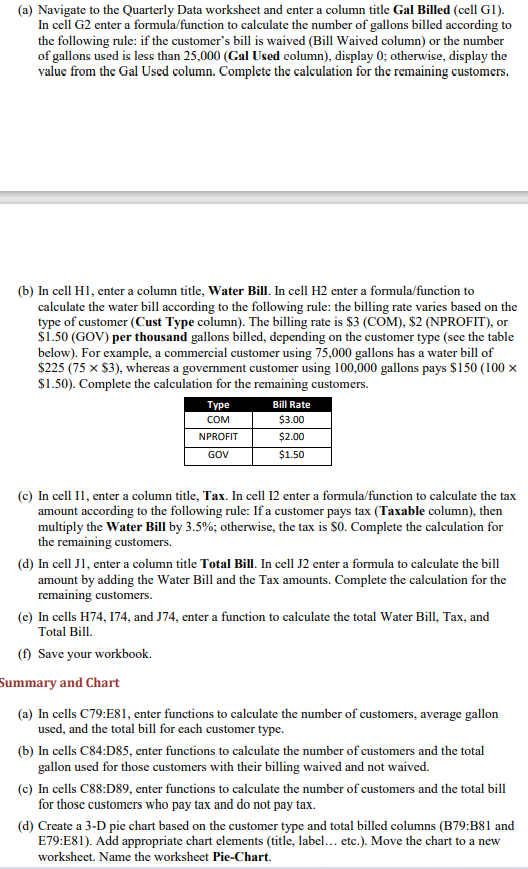
(a) Navigate to the Quarterly Data worksheet and enter a column title Gal Billed (cell G1). In cell G2 enter a formula/function to calculate the number of gallons billed according to the following rule: if the customer's bill is waived (Bill Waived column) or the number of gallons used is less than 25,000 (Gal Used column), display 0; otherwise, display the value from the Gal Used column. Complete the calculation for the remaining customers. (b) In cell H1, enter a column title, Water Bill. In cell H2 enter a formula/function to calculate the water bill according to the following rule: the billing rate varies based on the type of customer (Cust Type column). The billing rate is $3 (COM), $2 (NPROFIT), or $1.50 (GOV) per thousand gallons billed, depending on the customer type (see the table below). For example, a commercial customer using 75,000 gallons has a water bill of $225 (75 x $3), whereas a government customer using 100,000 gallons pays $150 (100 x $1.50). Complete the calculation for the remaining customers. Type $3.00 $2.00 $1.50 Bill Rate COM NPROFIT GOV (c) In cell II, enter a column title, Tax. In cell 12 enter a formula/function to calculate the tax amount according to the following rule: If a customer pays tax (Taxable column), then multiply the Water Bill by 3.5%; otherwise, the tax is $0. Complete the calculation for the remaining customers. (d) In cell Jl, enter a column title Total Bill. In cell J2 enter a formula to calculate the bill amount by adding the Water Bill and the Tax amounts. Complete the calculation for the remaining customers. (C) In cells H74, 174, and 174, enter a function to calculate the total Water Bill, Tax, and Total Bill. (1) Save your workbook. Summary and Chart (a) In cells C79:E81, enter functions to calculate the number of customers, average gallon used, and the total bill for each customer type. (6) In cells C84:D85, enter functions to calculate the number of customers and the total gallon used for those customers with their billing waived and not waived. (c) In cells C88:D89, enter functions to calculate the number of customers and the total bill for those customers who pay tax and do not pay tax. (d) Create a 3-D pie chart based on the customer type and total billed columns (B79:B81 and E79:E81). Add appropriate chart elements (title, label... etc.). Move the chart to a new worksheet. Name the worksheet Pie Chart (a) Navigate to the Quarterly Data worksheet and enter a column title Gal Billed (cell G1). In cell G2 enter a formula/function to calculate the number of gallons billed according to the following rule: if the customer's bill is waived (Bill Waived column) or the number of gallons used is less than 25,000 (Gal Used column), display 0; otherwise, display the value from the Gal Used column. Complete the calculation for the remaining customers. (b) In cell H1, enter a column title, Water Bill. In cell H2 enter a formula/function to calculate the water bill according to the following rule: the billing rate varies based on the type of customer (Cust Type column). The billing rate is $3 (COM), $2 (NPROFIT), or $1.50 (GOV) per thousand gallons billed, depending on the customer type (see the table below). For example, a commercial customer using 75,000 gallons has a water bill of $225 (75 x $3), whereas a government customer using 100,000 gallons pays $150 (100 x $1.50). Complete the calculation for the remaining customers. Type $3.00 $2.00 $1.50 Bill Rate COM NPROFIT GOV (c) In cell II, enter a column title, Tax. In cell 12 enter a formula/function to calculate the tax amount according to the following rule: If a customer pays tax (Taxable column), then multiply the Water Bill by 3.5%; otherwise, the tax is $0. Complete the calculation for the remaining customers. (d) In cell Jl, enter a column title Total Bill. In cell J2 enter a formula to calculate the bill amount by adding the Water Bill and the Tax amounts. Complete the calculation for the remaining customers. (C) In cells H74, 174, and 174, enter a function to calculate the total Water Bill, Tax, and Total Bill. (1) Save your workbook. Summary and Chart (a) In cells C79:E81, enter functions to calculate the number of customers, average gallon used, and the total bill for each customer type. (6) In cells C84:D85, enter functions to calculate the number of customers and the total gallon used for those customers with their billing waived and not waived. (c) In cells C88:D89, enter functions to calculate the number of customers and the total bill for those customers who pay tax and do not pay tax. (d) Create a 3-D pie chart based on the customer type and total billed columns (B79:B81 and E79:E81). Add appropriate chart elements (title, label... etc.). Move the chart to a new worksheet. Name the worksheet Pie Chart
Step by Step Solution
There are 3 Steps involved in it

Get step-by-step solutions from verified subject matter experts
 Study Help