





Question: Please complete these two activities using the Python language Activity #1 Activity #2 TODO #1: Setup your Python program file * Prelab03.py Open a new,
Please complete these two activities using the Python language
Activity #1
Please complete these two activities using the Python language Activity #1 Activity
Activity #2
#2 TODO #1: Setup your Python program file * Prelab03.py" Open a

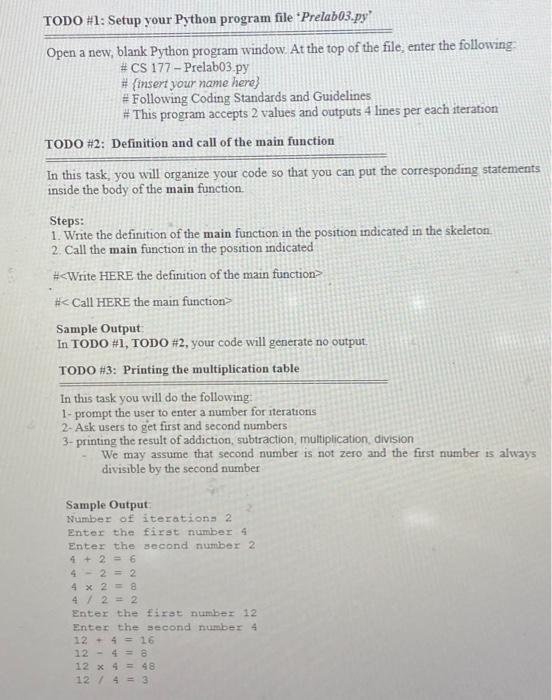
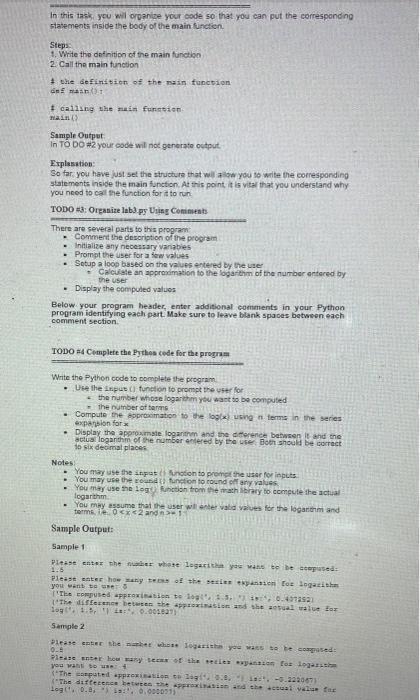
TODO #1: Setup your Python program file * Prelab03.py" Open a new, blank Python program window. At the top of the file, enter the following: #CS 177 - Prelab03.py # {insert your name here) # Following Coding Standards and Guidelines # This program accepts 2 values and outputs 4 lines per each iteration TODO #2: Definition and call of the main function In this task, you will organize your code so that you can put the corresponding statements inside the body of the main function. Steps: 1. Write the definition of the main function in the position indicated in the skeleton 2. Call the main function in the position indicated # Sample Output In TODO #1, TODO #2, your code will generate no output TODO #3: Printing the multiplication table In this task you will do the following 1- prompt the user to enter a number for iterations 2- Ask users to get first and second numbers 3- printing the result of addiction, subtraction, multiplication division We may assume that second number is not zero and the first number is always divisible by the second number Sample Output Number of iterations 2 Enter the first number 4 Enter the Second number 2 4+ 26 4 - 2 = 2 4 x 2 4 / 22 Enter the first number 12 Enter the second number 4 12+ 4 = 16 12 - 4 = 12 x 4 = 48 12 / 4 = 3 In this task you will panise your code so that you can put the corresponding statements inside the body of the main function Steps: 1. Write the definition of the main function 2. Call the main tunction + the definition of the function dem # calling the main function THEIR(; Sample Output In TO DOW2 your code wil net generate output Explanation: So far you have just set the structure that willow you to write the corresponding statements inside the main function. At this point, it is vital that you understand why you need to call the function for it to run TODO #3: Organize labs.py Using Comments There are several parts to this program Comment the description of the program . Initialize any necessary variables Prompt the user for a few values Setup a loop based on the values entered by the user Calculate an approximation to the logarithm of the number entered by the user Display the computed values Below your program header, enter additional comments in your Python program identifying each part. Make sure to leave blank spaces between each comment section TODO #4 Complete the Python code for the program Write the Python code to complete the program - Use the input function to prompt the user for the number whose logarithm you want to be computed the number of . Compute the protation to the box) using terms in the series expansion for Display the approximate logarithm and the difference between it and the actuat logarithm of the number entered by the user Both should be correct to six decimal places Notes You may use the input nation to promo the user for inputs You may use the rotunction to round off any values You may use the logo uction from the mathbrary to compute the actual logarithm You may assume that the user will enter vaba value for the logarithm and terms.

Step by Step Solution

There are 3 Steps involved in it

1 Expert Approved Answer
Step: 1 Unlock blur-text-image
Question Has Been Solved by an Expert!

Get step-by-step solutions from verified subject matter experts

Step: 2 Unlock
Step: 3 Unlock

Students Have Also Explored These Related Databases Questions!