







Question: please correct the errors of here INSERT INTO Viewing VALUES ('CR56', 'PA14', '24-May-2008', 'too small'); INSERT INTO Viewing VALUES ('CR77', 'PG4', '20-April-2008', 'too remote'); INSERT
please correct the errors of here
INSERT INTO Viewing VALUES ('CR56', 'PA14', '24-May-2008', 'too small');
INSERT INTO Viewing VALUES ('CR77', 'PG4', '20-April-2008', 'too remote');
INSERT INTO Viewing VALUES ('CR56', 'PG4', 3-Jun-2008, NULL );
INSERT INTO Viewing VALUES ('CR91', 'PA14', '14-May-2008', 'no dining room');
INSERT INTO Viewing VALUES ('CR56', 'PG36', '28-Apr-08', NULL );
INSERT INTO Viewing VALUES ('CR97', 'PL95', '15-Jun-2008', large bathroom' );
INSERT INTO Viewing VALUES ('CR98', 'PG4', '29-Jun-2008', 'on-suite bathroom' );
INSERT INTO Viewing VALUES ('CR99', 'PL95', '30-Jun-2008', large alfresco );
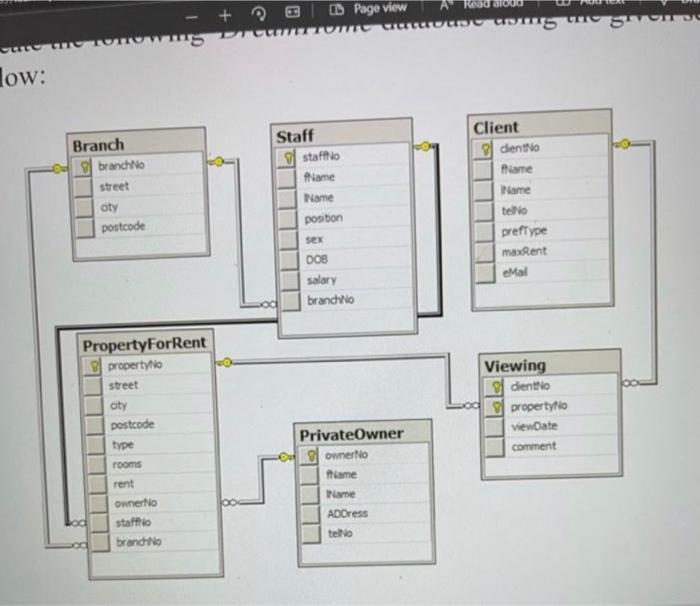
Page view Robo - + wws WUNO ums Son JU low: Branch g brancho street aty postcode Staff staffio Name Name Client g diento flame Name tello prefType maxRent position sex DOB salary brancho Mal Property For Rent g property to street aty postcode type rooms rent Owner No staffo brancho Viewing g diento g property viewDate comment Private Owner ownerlo frame Name ADDress telo
Step by Step Solution
There are 3 Steps involved in it

Get step-by-step solutions from verified subject matter experts
 Study Help