







Question: Please create general journal entry for every transaction. Instructions are on last photo. Record the January 2022 transactions, journal entries, in an Excel Spreadsheet. An
Please create general journal entry for every transaction.
Instructions are on last photo.
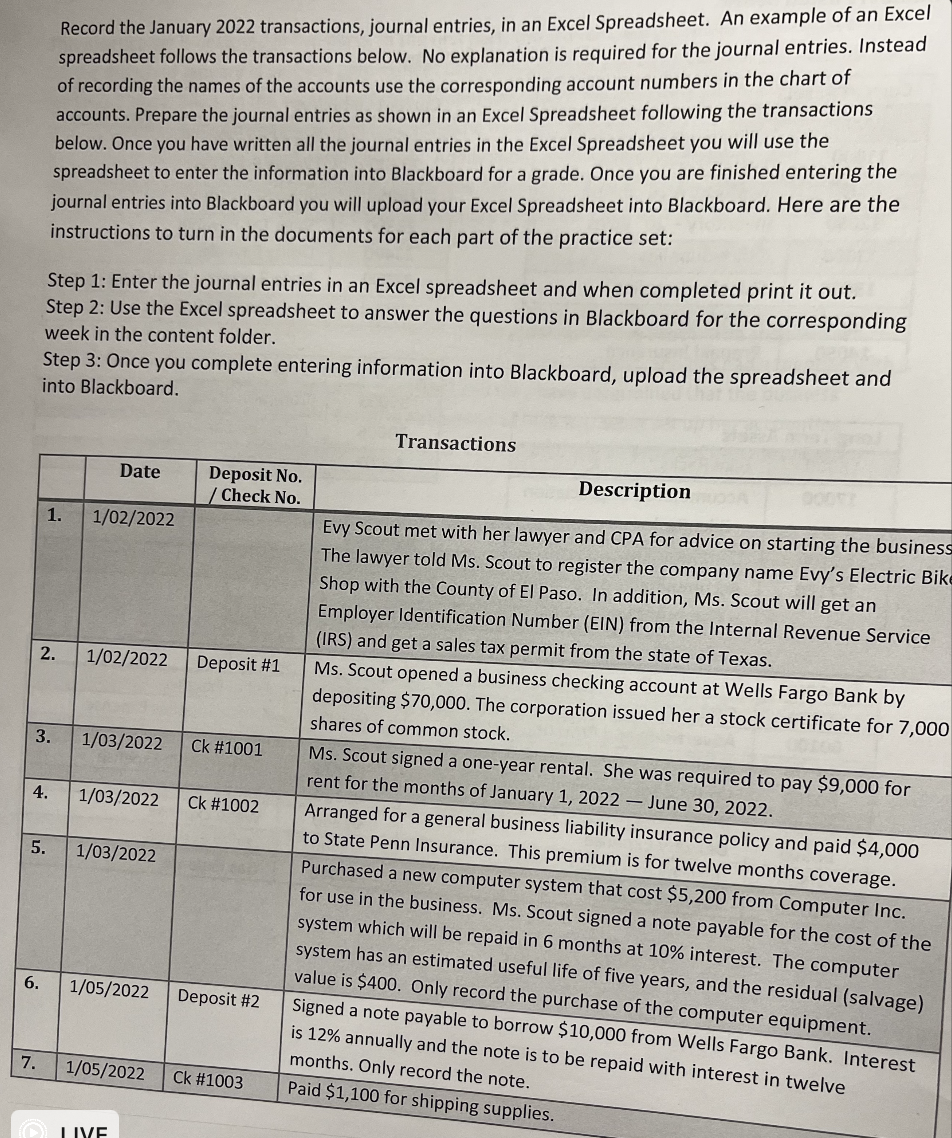
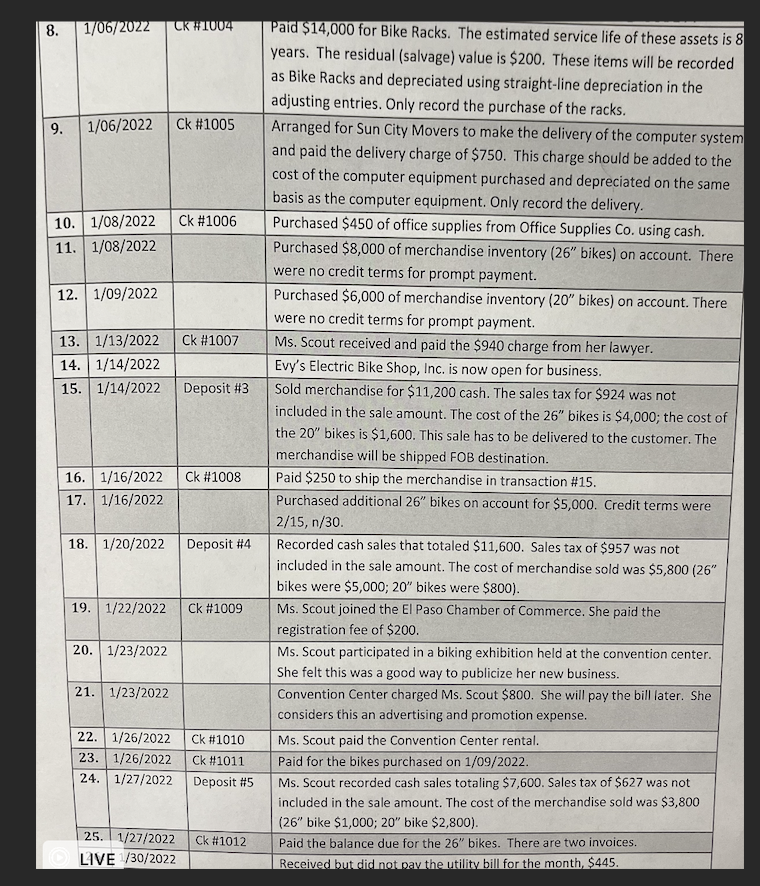
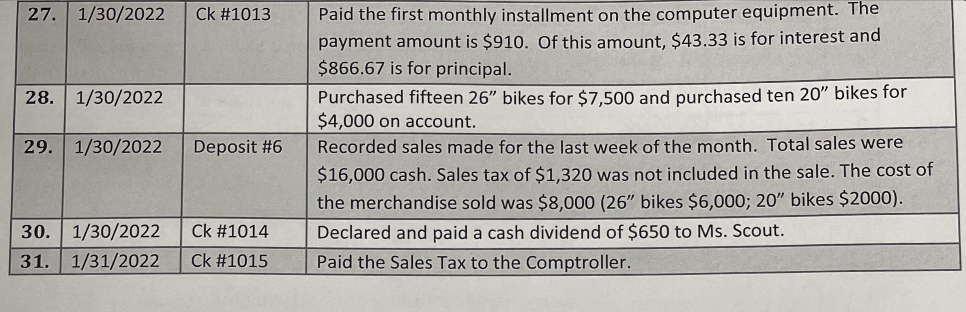
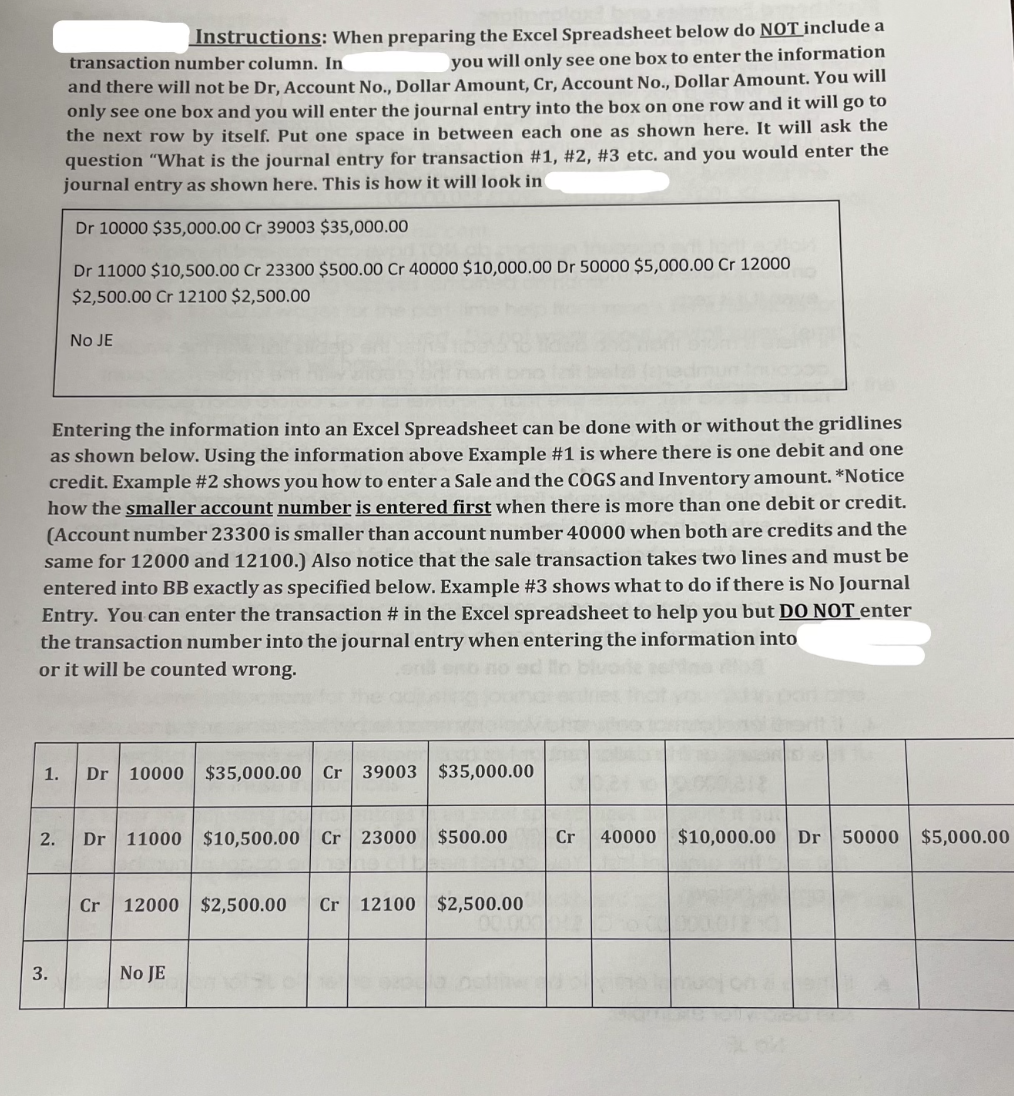
Record the January 2022 transactions, journal entries, in an Excel Spreadsheet. An example of an Excel spreadsheet follows the transactions below. No explanation is required for the journal entries. Instead of recording the names of the accounts use the corresponding account numbers in the chart of accounts. Prepare the journal entries as shown in an Excel Spreadsheet following the transactions below. Once you have written all the journal entries in the Excel Spreadsheet you will use the spreadsheet to enter the information into Blackboard for a grade. Once you are finished entering the journal entries into Blackboard you will upload your Excel Spreadsheet into Blackboard. Here are the instructions to turn in the documents for each part of the practice set: Step 1: Enter the journal entries in an Excel spreadsheet and when completed print it out. Step 2: Use the Excel spreadsheet to answer the questions in Blackboard for the corresponding week in the content folder. Step 3: Once you complete entering information into Blackboard, upload the spreadsheet and into Blackboard. Transactions Date Deposit No. / Check No. 1. 1/02/2022 2. 1/02/2022 Deposit #1 3. 1/03/2022 Ck #1001 Description Evy Scout met with her lawyer and CPA for advice on starting the business The lawyer told Ms. Scout to register the company name Evy's Electric Bike Shop with the County of El Paso. In addition, Ms. Scout will get an Employer Identification Number (EIN) from the Internal Revenue Service (IRS) and get a sales tax permit from the state of Texas. Ms. Scout opened a business checking account at Wells Fargo Bank by depositing $70,000. The corporation issued her a stock certificate for 7,000 shares of common stock. Ms. Scout signed a one-year rental. She was required to pay $9,000 for rent for the months of January 1, 2022 - June 30, 2022. Arranged for a general business liability insurance policy and paid $4,000 to State Penn Insurance. This premium is for twelve months coverage. Purchased a new computer system that cost $5,200 from Computer Inc. for use in the business. Ms. Scout signed a note payable for the cost of the system which will be repaid in 6 months at 10% interest. The computer system has an estimated useful life of five years, and the residual (salvage) value is $400. Only record the purchase of the computer equipment. Signed a note payable to borrow $10,000 from Wells Fargo Bank. Interest is 12% annually and the note is to be repaid with interest in twelve months. Only record the note. Paid $1,100 for shipping supplies. 4. 1/03/2022 Ck #1002 5. 1/03/2022 6. 1/05/2022 Deposit #2 7. 1/05/2022 Ck #1003 LIVE 8. 1/06/2022 CK #1004 Paid $14,000 for Bike Racks. The estimated service life of these assets is 8 years. The residual (salvage) value is $200. These items will be recorded as Bike Racks and depreciated using straight-line depreciation in the adjusting entries. Only record the purchase of the racks. 9. 1/06/2022 Ck #1005 Arranged for Sun City Movers to make the delivery of the computer system and paid the delivery charge of $750. This charge should be added to the cost of the computer equipment purchased and depreciated on the same basis as the computer equipment. Only record the delivery. 10. 1/08/2022 Ck #1006 Purchased $450 of office supplies from Office Supplies Co. using cash. 11. 1/08/2022 Purchased $8,000 of merchandise inventory (26" bikes) on account. There were no credit terms for prompt payment. 12. 1/09/2022 Purchased $6,000 of merchandise inventory (20" bikes) on account. There were no credit terms for prompt payment. 13. 1/13/2022 Ck #1007 Ms. Scout received and paid the $940 charge from her lawyer. 14. 1/14/2022 Evy's Electric Bike Shop, Inc. is now open for business. 15. 1/14/2022 Deposit #3 Sold merchandise for $11,200 cash. The sales tax for $924 was not included in the sale amount. The cost of the 26" bikes is $4,000; the cost of the 20' bikes is $1,600. This sale has to be delivered to the customer. The merchandise will be shipped FOB destination. 16. 1/16/2022 Ck #1008 Paid $250 to ship the merchandise in transaction #15. 17. 1/16/2022 Purchased additional 26" bikes on account for $5,000. Credit terms were 2/15, n/30 18. 1/20/2022 Deposit #4 Recorded cash sales that totaled $11,600. Sales tax of $957 was not included in the sale amount. The cost of merchandise sold was $5,800 (26" bikes were $5,000; 20" bikes were $800). 19. 1/22/2022 Ck #1009 Ms. Scout joined the El Paso Chamber of Commerce. She paid the registration fee of $200. 20. 1/23/2022 Ms. Scout participated in a biking exhibition held at the convention center. She felt this was a good way to publicize her new business. 21. 1/23/2022 Convention Center charged Ms. Scout $800. She will pay the bill later. She considers this an advertising and promotion expense. 22. 1/26/2022 Ck #1010 Ms. Scout paid the Convention Center rental. 23. 1/26/2022 Ck #1011 Paid for the bikes purchased on 1/09/2022. 24. 1/27/2022 Deposit #5 Ms. Scout recorded cash sales totaling $7,600. Sales tax of $627 was not included in the sale amount. The cost of the merchandise sold was $3,800 (26" bike $1,000; 20" bike $2,800). 25. 1/27/2022 Ck #1012 Paid the balance due for the 26" bikes. There are two invoices. LIVE /30/2022 Received but did not pay the utility bill for the month $445. 27. 1/30/2022 Ck #1013 28. 1/30/2022 29. 1/30/2022 Deposit #6 Paid the first monthly installment on the computer equipment. The payment amount is $910. Of this amount, $43.33 is for interest and $866.67 is for principal. Purchased fifteen 26" bikes for $7,500 and purchased ten 20" bikes for $4,000 on account. Recorded sales made for the last week of the month. Total sales were $16,000 cash. Sales tax of $1,320 was not included in the sale. The cost of the merchandise sold was $8,000 (26" bikes $6,000; 20" bikes $2000). Declared and paid a cash dividend of $650 to Ms. Scout. Paid the Sales Tax to the Comptroller. Ck #1014 30. 1/30/2022 31. 1/31/2022 Ck #1015 Instructions: When preparing the Excel Spreadsheet below do NOT include a transaction number column. In you will only see one box to enter the information and there will not be Dr, Account No., Dollar Amount, Cr, Account No., Dollar Amount. You will only see one box and you will enter the journal entry into the box on one row and it will go to the next row by itself. Put one space in between each one as shown here. It will ask the question "What is the journal entry for transaction #1, #2, #3 etc. and you would enter the journal entry as shown here. This is how it will look in Dr 10000 $35,000.00 Cr 39003 $35,000.00 Dr 11000 $10,500.00 Cr 23300 $500.00 Cr 40000 $10,000.00 Dr 50000 $5,000.00 Cr 12000 $2,500.00 Cr 12100 $2,500.00 NO JE Entering the information into an Excel Spreadsheet can be done with or without the gridlines as shown below. Using the information above Example #1 is where there is one debit and one credit. Example #2 shows you how to enter a Sale and the COGS and Inventory amount. *Notice how the smaller account number is entered first when there is more than one debit or credit. (Account number 23300 is smaller than account number 40000 when both are credits and the same for 12000 and 12100.) Also notice that the sale transaction takes two lines and must be entered into BB exactly as specified below. Example #3 shows what to do if there is No Journal Entry. You can enter the transaction # in the Excel spreadsheet to help you but DO NOT enter the transaction number into the journal entry when entering the information into or it will be counted wrong. 1. Dr 10000 $35,000.00 Cr 39003 $35,000.00 2. Dr 11000 $10,500.00 Cr 23000 $500.00 Cr 40000 $10,000.00 Dr 50000 $5,000.00 Cr 12000 $2,500.00 Cr 12100 $2,500.00 3. NO JE
Step by Step Solution
There are 3 Steps involved in it

Get step-by-step solutions from verified subject matter experts
 Study Help