Question: Please create this worksheet. Will rate good. For the Module 4 Lab Assignment, you will create a consumer debt analysis worksheet including an interest comparison
Please create this worksheet. Will rate good.
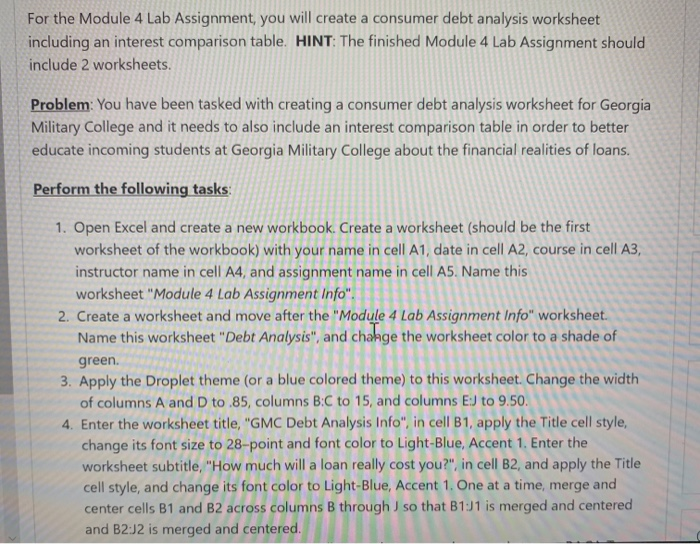
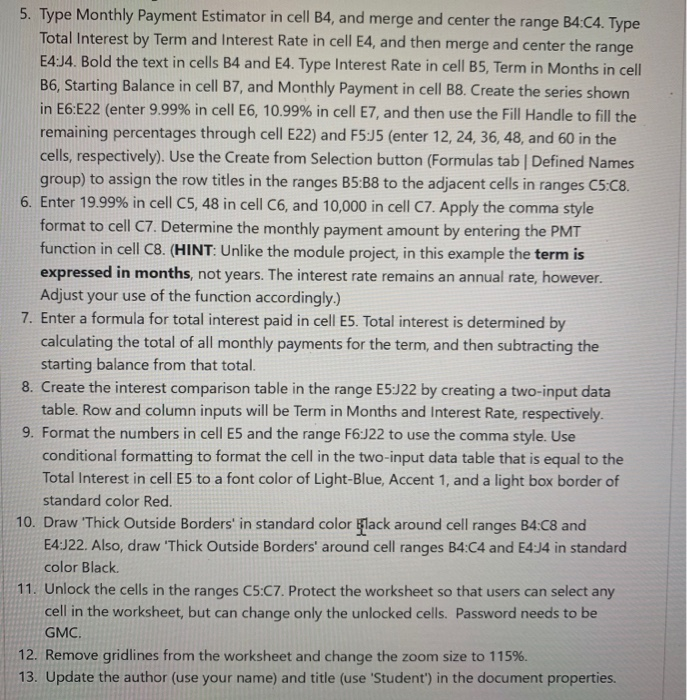
For the Module 4 Lab Assignment, you will create a consumer debt analysis worksheet including an interest comparison table. HINT: The finished Module 4 Lab Assignment should include 2 worksheets. Problem: You have been tasked with creating a consumer debt analysis worksheet for Georgia Military College and it needs to also include an interest comparison table in order to better educate incoming students at Georgia Military College about the financial realities of loans. Perform the following tasks: 1. Open Excel and create a new workbook. Create a worksheet (should be the first worksheet of the workbook) with your name in cell A1, date in cell A2, course in cell A3, instructor name in cell A4, and assignment name in cell AS. Name this worksheet "Module 4 Lab Assignment Info". 2. Create a worksheet and move after the "Module 4 Lab Assignment Info" worksheet. Name this worksheet "Debt Analysis", and chahge the worksheet color to a shade of green. 3. Apply the Droplet theme (or a blue colored theme) to this worksheet. Change the width of columns A and D to.85, columns BC to 15, and columns EJ to 9.50. 4. Enter the worksheet title, "GMC Debt Analysis Info", in cell B1, apply the Title cell style, change its font size to 28-point and font color to Light-Blue, Accent 1. Enter the worksheet subtitle, "How much will a loan really cost you?", in cell B2, and apply the Title cell style, and change its font color to Light-Blue, Accent 1. One at a time, merge and center cells B1 and B2 across columns B through so that B1:1 is merged and centered and B2:J2 is merged and centered. 5. Type Monthly Payment Estimator in cell B4, and merge and center the range B4:04. Type Total Interest by Term and Interest Rate in cell E4, and then merge and center the range E4:14. Bold the text in cells B4 and E4. Type Interest Rate in cell B5, Term in Months in cell B6, Starting Balance in cell B7, and Monthly Payment in cell B8. Create the series shown in E6:E22 (enter 9.99% in cell E6, 10.99% in cell E7, and then use the Fill Handle to fill the remaining percentages through cell E22) and F5:45 (enter 12, 24, 36, 48, and 60 in the cells, respectively). Use the Create from Selection button (Formulas tab | Defined Names group) to assign the row titles in the ranges B5:38 to the adjacent cells in ranges C5:C8. 6. Enter 19.99% in cell C5, 48 in cell C6, and 10,000 in cell C7. Apply the comma style format to cell C7. Determine the monthly payment amount by entering the PMT function in cell C8. (HINT: Unlike the module project, in this example the term is expressed in months, not years. The interest rate remains an annual rate, however. Adjust your use of the function accordingly.) 7. Enter a formula for total interest paid in cell E5. Total interest is determined by calculating the total of all monthly payments for the term, and then subtracting the starting balance from that total. 8. Create the interest comparison table in the range E5:22 by creating a two-input data table. Row and column inputs will be Term in Months and Interest Rate, respectively. 9. Format the numbers in cell E5 and the range F6:J22 to use the comma style. Use conditional formatting to format the cell in the two-input data table that is equal to the Total Interest in cell E5 to a font color of Light-Blue, Accent 1, and a light box border of standard color Red. 10. Draw 'Thick Outside Borders' in standard color Black around cell ranges B4:C8 and E4:22. Also, draw 'Thick Outside Borders' around cell ranges B4:04 and 54:34 in standard color Black 11. Unlock the cells in the ranges C5:07. Protect the worksheet so that users can select any cell in the worksheet, but can change only the unlocked cells. Password needs to be GMC. 12. Remove gridlines from the worksheet and change the zoom size to 115%. 13. Update the author (use your name) and title (use 'Student') in the document properties









 Study Help