







Question: Please display code. Align the text fields on the right, which is typical for numbers. Make the Area and Circumference text boxes uneditable. Format the
Please display code.
-
Align the text fields on the right, which is typical for numbers.
-
Make the Area and Circumference text boxes uneditable.
-
Format the area and circumference values with two decimal places. (Read more about different ways to format numbers in Java.
-
After the clear button is clicked, put the insertion point in the radius text box. (HINT: this is a focus event)
Instead of making the calculations within the method, add a Circle.java class to the project and create a circle object. Use the methods we wrote earlier to calculate the area and circumference in your button click events instead of doing the calculations there directly. (HINT: right-click the package and add a new Java class called Circle.java, then copy and paste your code into that file) This uses a technique called Model-View-Controller where we separate out the GUI code from the classes that model objects in the application.
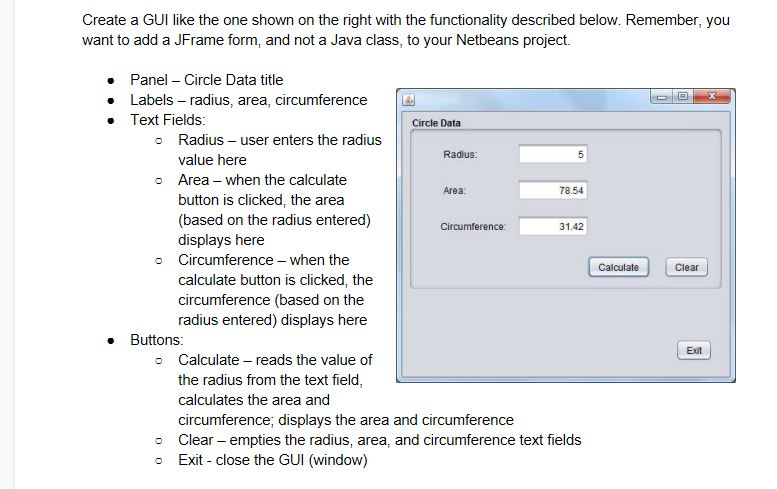
Create a GUI like the one shown on the right with the functionality described below. Remember, you want to add a JFrame form, and not a Java class, to your Netbeans project. Panel Circle Data title Labels radius, area, circumference Text Fields Circle Data o Radius user enters the radius Radius: value here Area - when the calculate button is clicked, the area (based on the radius entered) displays here o Area 78.54 31.42 o Circumference-when the Calculate Clear calculate button is clicked, the circumference (based on the radius entered) displays here Buttons Exit o Calculate reads the value of the radius from the text field calculates the area and circumference, displays the area and circumference o Clear- empties the radius, area, and circumference text fields o Exit close the GUI (window) Create a GUI like the one shown on the right with the functionality described below. Remember, you want to add a JFrame form, and not a Java class, to your Netbeans project. Panel Circle Data title Labels radius, area, circumference Text Fields Circle Data o Radius user enters the radius Radius: value here Area - when the calculate button is clicked, the area (based on the radius entered) displays here o Area 78.54 31.42 o Circumference-when the Calculate Clear calculate button is clicked, the circumference (based on the radius entered) displays here Buttons Exit o Calculate reads the value of the radius from the text field calculates the area and circumference, displays the area and circumference o Clear- empties the radius, area, and circumference text fields o Exit close the GUI (window)
Step by Step Solution
There are 3 Steps involved in it

Get step-by-step solutions from verified subject matter experts
 Study Help