Question: please do 2 and 3 ASAP 2. In the new class' code, replace the String colName property with an int lineWidth property. Change the constructor
please do 2 and 3 ASAP
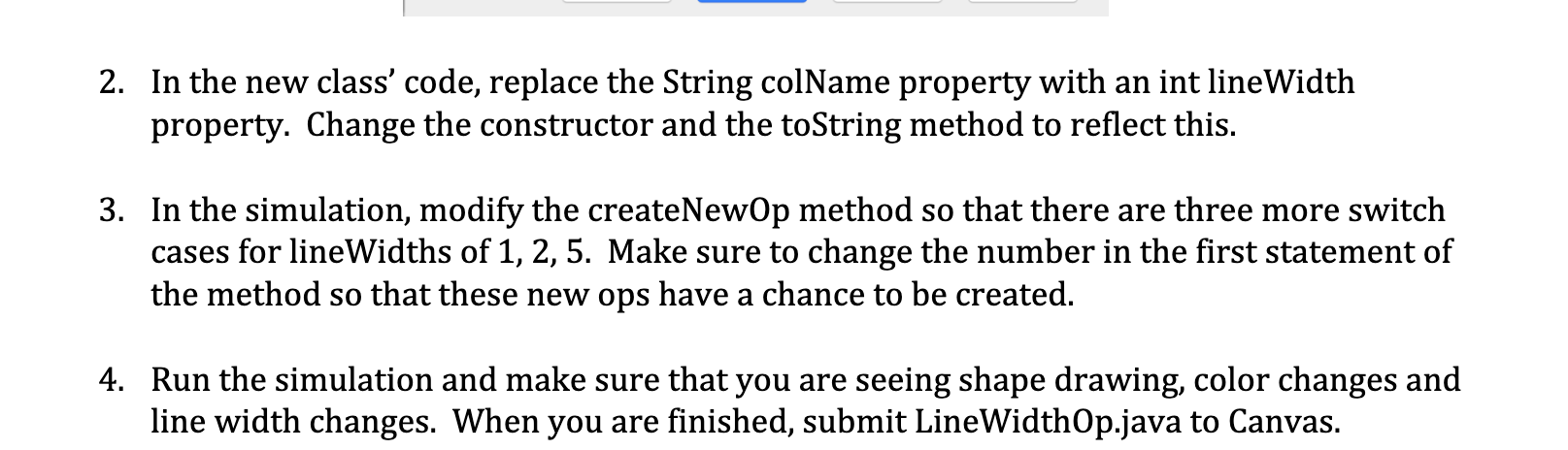
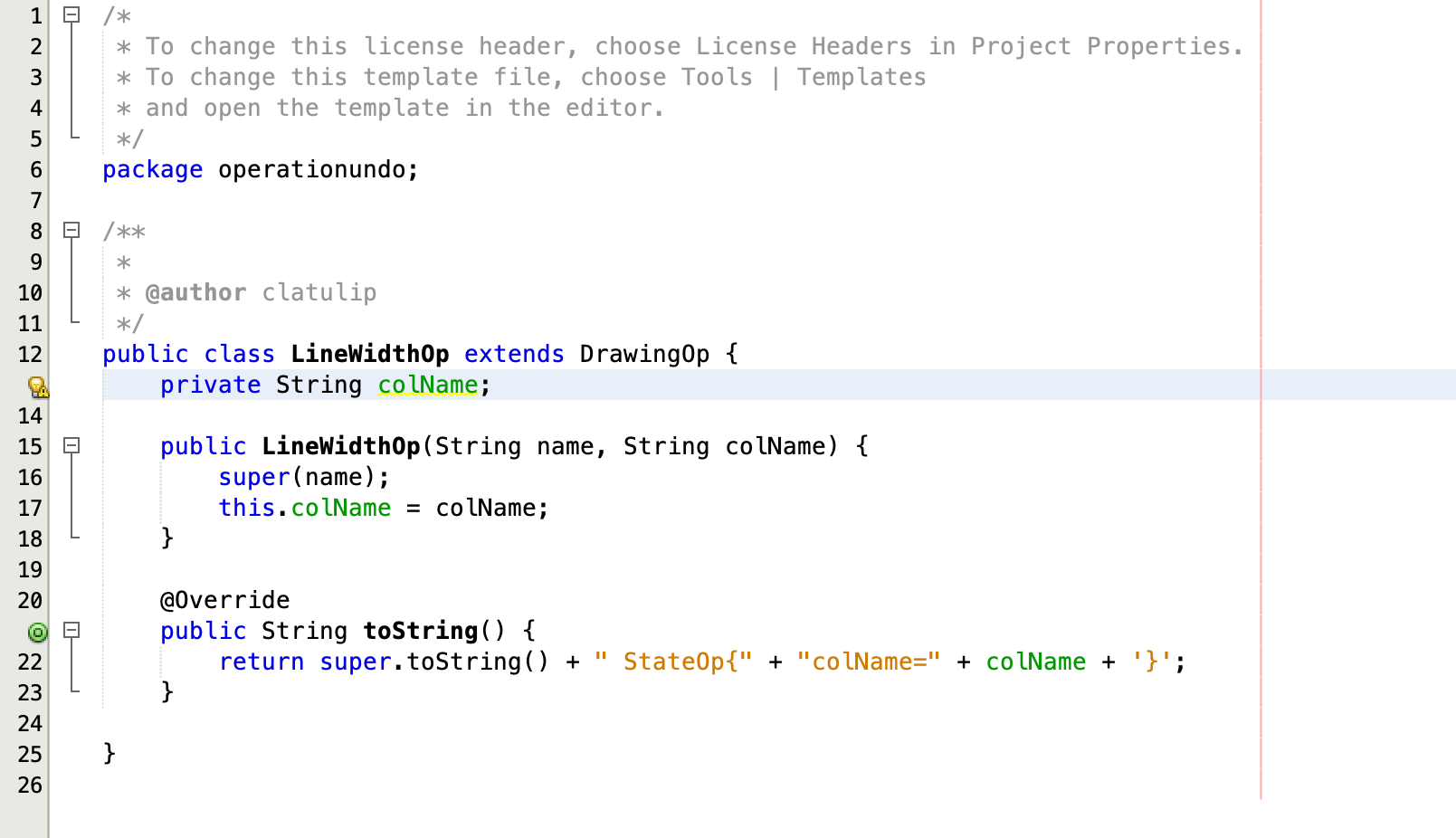
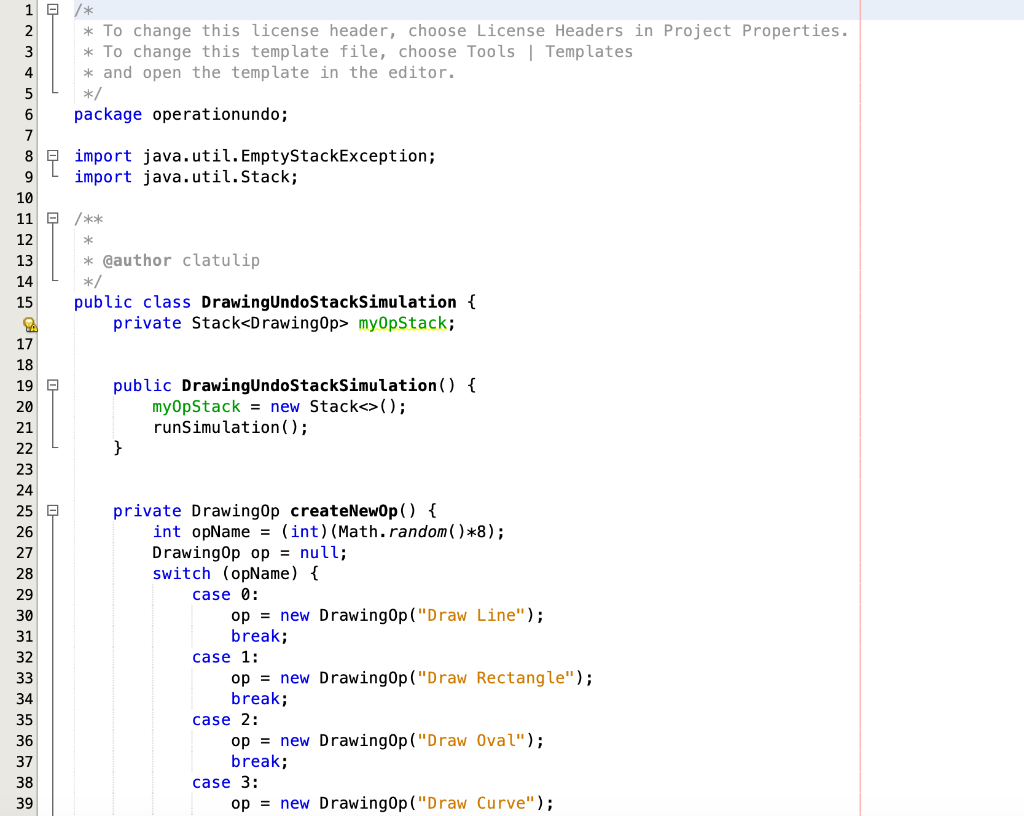
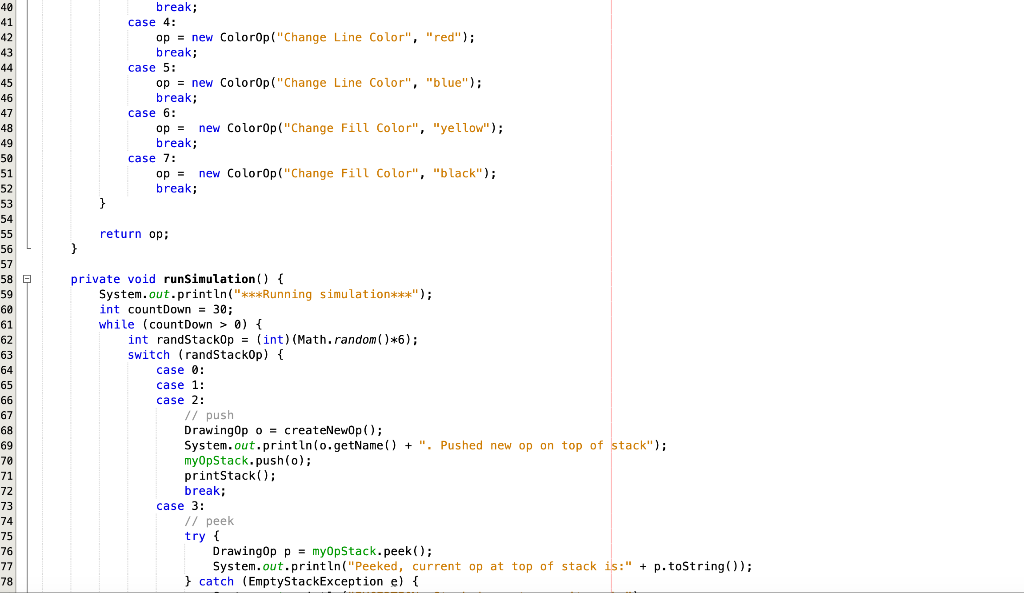
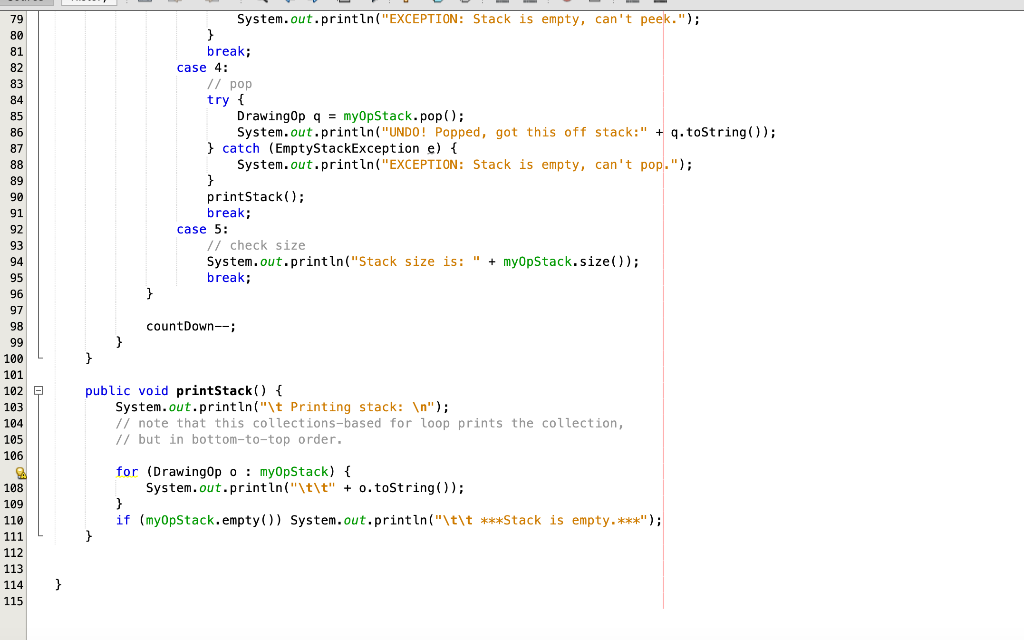
2. In the new class' code, replace the String colName property with an int lineWidth property. Change the constructor and the toString method to reflect this. 3. In the simulation, modify the createNewOp method so that there are three more switch cases for lineWidths of 1, 2,5. Make sure to change the number in the first statement of the method so that these new ops have a chance to be created. 4. Run the simulation and make sure that you are seeing shape drawing, color changes and line width changes. When you are finished, submit LineWidthOp.java to Canvas. 000 * 1 /* 2 * To change this license header, choose License Headers in Project Properties. 3 * To change this template file, choose Tools | Templates 4 * and open the template in the editor. 5 */ 6 package operationundo; 7 8 O /** 9 10 * @author clatulip 11 */ 12 public class LineWidthOp extends DrawingOp { private String colName; 14 15 public LineWidthop(String name, String colName) { 16 super(name); 17 this.colName = colName; 18 } 19 20 @Override public String toString() { 22 return super.toString() + " StateOp{" + "colName=" + colName + '}'; 23 } 24 25 } 26 1 2 * To change this license header, choose License Headers in Project Properties. 3 * To change this template file, choose Tools | Templates 4 * and open the template in the editor. 5 */ 6 package operationundo; 7 8 import java.util. EmptyStackException; 9 import java.util.Stack; 10 11 /** 12 13 * @author clatulip 14 */ 15 public class DrawingUndoStackSimulation { 2 private Stack myOpStack; 17 18 19 public DrawingUndoStackSimulation () { 20 myOpStack = new Stack(); 21 runSimulation(); 22 } 23 24 25 private DrawingOp createNewOp() { 26 int opName = (int) (Math.random()*8); 27 DrawingOp op = null; 28 switch (opName) { 29 case 0 : 30 op = new DrawingOp ("Draw Line"); 31 break; 32 case 1: 33 op = new DrawingOp ("Draw Rectangle"); 34 break; 35 case 2: 36 op = new DrawingOp("Draw Oval"); 37 break; 38 case 3: 39 op = new DrawingOp ("Draw Curve"); break; case 4: op = new ColorOp("Change Line Color", "red"); break; case 5: op = new ColorOp("Change Line Color", "blue"); break; case 6: new Colorop("Change Fill Color", "yellow"); break; case 7: new ColorOp ("Change Fill Color", "black"); break; op = } return op: 40 41 42 43 44 45 46 47 48 49 50 51 52 53 54 55 56 57 58 59 60 61 62 63 64 65 66 67 68 69 70 71 72 73 74 75 76 77 78 private void runSimulation () { System.out.println("***Running simulation***"); int countDown = 30; while (countDown > 0) { int randStackOp = (int) (Math.random()*6); switch (randStackop) { case 0: case 1: case 2: // push Drawingopo = createNewOp(); System.out.println(o.getName() + ". Pushed new op on top of stack"); myOpStack.push(o); printStack(); break; case 3: // peek try { DrawingOp p = myOpStack.peek(); System.out.println("Peeked, current op at top of stack is:" + p.toString(); } catch (EmptyStackException e) { System.out.println("EXCEPTION: Stack is empty, can't peek."); 79 80 81 break; case 4: // pop try { DrawingOp q = myOpStack.pop(); System.out.println("UNDO! Popped, got this off stack:" + q.toString()); } catch (EmptyStackException e) { System.out.println("EXCEPTION: Stack is empty, can't pop."); } printStack(); break; case 5: // check size System.out.println("Stack size is: " + myOpStack.size()); break; } countDown--; } } 2 100 101 102 103 104 105 106 SA 108 109 110 public void printStack() { System.out.println("\t Printing stack: "); 1/ note that this collections-based for loop prints the collection, // but in bottom-to-top order. for (DrawingOp o : myOpStack) { System.out.println("\t\t" + o.toString()); } if (myOpStack.empty()) System.out.println("\t\t ***Stack is empty.***"); 112 113 114 115 } 2. In the new class' code, replace the String colName property with an int lineWidth property. Change the constructor and the toString method to reflect this. 3. In the simulation, modify the createNewOp method so that there are three more switch cases for lineWidths of 1, 2,5. Make sure to change the number in the first statement of the method so that these new ops have a chance to be created. 4. Run the simulation and make sure that you are seeing shape drawing, color changes and line width changes. When you are finished, submit LineWidthOp.java to Canvas. 000 * 1 /* 2 * To change this license header, choose License Headers in Project Properties. 3 * To change this template file, choose Tools | Templates 4 * and open the template in the editor. 5 */ 6 package operationundo; 7 8 O /** 9 10 * @author clatulip 11 */ 12 public class LineWidthOp extends DrawingOp { private String colName; 14 15 public LineWidthop(String name, String colName) { 16 super(name); 17 this.colName = colName; 18 } 19 20 @Override public String toString() { 22 return super.toString() + " StateOp{" + "colName=" + colName + '}'; 23 } 24 25 } 26 1 2 * To change this license header, choose License Headers in Project Properties. 3 * To change this template file, choose Tools | Templates 4 * and open the template in the editor. 5 */ 6 package operationundo; 7 8 import java.util. EmptyStackException; 9 import java.util.Stack; 10 11 /** 12 13 * @author clatulip 14 */ 15 public class DrawingUndoStackSimulation { 2 private Stack myOpStack; 17 18 19 public DrawingUndoStackSimulation () { 20 myOpStack = new Stack(); 21 runSimulation(); 22 } 23 24 25 private DrawingOp createNewOp() { 26 int opName = (int) (Math.random()*8); 27 DrawingOp op = null; 28 switch (opName) { 29 case 0 : 30 op = new DrawingOp ("Draw Line"); 31 break; 32 case 1: 33 op = new DrawingOp ("Draw Rectangle"); 34 break; 35 case 2: 36 op = new DrawingOp("Draw Oval"); 37 break; 38 case 3: 39 op = new DrawingOp ("Draw Curve"); break; case 4: op = new ColorOp("Change Line Color", "red"); break; case 5: op = new ColorOp("Change Line Color", "blue"); break; case 6: new Colorop("Change Fill Color", "yellow"); break; case 7: new ColorOp ("Change Fill Color", "black"); break; op = } return op: 40 41 42 43 44 45 46 47 48 49 50 51 52 53 54 55 56 57 58 59 60 61 62 63 64 65 66 67 68 69 70 71 72 73 74 75 76 77 78 private void runSimulation () { System.out.println("***Running simulation***"); int countDown = 30; while (countDown > 0) { int randStackOp = (int) (Math.random()*6); switch (randStackop) { case 0: case 1: case 2: // push Drawingopo = createNewOp(); System.out.println(o.getName() + ". Pushed new op on top of stack"); myOpStack.push(o); printStack(); break; case 3: // peek try { DrawingOp p = myOpStack.peek(); System.out.println("Peeked, current op at top of stack is:" + p.toString(); } catch (EmptyStackException e) { System.out.println("EXCEPTION: Stack is empty, can't peek."); 79 80 81 break; case 4: // pop try { DrawingOp q = myOpStack.pop(); System.out.println("UNDO! Popped, got this off stack:" + q.toString()); } catch (EmptyStackException e) { System.out.println("EXCEPTION: Stack is empty, can't pop."); } printStack(); break; case 5: // check size System.out.println("Stack size is: " + myOpStack.size()); break; } countDown--; } } 2 100 101 102 103 104 105 106 SA 108 109 110 public void printStack() { System.out.println("\t Printing stack: "); 1/ note that this collections-based for loop prints the collection, // but in bottom-to-top order. for (DrawingOp o : myOpStack) { System.out.println("\t\t" + o.toString()); } if (myOpStack.empty()) System.out.println("\t\t ***Stack is empty.***"); 112 113 114 115 }









 Study Help