Question: please do in excel and show formule in excel #4: For the following problem, you are to create a Macro using the Record Macro functionality.
please do in excel and show formule in excel
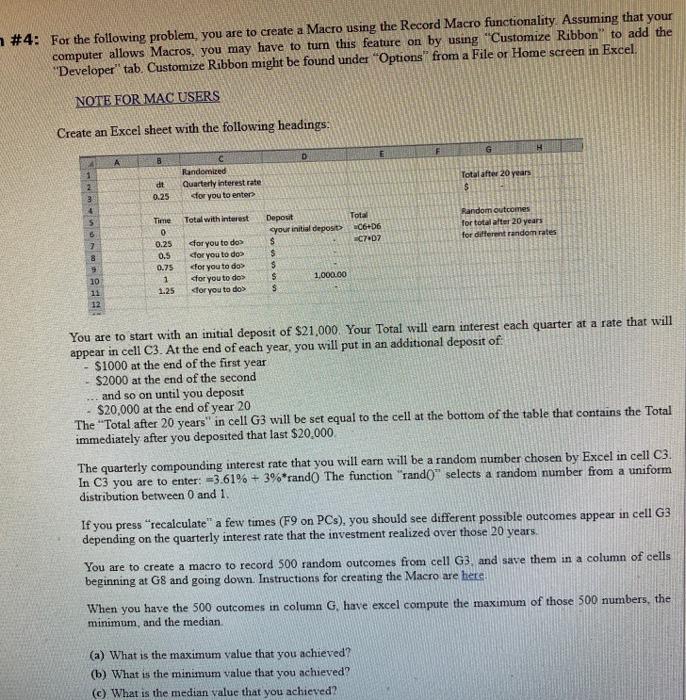
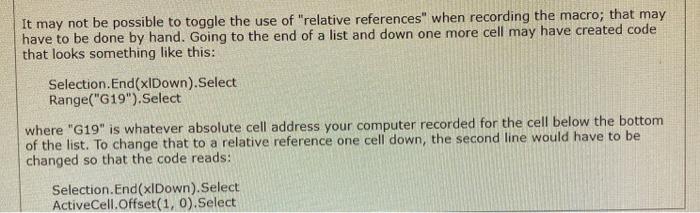
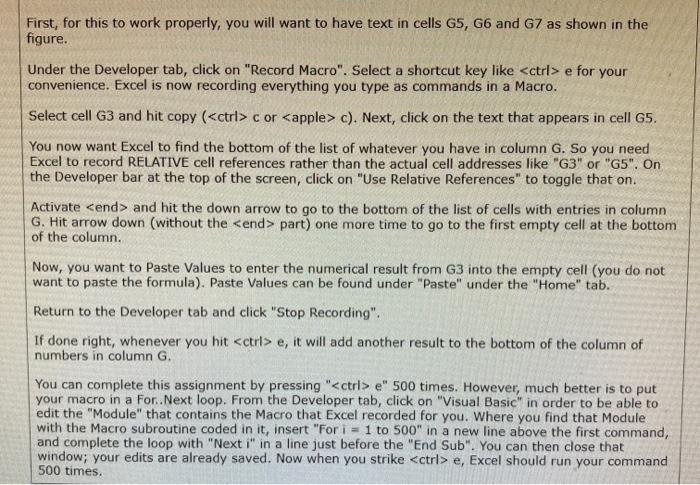
#4: For the following problem, you are to create a Macro using the Record Macro functionality. Assuming that your computer allows Macros, you may have to turn this feature on by using Customize Ribbon" to add the "Developer" tab. Customize Ribbon might be found under "Options from a File or Home screen in Excel NOTE FOR MAC USERS Create an Excel sheet with the following headings: G H D B Randomized Quarterly interest rate for you to enter Total after 20 years $ dt 0.25 3 4 Total with interest Random outcomes for total after 20 years for different random rates & 9 Time 0 0.25 0.5 0.75 1 1.25 for you to dos for you to do e for your convenience. Excel is now recording everything you type as commands in a Macro. Select cell G3 and hit copy (ctrl> c or c). Next, click on the text that appears in cell G5. You now want Excel to find the bottom of the list of whatever you have in column G. So you need Excel to record RELATIVE cell references rather than the actual cell addresses like "G3" or "G5". On the Developer bar at the top of the screen, click on "Use Relative References" to toggle that on. Activate and hit the down arrow to go to the bottom of the list of cells with entries in column G. Hit arrow down (without the part) one more time to go to the first empty cell at the bottom of the column. Now, you want to Paste Values to enter the numerical result from G3 into the empty cell (you do not want to paste the formula). Paste Values can be found under "Paste" under the "Home" tab. Return to the Developer tab and click "Stop Recording". If done right, whenever you hit e, it will add another result to the bottom of the column of numbers in column G. You can complete this assignment by pressing " e" 500 times. However, much better is to put your macro in a For. Next loop. From the Developer tab, click on "Visual Basic" in order to be able to edit the "Module" that contains the Macro that Excel recorded for you. Where you find that Module with the Macro subroutine coded in it, insert "For i = 1 to 500" in a new line above the first command, and complete the loop with "Next i" in a line just before the "End Sub". You can then close that window; your edits are already saved. Now when you strike e, Excel should run your command 500 times. #4: For the following problem, you are to create a Macro using the Record Macro functionality. Assuming that your computer allows Macros, you may have to turn this feature on by using Customize Ribbon" to add the "Developer" tab. Customize Ribbon might be found under "Options from a File or Home screen in Excel NOTE FOR MAC USERS Create an Excel sheet with the following headings: G H D B Randomized Quarterly interest rate for you to enter Total after 20 years $ dt 0.25 3 4 Total with interest Random outcomes for total after 20 years for different random rates & 9 Time 0 0.25 0.5 0.75 1 1.25 for you to dos for you to do e for your convenience. Excel is now recording everything you type as commands in a Macro. Select cell G3 and hit copy (ctrl> c or c). Next, click on the text that appears in cell G5. You now want Excel to find the bottom of the list of whatever you have in column G. So you need Excel to record RELATIVE cell references rather than the actual cell addresses like "G3" or "G5". On the Developer bar at the top of the screen, click on "Use Relative References" to toggle that on. Activate and hit the down arrow to go to the bottom of the list of cells with entries in column G. Hit arrow down (without the part) one more time to go to the first empty cell at the bottom of the column. Now, you want to Paste Values to enter the numerical result from G3 into the empty cell (you do not want to paste the formula). Paste Values can be found under "Paste" under the "Home" tab. Return to the Developer tab and click "Stop Recording". If done right, whenever you hit e, it will add another result to the bottom of the column of numbers in column G. You can complete this assignment by pressing " e" 500 times. However, much better is to put your macro in a For. Next loop. From the Developer tab, click on "Visual Basic" in order to be able to edit the "Module" that contains the Macro that Excel recorded for you. Where you find that Module with the Macro subroutine coded in it, insert "For i = 1 to 500" in a new line above the first command, and complete the loop with "Next i" in a line just before the "End Sub". You can then close that window; your edits are already saved. Now when you strike e, Excel should run your command 500 times









 Study Help