







Question: PLEASE DO IT IN C++ AND MAKE SURE YOUR OUTPUT MATCHES THE OUTPUT GIVEN. EXPLAIN AS YOU CODE. KEEP IT BASIC. LOOK AT THE BOTTOM
PLEASE DO IT IN C++ AND MAKE SURE YOUR OUTPUT MATCHES THE OUTPUT GIVEN. EXPLAIN AS YOU CODE. KEEP IT BASIC. LOOK AT THE BOTTOM FOR 3 FILES.
main.cpp
#include "extPersonType.h"
#includeint main() { extPersonType myPerson = extPersonType("John", "Denver", 3 , addressType(" 42 W Warren Ave", "Wayne", "MI", "48202")); myPerson.print(); system("pause"); }
personType.h
#include
using namespace std; class personType { public: virtual void print() const; void setName(string first, string last); string getFirstName() const; string getLastName() const; personType(string first = "", string last = ""); protected: string firstName; string lastName; }; #include#include "personType.h" using namespace std; void personType::print() const { cout
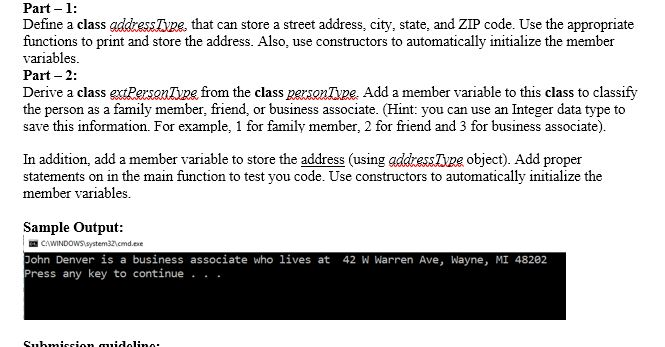
Part-1 Define a class addressTyze, that can store a street address, city, state, and ZIP code. Use the appropriate functions to print and store the address. Also, use constructors to automatically initialize the member variables Part- 2: Derive a class extPersauipe from the class esonTpe. Add a member variable to this class to classify the person as a family member, friend, or business associate. (Hint: you can use an Integer data type to save this information. For example, 1 for family member, 2 for friend and 3 for business associate). In addition, add a member variable to store the address (using addressTvpe object). Add proper statements on in the main function to test you code. Use constructors to automatically initialize the member variables Sample Output: John Denver is a business associate who 1ives at 42 W Warren Ave, Wayne, MI 48202 Press any key to continue
Step by Step Solution
There are 3 Steps involved in it

Get step-by-step solutions from verified subject matter experts
 Study Help