







Question: PLEASE DO IT IN C# Book Store Due Week 3 B ArkhamBooks Order Form OOX Java for dummies Author: Joe Nobody ISBN: 34567 Price: $15.00
PLEASE DO IT IN C#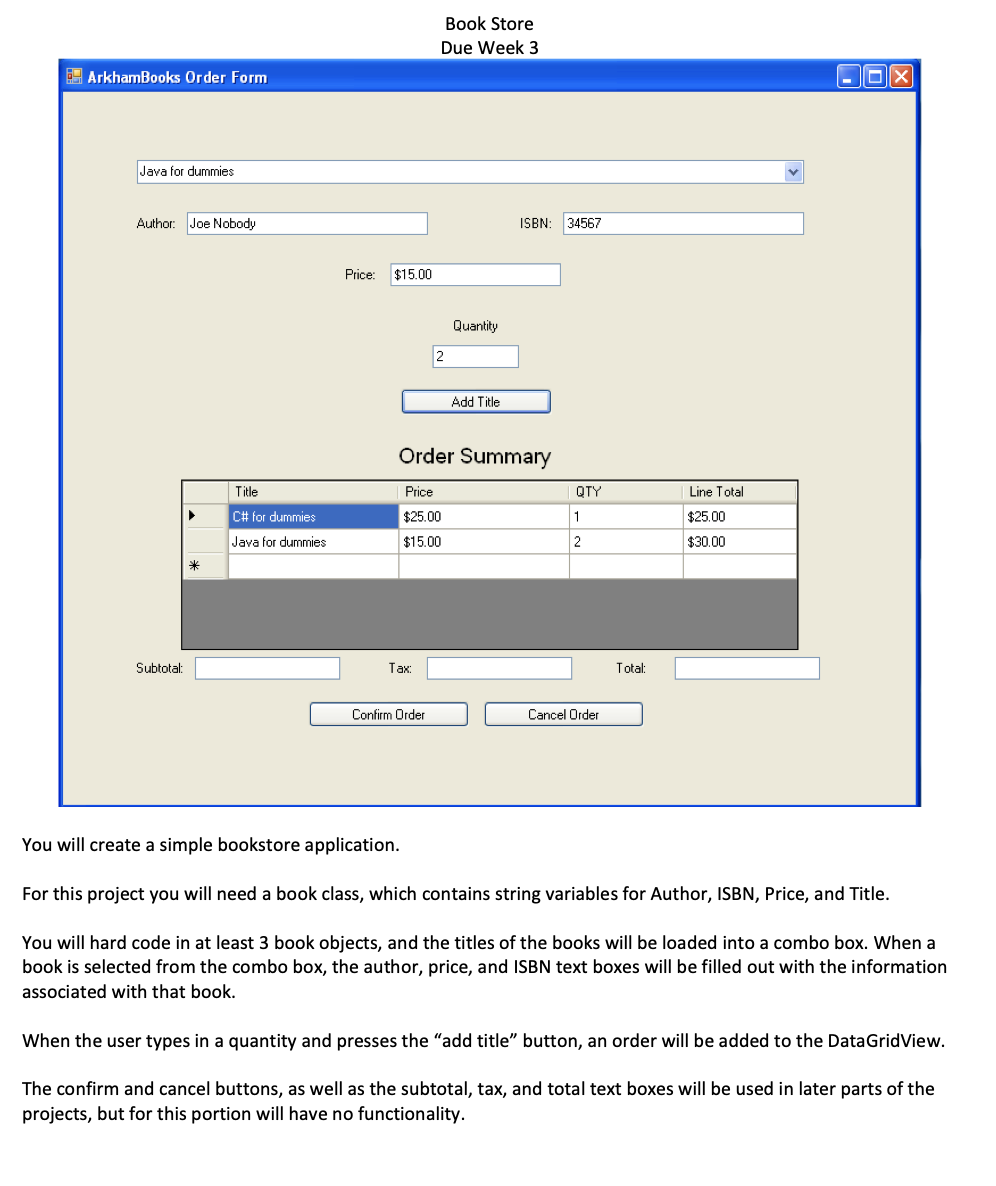
Book Store Due Week 3 B ArkhamBooks Order Form OOX Java for dummies Author: Joe Nobody ISBN: 34567 Price: $15.00 Quantity 2 Add Title Order Summary Title QTY C# for dummies Java for dummies Price $25.00 $15.00 Line Total $25.00 $30.00 2 Subtotal: C Tax Total: D Confirm Order Cancel Order You will create a simple bookstore application. For this project you will need a book class, which contains string variables for Author, ISBN, Price, and Title. You will hard code in at least 3 book objects, and the titles of the books will be loaded into a combo box. When a book is selected from the combo box, the author, price, and ISBN text boxes will be filled out with the information associated with that book. When the user types in a quantity and presses the "add title button, an order will be added to the DataGridView. The confirm and cancel buttons, as well as the subtotal, tax, and total text boxes will be used in later parts of the projects, but for this portion will have no functionality. Book Store Due Week 3 B ArkhamBooks Order Form OOX Java for dummies Author: Joe Nobody ISBN: 34567 Price: $15.00 Quantity 2 Add Title Order Summary Title QTY C# for dummies Java for dummies Price $25.00 $15.00 Line Total $25.00 $30.00 2 Subtotal: C Tax Total: D Confirm Order Cancel Order You will create a simple bookstore application. For this project you will need a book class, which contains string variables for Author, ISBN, Price, and Title. You will hard code in at least 3 book objects, and the titles of the books will be loaded into a combo box. When a book is selected from the combo box, the author, price, and ISBN text boxes will be filled out with the information associated with that book. When the user types in a quantity and presses the "add title button, an order will be added to the DataGridView. The confirm and cancel buttons, as well as the subtotal, tax, and total text boxes will be used in later parts of the projects, but for this portion will have no functionality
Step by Step Solution
There are 3 Steps involved in it

Get step-by-step solutions from verified subject matter experts
 Study Help