







Question: please do not copy from other solutions PRG455 LAB ASSIGNMENT #1 Marks: 2.5 Due: Week 3 lab class Design a Windows Forms Application which contains
please do not copy from other solutions
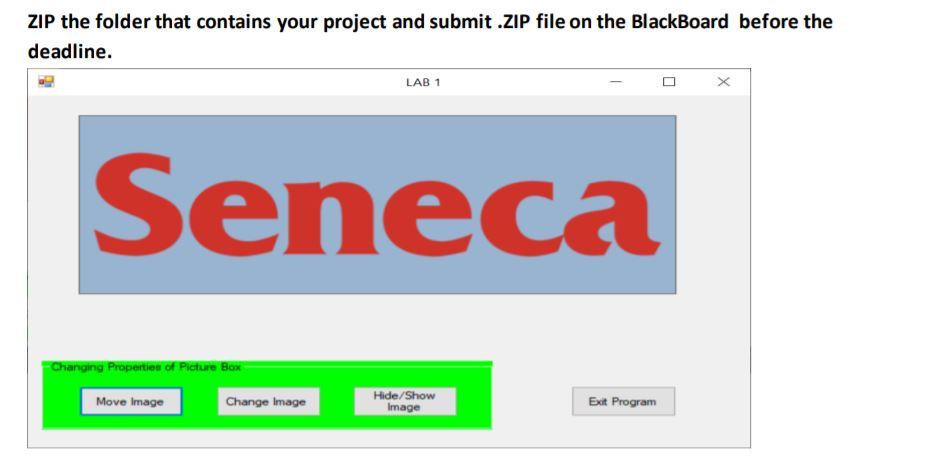
PRG455 LAB ASSIGNMENT #1 Marks: 2.5 Due: Week 3 lab class Design a Windows Forms Application which contains one form and the following controls: a picture box, a group box, four buttons, and a timer. Set the properties of the form and all controls as shown in figure below. You should use your own image files. Please note that it is required to follow naming conventions when naming your controls and to avoid empty event handlers. The timer control is used to gradually increase the image size every second for up to 5 seconds. Please note that the timer will start working as soon as the form is loaded and disabled after 5 seconds. The Click event of each button should be handled as follows: Move Image will change the Location property of the picture box, i.e., move the picture box to a new location Change Image will assign another image to the image property of the picture box. Hide/Show Image will change the Visible property of the picture box to false, if it is set to true and vice versa Exit Program will use the MessageBox.Show() method to display the message "Program will terminate" first, and then terminate the program. ZIP the folder that contains your project and submit .ZIP file on the BlackBoard before the deadline. LAB 1 Seneca Changing Properties of Picture Box Move Image Change Image Hide/Show Image Exit Program
Step by Step Solution
There are 3 Steps involved in it

Get step-by-step solutions from verified subject matter experts
 Study Help