







Question: Please do not put needs more information nad not specify what info. Please this is due tomorrow, I will upvote you even if you cant
Please do not put needs more information nad not specify what info. Please this is due tomorrow, I will upvote you even if you cant complete it as long as you solidly help me with some.
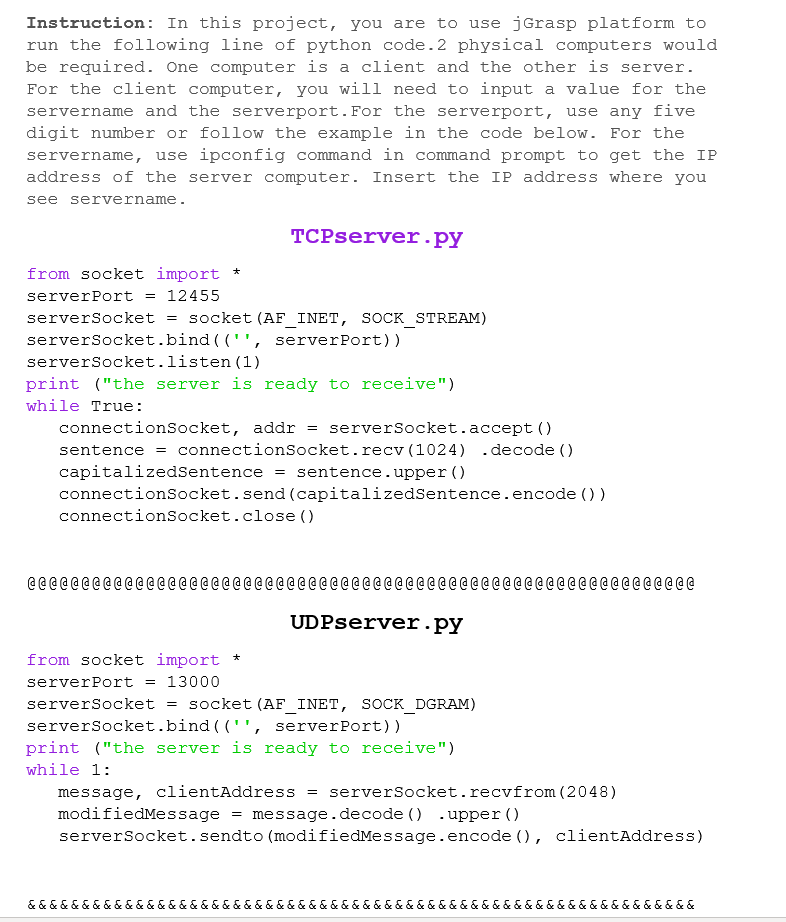
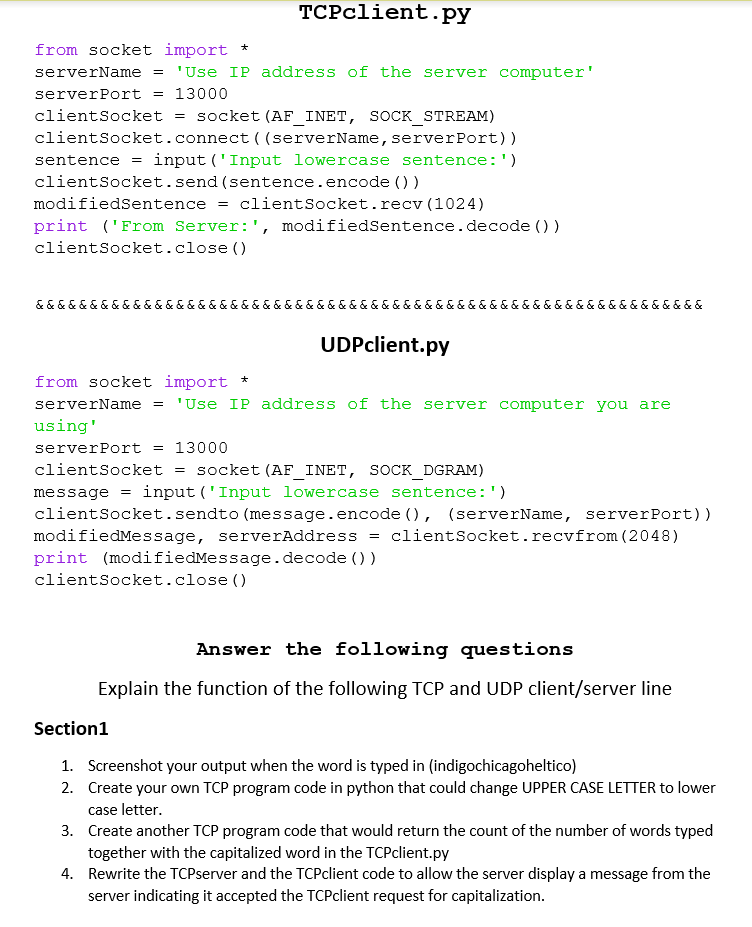
Instruction: In this project, you are to use jGrasp platform to run the following line of python code. 2 physical computers would be required. One computer is a client and the other is server. For the client computer, you will need to input a value for the servername and the serverport. For the serverport, use any five digit number or follow the example in the code below. For the servername, use ipconfig command in command prompt to get the IP address of the server computer. Insert the IP address where you see servername. TCPserver.py from socket import + serverPort = 12455 serverSocket = socket (AF INET, SOCK_STREAM) serverSocket.bind(("', server Port)) serverSocket.listen (1) print ("the server is ready to receive") while True: connectionSocket, addr = serverSocket.accept() sentence = connectionSocket.recv (1024) .decode() capitalizedSentence = sentence.upper() connectionSocket.send (capitalizedSentence.encode()) connectionSocket.close() @ @ @ @ @ @ @ @ @ @ @ @ @ @ @ @ @ @ @ @ @ @ @ @ @ @ @ @ @ @ @ @ @ @ @ @ @ @ @ @ @ @ @ @ @ @ @ @ @ @ @ @ @ @ @ @ @ @ @ @ @ @ UDPserver.py from socket import + server Port = 13000 serverSocket = socket (AF INET, SOCK_DGRAM) serverSocket.bind(('', server Port)) print ("the server is ready to receive") while 1: message, clientAddress = serverSocket.recvfrom (2048) modifiedMessage = message.decode() .upper() serverSocket.sendto (modifiedMessage.encode (), clientAddress) &&&&&&&&&&&&&&&&&&&&&&&&&&&&&&&&&&&&&&&&&&&&&&&&&&&&&&&&&&&&&& TCPclient.py from socket import * serverName = 'Use IP address of the server computer' server Port = 13000 client Socket = socket (AF INET, SOCK_STREAM) client Socket.connect((serverName, server Port)) sentence = input ('Input lowercase sentence:') client Socket.send (sentence.encode()) modifiedSentence = client Socket.recv (1024) print (From Server:', modifiedSentence.decode() ) client Socket.close() & & & & & & & & & & & & & & & & & & & & & & & & & & & & & & & & & & & & & & & & & & & & & & & & & & & & & & & & & & & & & & UDPclient.py from socket import + serverName = 'Use IP address of the server computer you are using' server Port = 13000 client Socket = socket (AF INET, SOCK DGRAM) message = input ('Input lowercase sentence:') client Socket.sendto (message.encode (), (serverName, serverPort)) modifiedMessage, serverAddress = clientsocket.recvfrom (2048) print (modifiedMessage.decode()) client Socket.close() Answer the following questions Explain the function of the following TCP and UDP client/server line Section1 1. Screenshot your output when the word is typed in (indigochicagoheltico) 2. Create your own TCP program code in python that could change UPPER CASE LETTER to lower case letter. 3. Create another TCP program code that would return the count of the number of words typed together with the capitalized word in the TCPclient.py 4. Rewrite the TCP server and the TCPclient code to allow the server display a message from the server indicating it accepted the TCPclient request for capitalization. Instruction: In this project, you are to use jGrasp platform to run the following line of python code. 2 physical computers would be required. One computer is a client and the other is server. For the client computer, you will need to input a value for the servername and the serverport. For the serverport, use any five digit number or follow the example in the code below. For the servername, use ipconfig command in command prompt to get the IP address of the server computer. Insert the IP address where you see servername. TCPserver.py from socket import + serverPort = 12455 serverSocket = socket (AF INET, SOCK_STREAM) serverSocket.bind(("', server Port)) serverSocket.listen (1) print ("the server is ready to receive") while True: connectionSocket, addr = serverSocket.accept() sentence = connectionSocket.recv (1024) .decode() capitalizedSentence = sentence.upper() connectionSocket.send (capitalizedSentence.encode()) connectionSocket.close() @ @ @ @ @ @ @ @ @ @ @ @ @ @ @ @ @ @ @ @ @ @ @ @ @ @ @ @ @ @ @ @ @ @ @ @ @ @ @ @ @ @ @ @ @ @ @ @ @ @ @ @ @ @ @ @ @ @ @ @ @ @ UDPserver.py from socket import + server Port = 13000 serverSocket = socket (AF INET, SOCK_DGRAM) serverSocket.bind(('', server Port)) print ("the server is ready to receive") while 1: message, clientAddress = serverSocket.recvfrom (2048) modifiedMessage = message.decode() .upper() serverSocket.sendto (modifiedMessage.encode (), clientAddress) &&&&&&&&&&&&&&&&&&&&&&&&&&&&&&&&&&&&&&&&&&&&&&&&&&&&&&&&&&&&&& TCPclient.py from socket import * serverName = 'Use IP address of the server computer' server Port = 13000 client Socket = socket (AF INET, SOCK_STREAM) client Socket.connect((serverName, server Port)) sentence = input ('Input lowercase sentence:') client Socket.send (sentence.encode()) modifiedSentence = client Socket.recv (1024) print (From Server:', modifiedSentence.decode() ) client Socket.close() & & & & & & & & & & & & & & & & & & & & & & & & & & & & & & & & & & & & & & & & & & & & & & & & & & & & & & & & & & & & & & UDPclient.py from socket import + serverName = 'Use IP address of the server computer you are using' server Port = 13000 client Socket = socket (AF INET, SOCK DGRAM) message = input ('Input lowercase sentence:') client Socket.sendto (message.encode (), (serverName, serverPort)) modifiedMessage, serverAddress = clientsocket.recvfrom (2048) print (modifiedMessage.decode()) client Socket.close() Answer the following questions Explain the function of the following TCP and UDP client/server line Section1 1. Screenshot your output when the word is typed in (indigochicagoheltico) 2. Create your own TCP program code in python that could change UPPER CASE LETTER to lower case letter. 3. Create another TCP program code that would return the count of the number of words typed together with the capitalized word in the TCPclient.py 4. Rewrite the TCP server and the TCPclient code to allow the server display a message from the server indicating it accepted the TCPclient request for capitalization
Step by Step Solution
There are 3 Steps involved in it

Get step-by-step solutions from verified subject matter experts
 Study Help