







Question: Please do not use any built-in functions in Matlab that automatically convert a number to binary, and please follow the instructions thoroughly, implementing all given
Please do not use any built-in functions in Matlab that automatically convert a number to binary, and please follow the instructions thoroughly, implementing all given code.
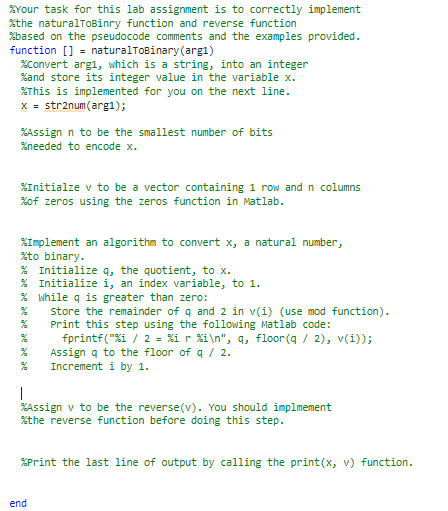
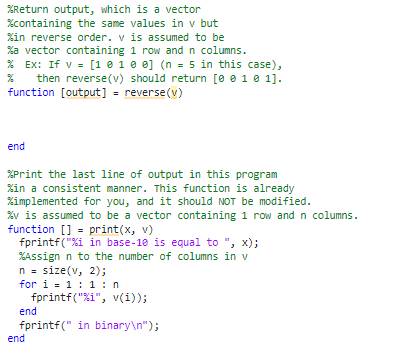
grour task for this lab assignment is to correctly implement \%the naturalToBinry function and reverse function \%based on the pseudocode comments and the examples provided. function [] = naturalToBinary(arg1) \%Convert arg1, which is a string, into an integer \%and store its integer value in the variable x. \%This is implemented for you on the next line. x=str2 num (arg1); \%Assign n to be the smallest number of bits \%needed to encode x. \%Initialze v to be a vector containing 1 row and n columns \%of zeros using the zeros function in Matlab. \%Implement an algorithm to convert x, a natural number, \%to binary. % Initialize q, the quotient, to x. % Initialize i, an index variable, to 1 . % While q is greater than zero: Store the remainder of q and 2 in v (i) (use mod function). Print this step using the following Matlab code: fprintf("\%i / 2=%ir%i ",q, floor (q/2),v(i)); Assign q to the floor of q/2. Increment i by 1 . 1 \%Assign v to be the reverse(v). You should implmement % the reverse function before doing this step. \%Print the last line of output by calling the print( x,v) function. end
Step by Step Solution
There are 3 Steps involved in it

Get step-by-step solutions from verified subject matter experts
 Study Help