







Question: Please do the question in excel and upload the screenshot of the results and formula used to do the calculation in excel sheet. And also
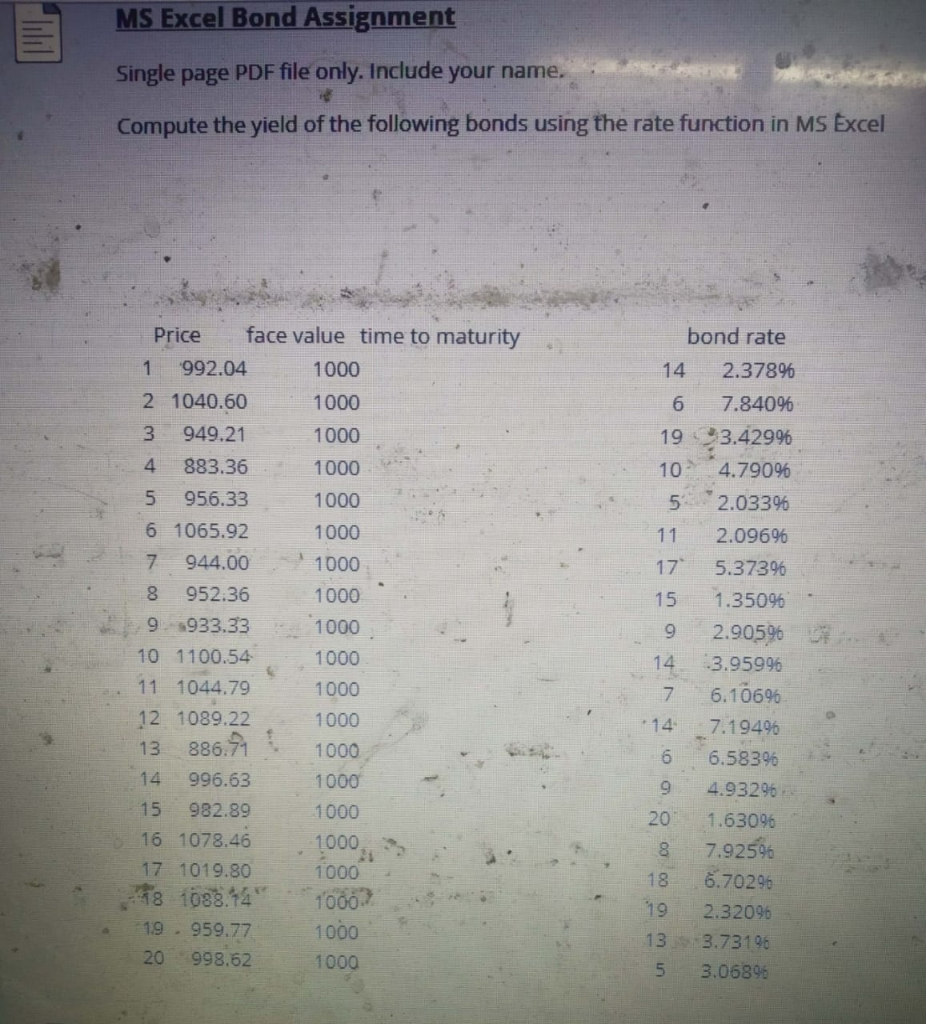
Please do the question in excel and upload the screenshot of the results and formula used to do the calculation in excel sheet. And also please explain how we did the problem..
Will rate your answer for sure
MS Excel Bond Assignment Single page PDF file only. Include your name. Compute the yield of the following bonds using the rate function in MS Excel Price face value time to maturity 992.04 1000 2 1040.60 1000 3 949.21 1000 4 883.36 1000 5 956.33 1000 6 1065.92 1000 7 944.00 1000 8 952:36 1000 9. 1933.33 1000 10 1100.54 1000 11 1044.79 1000 12 1089.22 1000 13 886.71 1000 14 996.63 1000 15 982.89 1000 16 1078.46 17 1019.80 1000 18 1038.14 1000? -19 . 959.77 1000 20 998.62 1000 bond rate 14 2.378% 6 7.84096 19 3.42996 10. 4.790% 5 2.03396 2.09696 5.3739 1.35096 2.905% 3.95996 7 6.10696 14 7.1949 6 6.58396 4.93296 20 1.63096 87.925% 18 6.70296 2.32096 133.73196 5 3.06896 1000
Step by Step Solution
There are 3 Steps involved in it

Get step-by-step solutions from verified subject matter experts
 Study Help