







Question: Please do this in EXCEL VBA and include the pictures of the result and attach the code. There is not Excel file or code required
Please do this in EXCEL VBA and include the pictures of the result and attach the code. There is not Excel file or code required to complete this code, so please follow the guidelines and complete the program. 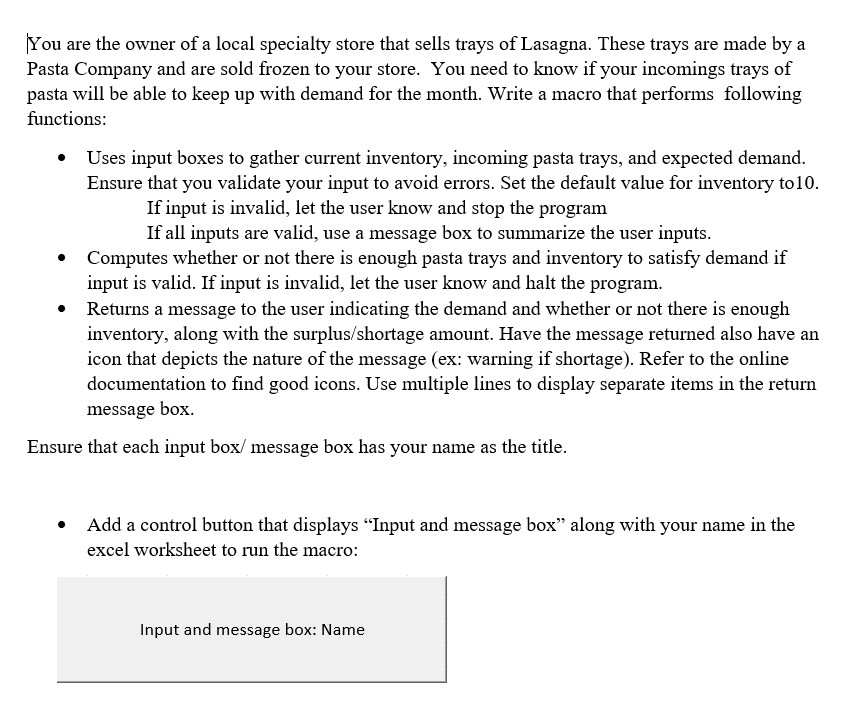
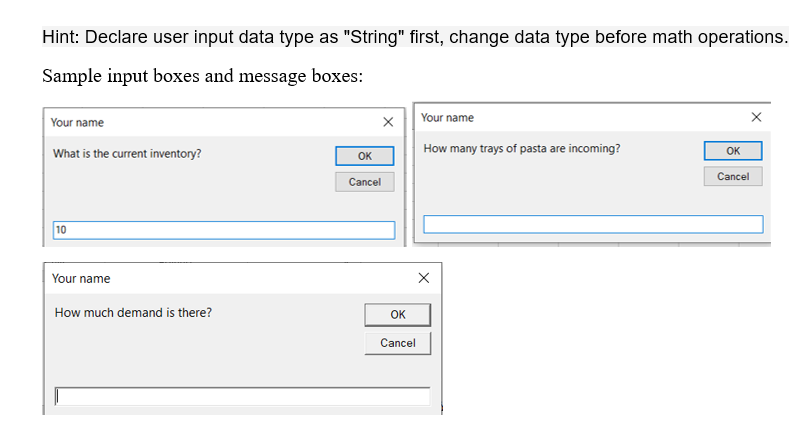
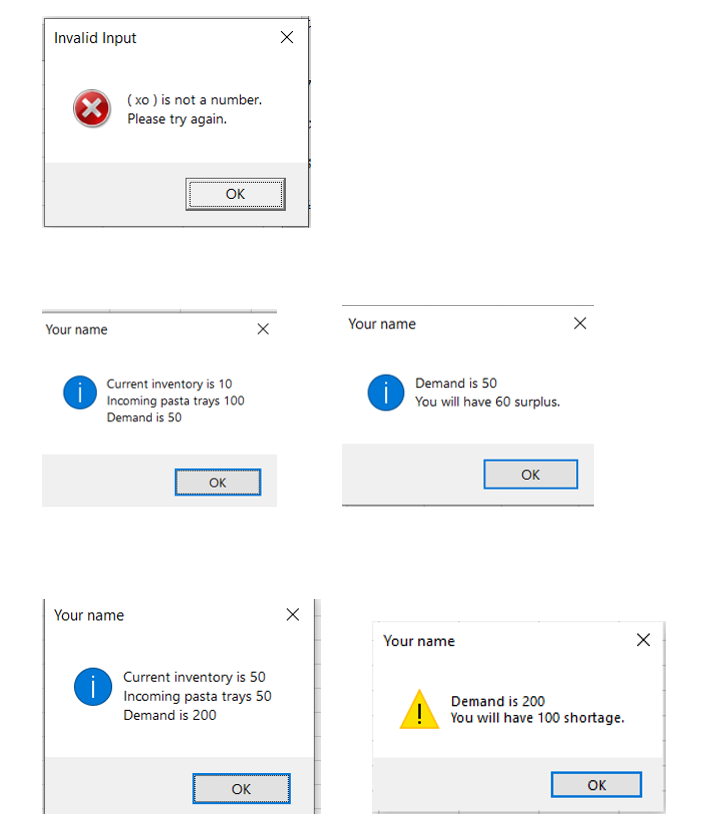
You are the owner of a local specialty store that sells trays of Lasagna. These trays are made by a Pasta Company and are sold frozen to your store. You need to know if your incomings trays of pasta will be able to keep up with demand for the month. Write a macro that performs following functions: Uses input boxes to gather current inventory, incoming pasta trays, and expected demand. Ensure that you validate your input to avoid errors. Set the default value for inventory to10. If input is invalid, let the user know and stop the program If all inputs are valid, use a message box to summarize the user inputs. Computes whether or not there is enough pasta trays and inventory to satisfy demand if input is valid. If input is invalid, let the user know and halt the program. Returns a message to the user indicating the demand and whether or not there is enough inventory, along with the surplus/shortage amount. Have the message returned also have an icon that depicts the nature of the message (ex: warning if shortage). Refer to the online documentation to find good icons. Use multiple lines to display separate items in the return message box. Ensure that each input box/ message box has your name as the title. Add a control button that displays Input and message box along with your name in the excel worksheet to run the macro: Input and message box: Name Hint: Declare user input data type as "String" first, change data type before math operations. Sample input boxes and message boxes: Your name Your name x What is the current inventory? How many trays of pasta are incoming? OK OK Cancel Cancel 10 Your name How much demand is there? OK Cancel Invalid Input (xo) is not a number. Please try again. OK Your name Your name Current inventory is 10 Incoming pasta trays 100 Demand is 50 Demand is 50 You will have 60 surplus. OK OK Your name Your name i Current inventory is 50 Incoming pasta trays 50 Demand is 200 Demand is 200 You will have 100 shortage. OK OK You are the owner of a local specialty store that sells trays of Lasagna. These trays are made by a Pasta Company and are sold frozen to your store. You need to know if your incomings trays of pasta will be able to keep up with demand for the month. Write a macro that performs following functions: Uses input boxes to gather current inventory, incoming pasta trays, and expected demand. Ensure that you validate your input to avoid errors. Set the default value for inventory to10. If input is invalid, let the user know and stop the program If all inputs are valid, use a message box to summarize the user inputs. Computes whether or not there is enough pasta trays and inventory to satisfy demand if input is valid. If input is invalid, let the user know and halt the program. Returns a message to the user indicating the demand and whether or not there is enough inventory, along with the surplus/shortage amount. Have the message returned also have an icon that depicts the nature of the message (ex: warning if shortage). Refer to the online documentation to find good icons. Use multiple lines to display separate items in the return message box. Ensure that each input box/ message box has your name as the title. Add a control button that displays Input and message box along with your name in the excel worksheet to run the macro: Input and message box: Name Hint: Declare user input data type as "String" first, change data type before math operations. Sample input boxes and message boxes: Your name Your name x What is the current inventory? How many trays of pasta are incoming? OK OK Cancel Cancel 10 Your name How much demand is there? OK Cancel Invalid Input (xo) is not a number. Please try again. OK Your name Your name Current inventory is 10 Incoming pasta trays 100 Demand is 50 Demand is 50 You will have 60 surplus. OK OK Your name Your name i Current inventory is 50 Incoming pasta trays 50 Demand is 200 Demand is 200 You will have 100 shortage. OK OK
Step by Step Solution
There are 3 Steps involved in it

Get step-by-step solutions from verified subject matter experts
 Study Help