







Question: Please do this in Javascript Please provide the code as well showing the result (with screenshots) 1. Create an input field (in App component) with
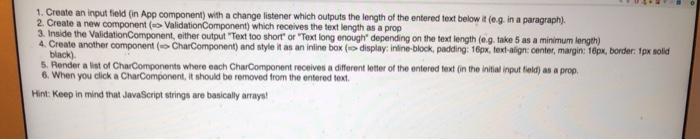
1. Create an input field (in App component) with a change listener which outputs the length of the entered text below it (0.9. in a paragraph). 2. Create a new component (ValidationComponent) which receives the text length as a prop 3. Inside the Validation Component, either output "Text too short or "Textlong enough depending on the text length (0.9. take 5 as a minimum length) 4. Create another component ( CharComponent) and style it as an inline box { display:inline-block, padding: 16px. text-align: center, margin: 16px, border: 1px solid black) 5. Render a list of CharComponents where each CharComponent receives a different letter of the entered text in the initial input feld) as a prop 6. When you click a CharComponent, it should be removed from the entered text Hint: Keep in mind that JavaScript strings are basically arraya
Step by Step Solution
There are 3 Steps involved in it

Get step-by-step solutions from verified subject matter experts
 Study Help