







Question: Please don't answer this question before you read all requirements. Question must be answered with consideration to use few main buttons as required also must
Please don't answer this question before you read all requirements.
Question must be answered with consideration to use few main buttons as required also must use padding , geometry, width, height and other properties please read all question requirements then answer.
following answer is not accepted it must be simpler than this and please solve the question only without additional code only simple functions and returns.
copy paste answer will be rated negatively need the correct and accurate answer so beginners can understand each step of the solution with description main goal is to answer question and all branches no need for additional code use simple functions only and simplest ideas the simple the solution is the better it is.
https://www.chegg.com/homework-help/questions-and-answerseed-simplest-possible-solution-question-answered-correctly-mistakes-required-following-im-q65998515
https://www.chegg.com/homework-help/questions-and-answers/question-1-write-separate-python-program-accomplish-question-save-program-filename-hw2qlpy-q65911566
answer should look simular to this but simpler
https://www.chegg.com/homework-help/questions-and-answers/please-want-clear-solution-put-every-full-tap-alone-please--answer-parts-please-q65933177
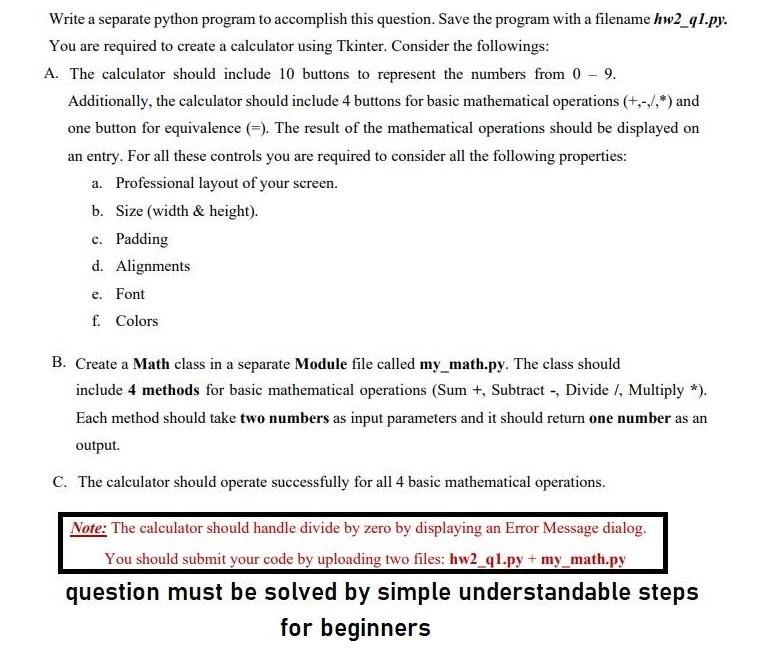
Write a separate python program to accomplish this question. Save the program with a filename hw2_91.py. You are required to create a calculator using Tkinter. Consider the followings: A. The calculator should include 10 buttons to represent the numbers from 0 - 9. Additionally, the calculator should include 4 buttons for basic mathematical operations (+,-/.*) and one button for equivalence (=). The result of the mathematical operations should be displayed on an entry. For all these controls you are required to consider all the following properties: a. Professional layout of your screen. b. Size (width & height). c. Padding d. Alignments e. Font f. Colors B. Create a Math class in a separate Module file called my_math.py. The class should include 4 methods for basic mathematical operations (Sum +, Subtract -, Divide I, Multiply *). Each method should take two numbers as input parameters and it should return one number as an output. C. The calculator should operate successfully for all 4 basic mathematical operations. Note: The calculator should handle divide by zero by displaying an Error Message dialog. You should submit your code by uploading two files: hw2_ql.py + my_math.py question must be solved by simple understandable steps for beginners Write a separate python program to accomplish this question. Save the program with a filename hw2_91.py. You are required to create a calculator using Tkinter. Consider the followings: A. The calculator should include 10 buttons to represent the numbers from 0 - 9. Additionally, the calculator should include 4 buttons for basic mathematical operations (+,-/.*) and one button for equivalence (=). The result of the mathematical operations should be displayed on an entry. For all these controls you are required to consider all the following properties: a. Professional layout of your screen. b. Size (width & height). c. Padding d. Alignments e. Font f. Colors B. Create a Math class in a separate Module file called my_math.py. The class should include 4 methods for basic mathematical operations (Sum +, Subtract -, Divide I, Multiply *). Each method should take two numbers as input parameters and it should return one number as an output. C. The calculator should operate successfully for all 4 basic mathematical operations. Note: The calculator should handle divide by zero by displaying an Error Message dialog. You should submit your code by uploading two files: hw2_ql.py + my_math.py question must be solved by simple understandable steps for beginners
Step by Step Solution
There are 3 Steps involved in it

Get step-by-step solutions from verified subject matter experts
 Study Help