







Question: Please don't do this on a drag-drop interface like Eclipse or similar etc. They have to be manually coded, please manually code it! Question 1:
Please don't do this on a drag-drop interface like Eclipse or similar etc. They have to be manually coded, please manually code it!
Question 1:
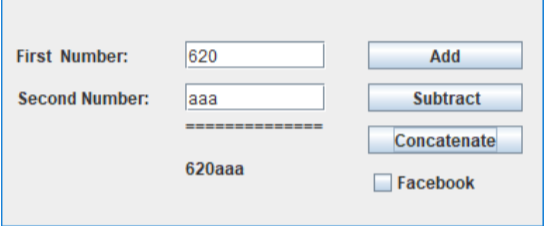
Write a simple swing form that has the following features and looks (more or less) like the following:
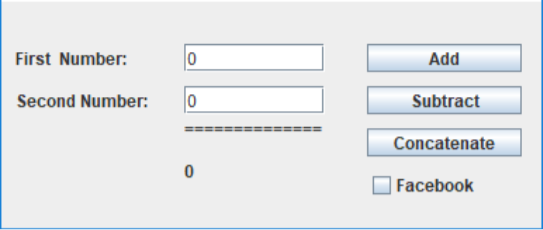
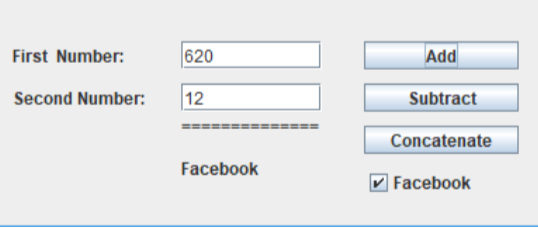
It has three buttons, each of which does one thing; Add, Subtract, Concatenate. It has 1 checkbox Facebook which modifies the add button so it displays Facebook, thus proving Facebook is more interesting than Math. (Joke)
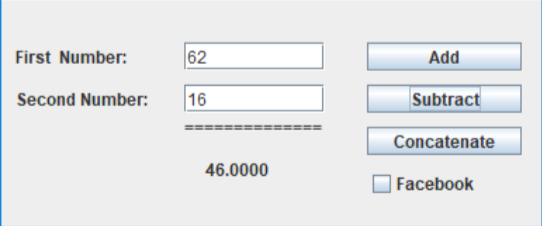
Here are examples of each function
Add
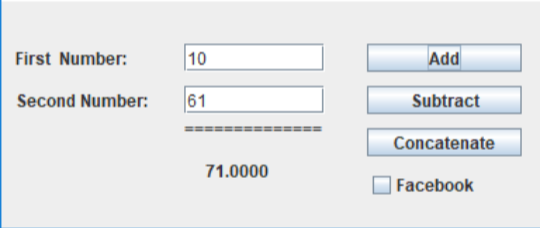
Subtract
Concatenate (example 1)
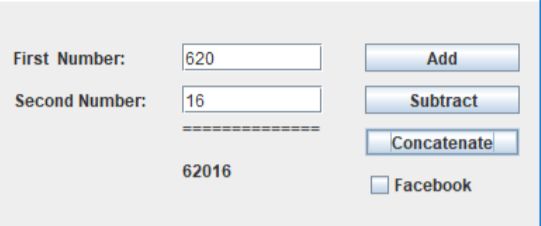
Concatenate (example 2)
Add with Facebook checked
// *******************************************************
getContentPane().setLayout(null);
setTitle("Homework Code");
// *******************************************************
String text = text1.getText();
try
{
val1 = Double.parseDouble(text);
}
catch (NumberFormatException e)
{
val1=0;
rc=false;
JOptionPane.showMessageDialog(null, "Enter a valid double precision number please",
">",
JOptionPane.ERROR_MESSAGE);
}
// *******************************************************
public class bAddAction implements ActionListener
{
public void actionPerformed (ActionEvent event)
{
///// -----------------
////// Lines deleted here that parsed the JTextFields into val1 and val2
///// -----------------
if (rc)
{displayText4.setText(String.format("%12.4f",(val1 + val2)));}
else
{displayText4.setText("0");}
}
}
// *******************************************************
int posX =260;
JButton buttonAdd = new JButton("Add");
buttonAdd.setLocation(posX,30);
buttonAdd.setSize(110,20);
buttonAdd.addActionListener(new bAddAction());
getContentPane().add(buttonAdd);
// *******************************************************
First Number: Add Subtract Concatenate Second Number: 0 Facebook
Step by Step Solution
There are 3 Steps involved in it

Get step-by-step solutions from verified subject matter experts
 Study Help