







Question: Please Draw a flowchart using microsoft visio basic flowchart diagram. Challenge: The Monthly Sales Tax A retail company must file a monthly sales tax report
Please Draw a flowchart using microsoft visio basic flowchart diagram.
Challenge: The Monthly Sales Tax
A retail company must file a monthly sales tax report listing the total sales for the month, and the amount of state and county sales tax collected. The state sales tax rate is 4 percent and the county sales tax is 2 percent. Create a GUI application that allows the user to enter the total sales for the month into a text field. From this figure, the application should calculate and display the following:
The amount of county sales tax
The amount of state sales tax
The total sales tax (County plus state)
In the applications code, represent the county tax rate (0.02) and the state tax rate (0.04) as named constants.
This is my code:
import java.awt.event.ActionEvent; import java.awt.event.ActionListener;
import javax.swing.JButton; import javax.swing.JFrame; import javax.swing.JLabel; import javax.swing.JOptionPane; import javax.swing.JPanel; import javax.swing.JTextField;
public class MonthlySalesTax extends JFrame {
/** * */ private static final long serialVersionUID = -5036912026821991615L;
// declaration private JPanel panel; private JLabel messageLabel; private JTextField salesTextField; private JButton calcButton;
// constants final double COUNTY_TAX_RATE = 0.02; final double STATE_TAX_RATE = 0.04;
/** * */ public MonthlySalesTax() { // TODO Auto-generated constructor stub setTitle("Monthly Sales Tax Calculation"); setDefaultCloseOperation(JFrame.EXIT_ON_CLOSE); messageLabel = new JLabel("Enter the month's sales");
salesTextField = new JTextField(10);
calcButton = new JButton("Calculate");
calcButton.addActionListener(new CaliculateMonthlyTaxListener());
panel = new JPanel();
panel.add(messageLabel); panel.add(salesTextField); panel.add(calcButton);
add(panel); pack(); setVisible(true);
}
/** * for button listener * * @author * */ private class CaliculateMonthlyTaxListener implements ActionListener {
/* * (non-Javadoc) * * @see * java.awt.event.ActionListener#actionPerformed(java.awt.event.ActionEvent * ) */ public void actionPerformed(ActionEvent e) { String input; double countyTax, stateTax, totalTax;
input = salesTextField.getText();
countyTax = Double.parseDouble(input) * COUNTY_TAX_RATE; stateTax = Double.parseDouble(input) * STATE_TAX_RATE; totalTax = countyTax + stateTax;
JOptionPane.showMessageDialog(null, "County sales tax: " + countyTax + " State sales tax: " + stateTax + " Total sales tax: " + totalTax);
}
}
public static void main(String[] args) { new MonthlySalesTax(); } }
OUTPUT:
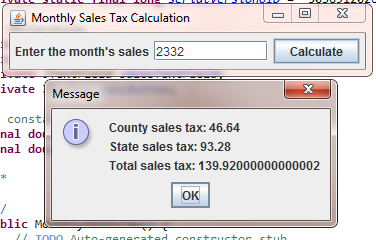
Monthly Sales Tax Calculation Enter the month's sales 2332 Calculate ivate Message const County sales tax: 46.64 nal do State sales tax: 93.28 nal do Total sales tax: 139.92000000000002 OK blic
Step by Step Solution
There are 3 Steps involved in it

Get step-by-step solutions from verified subject matter experts
 Study Help