







Question: Please enter a phrase: this is a test Please enter a character to search for: e The length of your String is 14. The character
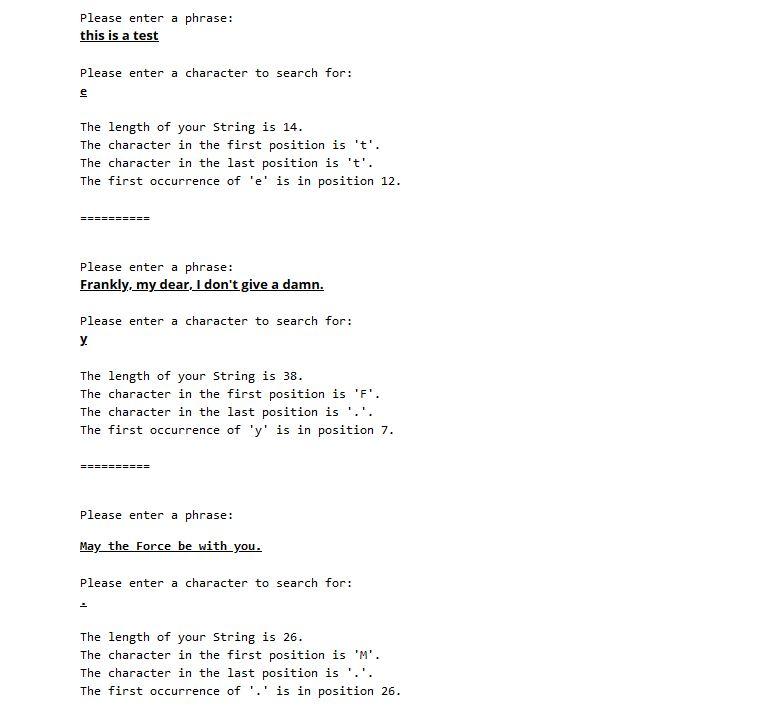
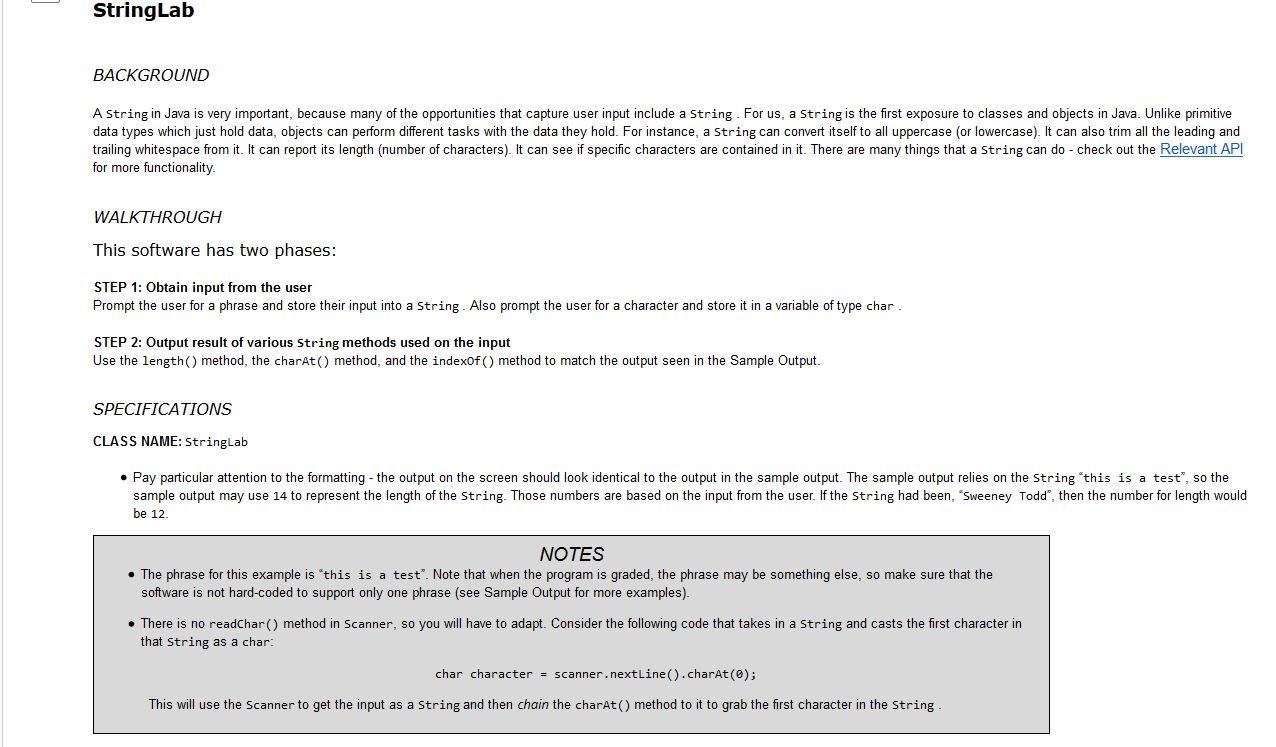
Please enter a phrase: this is a test Please enter a character to search for: e The length of your String is 14. The character in the first position is 't'. The character in the last position is 't'. The first occurrence of 'e' is in position 12. ========== Please enter a phrase: Frankly, my dear, I don't give a damn. Please enter a character to search for: y. The length of your String is 38. The character in the first position is 'F'. The character in the last position is '.'. The first occurrence of 'y' is in position 7. ====== Please enter a phrase: May the Force be with you. Please enter a character to search for: The length of your String is 26. The character in the first position is 'M'. The character in the last position is '.'. The first occurrence of '.' is in position 26. StringLab BACKGROUND A String in Java is very important, because many of the opportunities that capture user input include a string. For us, a String is the first exposure to classes and objects in Java. Unlike primitive data types which just hold data, objects can perform different tasks with the data they hold. For instance, a String can convert itself to all uppercase (or lowercase). It can also trim all the leading and trailing whitespace from it. It can report its length (number of characters). It can see if specific characters are contained in it. There are many things that a string can do - check out the Relevant API for more functionality WALKTHROUGH This software has two phases: STEP 1: Obtain input from the user Prompt the user for a phrase and store their input into a string. Also prompt the user for a character and store it in a variable of type char. STEP 2: Output result of various String methods used on the input Use the length() method, the charAt() method, and the indexOf() method to match the output seen in the Sample Output. SPECIFICATIONS CLASS NAME: StringLab Pay particular attention to the formatting - the output on the screen should look identical to the output in the sample output. The sample output relies on the String this is a test", so the sample output may use 14 to represent the length of the String. Those numbers are based on the input from the user. If the String had been, "Sweeney Todd", then the number for length would be 12 NOTES The phrase for this example is this is a test. Note that when the program is graded, the phrase may be something else, so make sure that the software is not hard-coded to support only one phrase (see Sample Output for more examples). There is no readChar() method in Scanner, so you will have to adapt. Consider the following code that takes in a string and casts the first character in that String as a char: char character = scanner.nextLine().charAt(0); This will use the Scanner to get the input as a String and then chain the charAt() method to it to grab the first character in the String
Step by Step Solution
There are 3 Steps involved in it

Get step-by-step solutions from verified subject matter experts
 Study Help