







Question: Please explain and write readable When sorting through the payroll documents that Mr. Castle gave you, you find the following unentered timesheets for Dan Miller
 Please explain and write readable
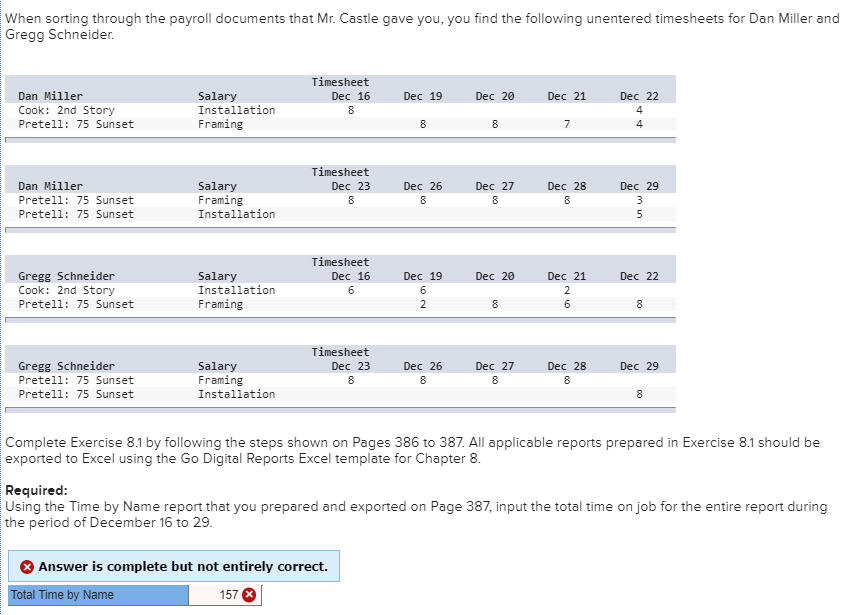
When sorting through the payroll documents that Mr. Castle gave you, you find the following unentered timesheets for Dan Miller and Gregg Schneider. Timesheet Dec 16 Dec 19 Dec 20 Dec 21 Dec 22 Dan Miller Cook: 2nd Story Pretell: 75 Sunset Salary Installation Framing et Timesheet Dec 23 Dan Miller Pretell: 75 Sunset Pretell: 75 Sunset Salary Framing Installation Dec 26 8 Dec 27 8 7 be a bea Dec 28 8 Dec 29 3 Timesheet Dec 16 Dec 19 Dec 20 Dec 21 Dec 22 Gregg Schneider Cook: 2nd Story Pretell: 75 Sunset Salary Installation Framing Gregg Schneider Pretell: 75 Sunset Pretell: 75 Sunset Dec 29 Salary Framing Installation Timesheet Dec 23 Dec 26 Dec 27 Dec 28 8 888 Complete Exercise 8.1 by following the steps shown on Pages 386 to 387. All applicable reports prepared in Exercise 8.1 should be exported to Excel using the Go Digital Reports Excel template for Chapter 8. Required: Using the Time by Name report that you prepared and exported on Page 387, input the total time on job for the entire report during the period of December 16 to 29. > Answer is complete but not entirely correct. Total Time by Name 157 When sorting through the payroll documents that Mr. Castle gave you, you find the following unentered timesheets for Dan Miller and Gregg Schneider. Timesheet Dec 16 Dec 19 Dec 20 Dec 21 Dec 22 Dan Miller Cook: 2nd Story Pretell: 75 Sunset Salary Installation Framing et Timesheet Dec 23 Dan Miller Pretell: 75 Sunset Pretell: 75 Sunset Salary Framing Installation Dec 26 8 Dec 27 8 7 be a bea Dec 28 8 Dec 29 3 Timesheet Dec 16 Dec 19 Dec 20 Dec 21 Dec 22 Gregg Schneider Cook: 2nd Story Pretell: 75 Sunset Salary Installation Framing Gregg Schneider Pretell: 75 Sunset Pretell: 75 Sunset Dec 29 Salary Framing Installation Timesheet Dec 23 Dec 26 Dec 27 Dec 28 8 888 Complete Exercise 8.1 by following the steps shown on Pages 386 to 387. All applicable reports prepared in Exercise 8.1 should be exported to Excel using the Go Digital Reports Excel template for Chapter 8. Required: Using the Time by Name report that you prepared and exported on Page 387, input the total time on job for the entire report during the period of December 16 to 29. > Answer is complete but not entirely correct. Total Time by Name 157
Step by Step Solution
There are 3 Steps involved in it

Get step-by-step solutions from verified subject matter experts
 Study Help