







Question: please explain how I correctly do this in excel. i cant get it to equal the number its supposed to. given info below this is
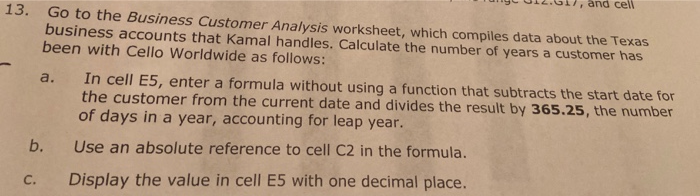
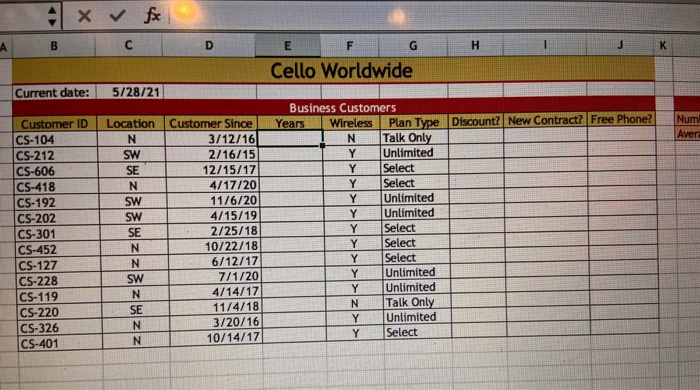
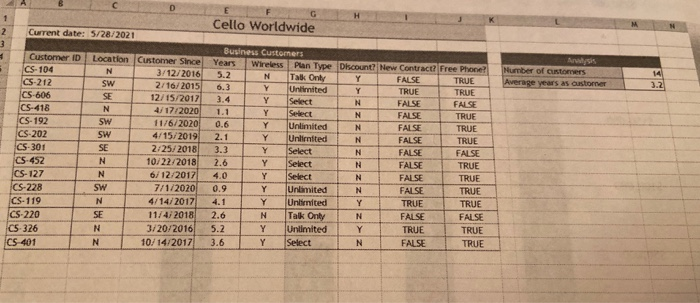
13. Go to the Business Customer Analysis worksheet, which compiles data about the Texas business accounts that Kamal handles. Calculate the number of years a customer has been with Cello Worldwide as follows: a. In cell E5, enter a formula without using a function that subtracts the start date for the customer from the current date and divides the result by 365.25, the number of days in a year, accounting for leap year. Use an absolute reference to cell C2 in the formula. Display the value in cell E5 with one decimal place. b. c. x fc B C D E FGHIJK Cello Worldwide Current date: 5/28/21 Location Customer Since Years Num N 3/12/16 SW Wireless N Y Y Customer ID CS-104 CS-212 CS-606 CS-418 CS-192 CS-202 CS-301 CS-452 CS-127 CS-228 CS-119 CS-220 CS-326 CS-401 Z Z33 Z 2/16/15 12/15/17 4/17/20 11/6/201 4/15/19 2/25/18 10/22/18 6/12/17 7/1/20 4/14/17 11/4/18 3/20/16 10/14/17 Plan Type Discount? New Contract? Free Phone Talk Only Unlimited Select Select Unlimited Unlimited Select 1 Select Select Unlimited Unlimited Talk Only Unlimited Select Y Y Y SW N SE N N Cello Worldwide Current date: 5/28/2021 Location N SW AS Number of customers Average years as customer TRUE TRUE Customer ID CS-104 CS-212 CS-606 CS-418 CS-192 CS-202 CS-301 CS-452 CS-127 CS-228 CS-119 CS-220 CS-326 CS 401 zzzz Customer Since 3/12/2016 2/16/2015 12/15/2017 4/17/2020 11/6/2020 4/15/2019 2/25/2018 10/22/2018 6/12/2017 7/1/2020 4/14/2017 11/4/2018 3/20/2016 10/14/2017 Business Customers Years Wireless Plan Type Discount? New Contract Free Phone? 5.2 N Tak Only FALSE TRUE 6.3 Y Unlimited TRUE 3.4 Y Select FALSE FALSE 1.1 T Select FALSE 0.6 Unlimited FALSE TRUE 2.1 Unlimited FALSE 3.3 Select FALSE FALSE 2.6 Select FALSE TRUE 4.0 Y Select FALSE TRUE 0.9 Unlimited FALSE TRUE 4.1 Unnited TRUE TRUE 2.6 Talk Only FALSE Unlimited TRUE TRUE 3.6 Select FALSE FALSE 5.2 TRUE
Step by Step Solution
There are 3 Steps involved in it

Get step-by-step solutions from verified subject matter experts
 Study Help