







Question: Please explain how to do these step by step! Thank you USE THE Vlookup WORKSHEET TO ANSWER THE QUESTIONS IN THIS SECTION. *** NOTE: The
Please explain how to do these step by step!
Thank you
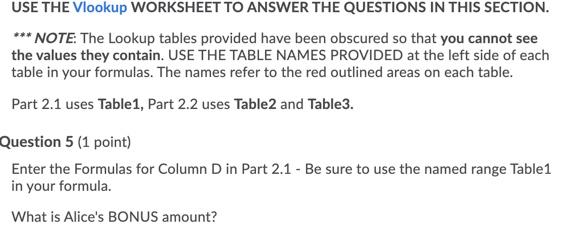
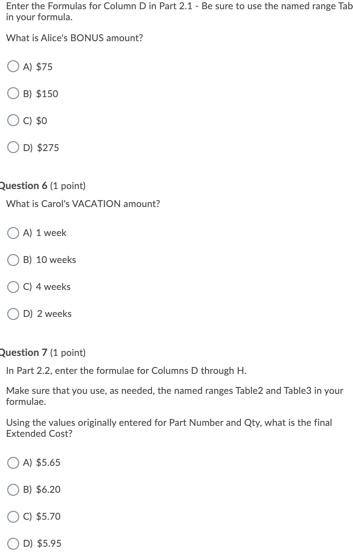
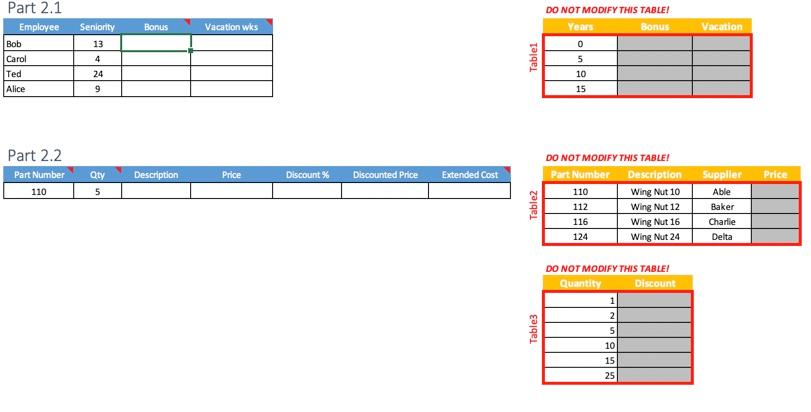
USE THE Vlookup WORKSHEET TO ANSWER THE QUESTIONS IN THIS SECTION. *** NOTE: The Lookup tables provided have been obscured so that you cannot see the values they contain. USE THE TABLE NAMES PROVIDED at the left side of each table in your formulas. The names refer to the red outlined areas on each table. Part 2.1 uses Table1, Part 2.2 uses Table and Table3. Question 5 (1 point) Enter the Formulas for Column D in Part 2.1 - Be sure to use the named range Table1 in your formula What is Alice's BONUS amount? Enter the Formulas for Column D in Part 2.1 - Be sure to use the named range Tab in your formula What is Alice's BONUS amount? A) $75 B) $150 C) $0 D) $275 Question 6 (1 point) What is Carol's VACATION amount? A) 1 week B) 10 weeks C) 4 weeks D) 2 weeks Question 7 (1 point) In Part 2.2, enter the formulae for Columns D through H. Make sure that you use, as needed, the named ranges Table and Table3 in your formulae. Using the values originally entered for Part Number and Qty. what is the final Extended Cost? A) $5.65 B) $6.20 C) $5.70 D) $5.95 Bonus Vacation wks Vacation Seniority 13 Part 2.1 Employee Bob Carol Ted Alice DO NOT MODIFY THIS TABLE! Years Bonus 0 5 10 15 4 Tablet 24 9 Part 2.2 Part Number 110 Description Price Discount% Discounted Price Qty 5 Extended Cost Price Table2 DO NOT MODIFY THIS TABLE! Part Number Description 110 Wing Nut 10 112 Wing Nut 12 116 Wing Nut 16 124 Wing Nut 24 Supplier Able Baker Charlie Delta DO NOT MODIFY THIS TABLE! Quantity Discount 1 2. Table3 5 10 15 25 USE THE Vlookup WORKSHEET TO ANSWER THE QUESTIONS IN THIS SECTION. *** NOTE: The Lookup tables provided have been obscured so that you cannot see the values they contain. USE THE TABLE NAMES PROVIDED at the left side of each table in your formulas. The names refer to the red outlined areas on each table. Part 2.1 uses Table1, Part 2.2 uses Table and Table3. Question 5 (1 point) Enter the Formulas for Column D in Part 2.1 - Be sure to use the named range Table1 in your formula What is Alice's BONUS amount? Enter the Formulas for Column D in Part 2.1 - Be sure to use the named range Tab in your formula What is Alice's BONUS amount? A) $75 B) $150 C) $0 D) $275 Question 6 (1 point) What is Carol's VACATION amount? A) 1 week B) 10 weeks C) 4 weeks D) 2 weeks Question 7 (1 point) In Part 2.2, enter the formulae for Columns D through H. Make sure that you use, as needed, the named ranges Table and Table3 in your formulae. Using the values originally entered for Part Number and Qty. what is the final Extended Cost? A) $5.65 B) $6.20 C) $5.70 D) $5.95 Bonus Vacation wks Vacation Seniority 13 Part 2.1 Employee Bob Carol Ted Alice DO NOT MODIFY THIS TABLE! Years Bonus 0 5 10 15 4 Tablet 24 9 Part 2.2 Part Number 110 Description Price Discount% Discounted Price Qty 5 Extended Cost Price Table2 DO NOT MODIFY THIS TABLE! Part Number Description 110 Wing Nut 10 112 Wing Nut 12 116 Wing Nut 16 124 Wing Nut 24 Supplier Able Baker Charlie Delta DO NOT MODIFY THIS TABLE! Quantity Discount 1 2. Table3 5 10 15 25Step by Step Solution
There are 3 Steps involved in it
1 Expert Approved Answer
Step: 1 Unlock

Question Has Been Solved by an Expert!
Get step-by-step solutions from verified subject matter experts
Step: 2 Unlock
Step: 3 Unlock
 Study Help