







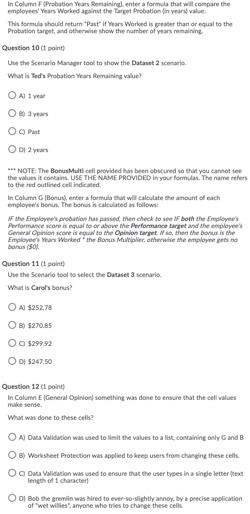
Question: Please Explain how to do these! Thank you In Column Probation Years Remaining enter a formula that will compare the employees' Years Worked against the
Please Explain how to do these!
Thank you
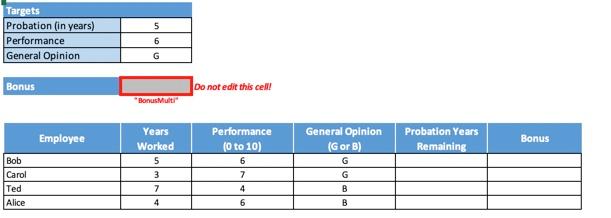
In Column Probation Years Remaining enter a formula that will compare the employees' Years Worked against the Target Probation in year vale This formula should retum Pastif Years Worked is greater than or equal to the Probation target and otherwise show the number of years remaining, Question 10 ct point Use the Scenario Mager tool to show the Datant 2 cari What Sed Probation Year Remaining value O Aty 3 years 2 years *** NOTE: The Bonudult call provided has been obscured to that you cannot see the values it contam. USE THE NAME PROVIDED in your forma. The name refers to the red outlined call indicated in Calume Bonu, enter a formula that will calculate the amount of each employee's bonus. The bonus in calculated follow If the Employee's probation has passed the check to see if both the Employees Performance score is equal to or above the performance target and the employees Geral Opinion score to the opinion target is, then the bowl is the Employee Years Werke the Bonus Malleotherwise the employed bu so Question 11 tpoint Use the Scenario tool to select the Dataset 3 scenario What is Carlos A $252.78 O 89 $270.85 O$299.92 OD 5247.50 Question 12 In Column General Opinion something was done to ensure that the cell values make sense What was done to these cells O A Dua Validation was used to limit the values to a list containing only and B 8) Worksheet Protection was applied to keep users from changing these cells. O Data Validation was used to ensure that the user types in a single letter free length of 1 character O Bob the green was hired to ever so slightly annoy, by precise application of wet willes, anyone who tries to change these cells Targets Probation (in years) Performance General Opinion 5 6 G Bonus Do not edit this celll BonusMult" Employee General Opinion (Gor) Performance (0 to 10) 6 7 Probation Years Remaining Bonus Years Worked 5 3 7 4 Bob Carol Ted Alice G 4 B 6 B In Column Probation Years Remaining enter a formula that will compare the employees' Years Worked against the Target Probation in year vale This formula should retum Pastif Years Worked is greater than or equal to the Probation target and otherwise show the number of years remaining, Question 10 ct point Use the Scenario Mager tool to show the Datant 2 cari What Sed Probation Year Remaining value O Aty 3 years 2 years *** NOTE: The Bonudult call provided has been obscured to that you cannot see the values it contam. USE THE NAME PROVIDED in your forma. The name refers to the red outlined call indicated in Calume Bonu, enter a formula that will calculate the amount of each employee's bonus. The bonus in calculated follow If the Employee's probation has passed the check to see if both the Employees Performance score is equal to or above the performance target and the employees Geral Opinion score to the opinion target is, then the bowl is the Employee Years Werke the Bonus Malleotherwise the employed bu so Question 11 tpoint Use the Scenario tool to select the Dataset 3 scenario What is Carlos A $252.78 O 89 $270.85 O$299.92 OD 5247.50 Question 12 In Column General Opinion something was done to ensure that the cell values make sense What was done to these cells O A Dua Validation was used to limit the values to a list containing only and B 8) Worksheet Protection was applied to keep users from changing these cells. O Data Validation was used to ensure that the user types in a single letter free length of 1 character O Bob the green was hired to ever so slightly annoy, by precise application of wet willes, anyone who tries to change these cells Targets Probation (in years) Performance General Opinion 5 6 G Bonus Do not edit this celll BonusMult" Employee General Opinion (Gor) Performance (0 to 10) 6 7 Probation Years Remaining Bonus Years Worked 5 3 7 4 Bob Carol Ted Alice G 4 B 6 BStep by Step Solution
There are 3 Steps involved in it
1 Expert Approved Answer
Step: 1 Unlock

Question Has Been Solved by an Expert!
Get step-by-step solutions from verified subject matter experts
Step: 2 Unlock
Step: 3 Unlock
 Study Help