







Question: Please Explain, Thanks USE THIS TEMPLATE Dog Weight . Java // You must use this package package wt; public class DogWeight extends Weight { private
Please Explain, Thanks
USE THIS TEMPLATE Dog Weight . Java
// You must use this package package wt;
public class DogWeight extends Weight { private final int MAXP = 350; private final int MINP = 1; private final double MAXK = 158.757; private final double MINK = 0.453592;
private static int numDogs = 0; public static int getNumDogs() { // Replace this when you write the method return 0; } // The default constructor public DogWeight() { } // The parameterized constructor public DogWeight(double initW, char initS) { } public String toString() { // Replace this when you write the method return ""; } public boolean equals(DogWeight other) { // Replace this when you write the method return false; } }
DO NOT CHANGE THIS TEMPLATE Wieght. Java
// You must use this package // Do not change it package wt;
// Do not change this class
import java.util.Scanner;
public class Weight { protected double wValue; protected char scale; private final double FACTOR = 2.2046; private final double MINW = 10.0; private Scanner vScan = new Scanner(System.in);
// The default constructor for the class public Weight() { wValue = MINW; scale = 'p'; }
// The parameterized constructor for the class public Weight(double initW, char initS) { if (initS != 'p' && initS != 'P' && initS != 'k' && initS != 'K') scale = 'p'; else scale = initS; if (initW >= MINW) wValue = initW; else wValue = MINW; }
// Input values for the instance variables using the Scanner vScan public void set() { String iText; boolean done = false;
while (!done) { System.out.print("Please enter the weight scale (p/k): "); iText = vScan.next(); scale = iText.charAt(0); if (scale != 'p' && scale != 'P' && scale != 'k' && scale != 'K') System.out.println("Pounds and kilos are the only valid scales"); else done = true; } done = false; while (!done) { System.out.print("Please enter a weight measurement: "); wValue = vScan.nextDouble(); if (wValue
// Return the weight in pounds public double getP() { double value;
if (scale == 'p' || scale == 'P') value = wValue; else value = wValue * FACTOR; return value; }
// Return the weight in kilos public double getK() { double value;
if (scale == 'k' || scale == 'K') value = wValue; else value = wValue / FACTOR; return value; }
}
TEST Weight. Java
package hw6;
import wt.DogWeight;
// Feel free to change this test program when developing the DogWeight subclass // You will not hand in this file
public class TestWeight {
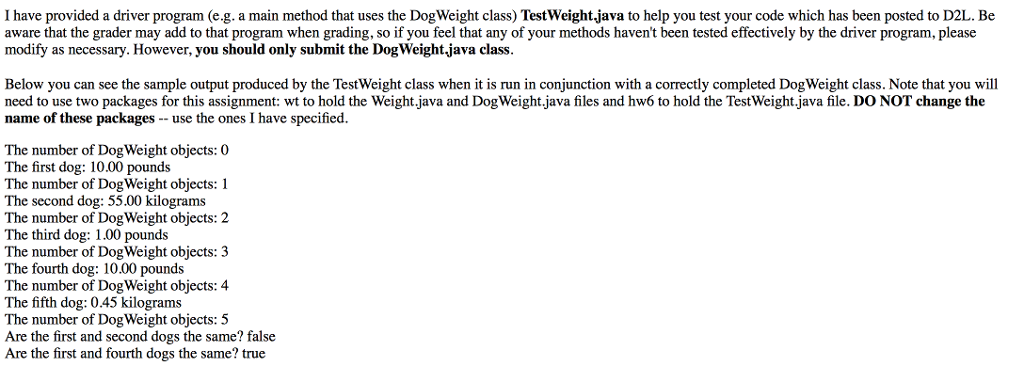
public static void main(String[] args) { System.out.println("The number of DogWeight objects: " + DogWeight.getNumDogs()); DogWeight w1 = new DogWeight(); System.out.println("The first dog: " + w1); System.out.println("The number of DogWeight objects: " + DogWeight.getNumDogs()); DogWeight w2 = new DogWeight(55, 'k'); System.out.println("The second dog: " + w2); System.out.println("The number of DogWeight objects: " + DogWeight.getNumDogs()); DogWeight w3 = new DogWeight(0, '%'); System.out.println("The third dog: " + w3); System.out.println("The number of DogWeight objects: " + DogWeight.getNumDogs()); DogWeight w4 = new DogWeight(10, 'p'); System.out.println("The fourth dog: " + w4); System.out.println("The number of DogWeight objects: " + DogWeight.getNumDogs()); DogWeight w5 = new DogWeight(-3, 'k'); System.out.println("The fifth dog: " + w5); System.out.println("The number of DogWeight objects: " + DogWeight.getNumDogs()); System.out.println("Are the first and second dogs the same? " + w1.equals(w2)); System.out.println("Are the first and fourth dogs the same? " + w1.equals(w4)); } }
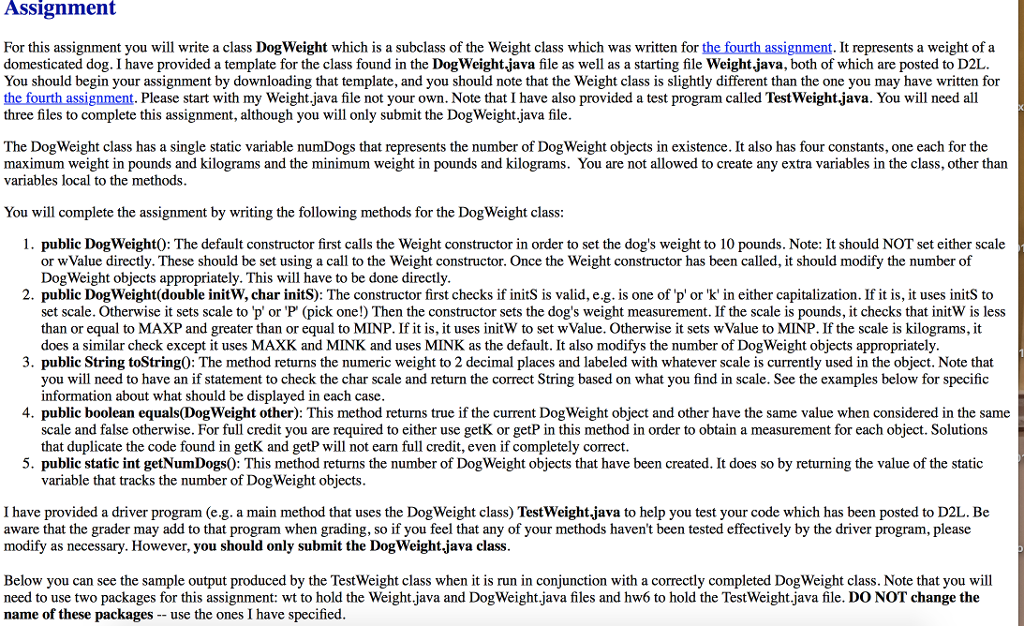
Assignment For this assignment you will write a class DogWeight which is a subclass of the Weight class which was written for the fourth assignment. It represents a weight of a domesticated dog. I have provided a template for the class found in the DogWeight.java file as well as a starting file Weightjava, both of which are posted to D2L. You should begin your assignment by downloading that template, and you should note that the Weight class is slightly different than the one you may have written for the fourth assignment. Please start with my Weight.java file not your own. Note that I have also provided a test program called TestWeight.java. You will need all three files to complete this assignment, although you will only submit the DogWeight.java file The DogWeight class has a single static variable numDogs that represents the number of DogWeight objects in existence. It also has four constants, one each for the maximum weight in pounds and kilograms and the minimum weight in pounds and kilograms. You are not allowed to create any extra variables in the class, other than variables local to the methods You will complete the assignment by writing the following methods for the DogWeight class 1. public DogWeight0: The default constructor first calls the Weight constructor in order to set the dog's weight to 10 pounds. Note: It should NOT set either scale or wValue directly. These should be set using a call to the Weight constructor. Once the Weight constructor has been called, it should modify the number of DogWeight objects appropriately. This will have to be done directly 2. public DogWeight(double initW, char initS): The constructor first checks if initS is valid, e.g. is one of p'or 'k' in either capitalization. If it is, it uses initS to set scale. Otherwise it sets scale to 'p' or 'P (pick one!) Then the constructor sets the dog's weight measurement. If the scale is pounds, it checks that initW is less than or equal to MAXP and greater than or equal to MINP. If it is, it uses initW to set wValue. Otherwise it sets wValue to MINP. If the scale is kilograms, it does a similar check except it uses MAXK and MINK and uses MINK as the default. It also modifys the number of DogWeight objects appropriately 3. public String toString0: The method returns the numeric weight to 2 decimal places and labeled with whatever scale is currently used in the object. Note that you will need to have an if statement to check the char scale and return the correct String based on what you find in scale. See the examples below for specific information about what should be displayed in each case 4. public boolean equals(DogWeight other): This method returns true if the current Dog Weight object and other have the same value when considered in the same scale and false otherwise. For full credit you are required to either use getK or getP in this method in order to obtain a measurement for each object. Solutions that duplicate the code found in getK and getP will not earn full credit, even if completely correct. 5. public static int getNumDogs0: This method returns the number of DogWeight objects that have been created. It does so by returning the value of the static variable that tracks the number of DogWeight objects I have provided a driver program (e.g. a main method that uses the DogWeight class) TestWeight.java to help you test your code which has been posted to D2L. Be aware that the grader may add to that program when grading, so if you feel that any of you modify as necessary. However, you should only submit the DogWeight.java class r methods haven't been tested effectively by the driver program, please Below you can see the sample output produced by the TestWeight class when it is run in conjunction with a correctly completed DogWeight class. Note that you wil need to use two packages for this assignment: wt to hold the Weight.java and DogWeight.java files and hw6 to hold the TestWeight.java file. DO NOT change the name of these packages-- use the ones I have specified
Step by Step Solution
There are 3 Steps involved in it

Get step-by-step solutions from verified subject matter experts
 Study Help