







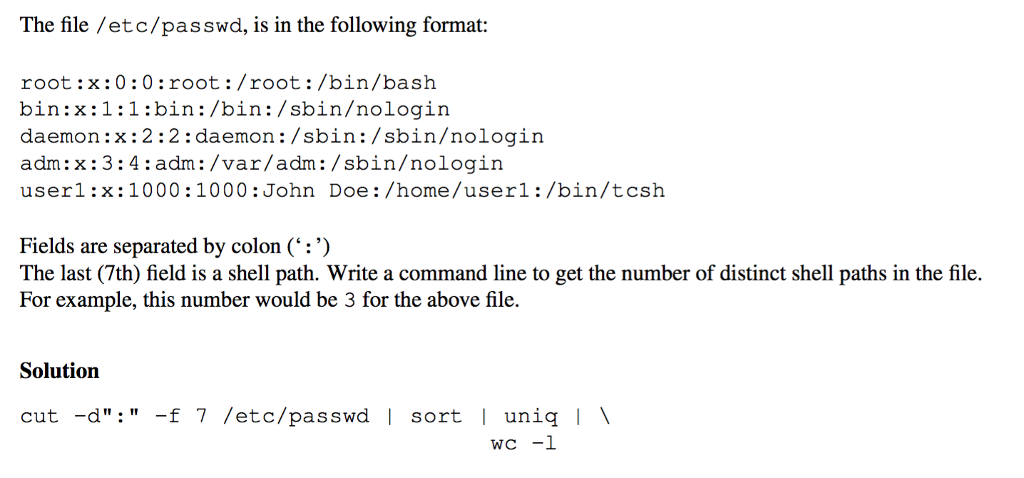
Question: Please explain the solution step by step in detail. Thank you! The file /etc/passwd, is in the following format root: x:0:0:root:/root:/bin/bash bin:x:1:1:bin:/bin:/sbinologin daemon:x:2:2:daemon: /sbin:/sbinologin adm:
Please explain the solution step by step in detail. Thank you!
The file /etc/passwd, is in the following format root: x:0:0:root:/root:/bin/bash bin:x:1:1:bin:/bin:/sbinologin daemon:x:2:2:daemon: /sbin:/sbinologin adm: x:3:4:adm:/var/adm:/sbinologin userl:x:1000:1000:John Doe:/home/userl:/bin/tcsh Fields are separated by colon (' : ') The last (7th) field is a shell path. Write a command line to get the number of distinct shell paths in the file. For example, this number would be 3 for the above file. Solution cut -d":"f 7 /etc/passwd | sort uniq The file /etc/passwd, is in the following format root: x:0:0:root:/root:/bin/bash bin:x:1:1:bin:/bin:/sbinologin daemon:x:2:2:daemon: /sbin:/sbinologin adm: x:3:4:adm:/var/adm:/sbinologin userl:x:1000:1000:John Doe:/home/userl:/bin/tcsh Fields are separated by colon (' : ') The last (7th) field is a shell path. Write a command line to get the number of distinct shell paths in the file. For example, this number would be 3 for the above file. Solution cut -d":"f 7 /etc/passwd | sort uni
Step by Step Solution
There are 3 Steps involved in it

Get step-by-step solutions from verified subject matter experts
 Study Help