







Question: Please feel free to consider this as multiple questions from my monthly allowable question posts!! Name Miles Traveled Average MPG Average Price/Gallon Total Expense (S)
Please feel free to consider this as multiple questions from my monthly allowable question posts!!
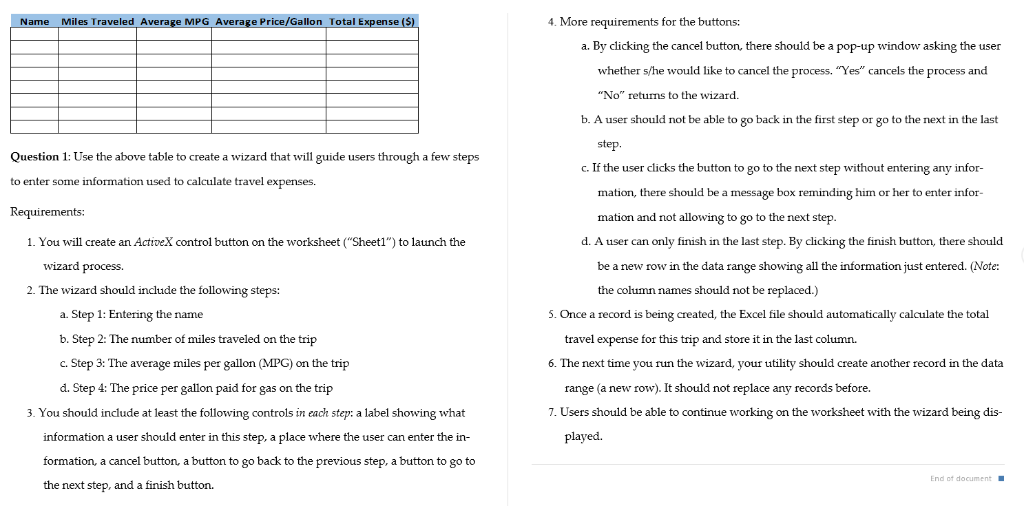
Name Miles Traveled Average MPG Average Price/Gallon Total Expense (S) 4. M ore requirements for the buttons: a. By clicking the cancel button, there should be a pop-up window asking the user whether s/he would like to cancel the process. "Yes" cancels the process and "No" returns to the wizard. b. A user should not be able to go back in the first step or go to the next in the last step. Question 1: Use the above table to create a wizard that will guide users through a few steps to enter some information used to calculate travel expenses. Requirements: c. If the user clicks the button to go to the next step without entering any infor- mation, there should be a message box reminding him or her to enter infor- mation and not allowing to go to the next step 1. You will create an ActiveX control button on the worksheet ("Sheet1") to launch the d. A user can only finish in the last step. By clicking the finish button, there should be a new row in the data range showing all the information just entered. (Note: wizard process. 2. The wizard should include the following steps: the column names should not be replaced.) a. Step 1: Entering the name b. Step 2: The number of miles traveled on the trip c. Step 3: The average miles per gallon (MPG) on the trijp d. Step 4: The price per gallon paid for gas on the trip . Once a record is being created, the Excel file should automatically calculate the total travel expense for this trip and store it in the last column 6. The next time you run the wizard, your utility should create another record in the data range (a new row). It should not replace any records before. 7. Users should be able to continue working on the worksheet with the wizard being dis- 3. You should include at least the following controls in each step: a label showing what information a user should enter in this step, a place where the user can enter the in- formation, a cancel button, a button to go back to the previous step, a button to go to the next played. step, and a finish button. Name Miles Traveled Average MPG Average Price/Gallon Total Expense (S) 4. M ore requirements for the buttons: a. By clicking the cancel button, there should be a pop-up window asking the user whether s/he would like to cancel the process. "Yes" cancels the process and "No" returns to the wizard. b. A user should not be able to go back in the first step or go to the next in the last step. Question 1: Use the above table to create a wizard that will guide users through a few steps to enter some information used to calculate travel expenses. Requirements: c. If the user clicks the button to go to the next step without entering any infor- mation, there should be a message box reminding him or her to enter infor- mation and not allowing to go to the next step 1. You will create an ActiveX control button on the worksheet ("Sheet1") to launch the d. A user can only finish in the last step. By clicking the finish button, there should be a new row in the data range showing all the information just entered. (Note: wizard process. 2. The wizard should include the following steps: the column names should not be replaced.) a. Step 1: Entering the name b. Step 2: The number of miles traveled on the trip c. Step 3: The average miles per gallon (MPG) on the trijp d. Step 4: The price per gallon paid for gas on the trip . Once a record is being created, the Excel file should automatically calculate the total travel expense for this trip and store it in the last column 6. The next time you run the wizard, your utility should create another record in the data range (a new row). It should not replace any records before. 7. Users should be able to continue working on the worksheet with the wizard being dis- 3. You should include at least the following controls in each step: a label showing what information a user should enter in this step, a place where the user can enter the in- formation, a cancel button, a button to go back to the previous step, a button to go to the next played. step, and a finish button
Step by Step Solution
There are 3 Steps involved in it

Get step-by-step solutions from verified subject matter experts
 Study Help