



Question: Please find the areas highlighted in blue Project Management NPV Exercise Rate: 10.00% Project 1 Year 1 Year 2 Year 3 Year 4 Year 5
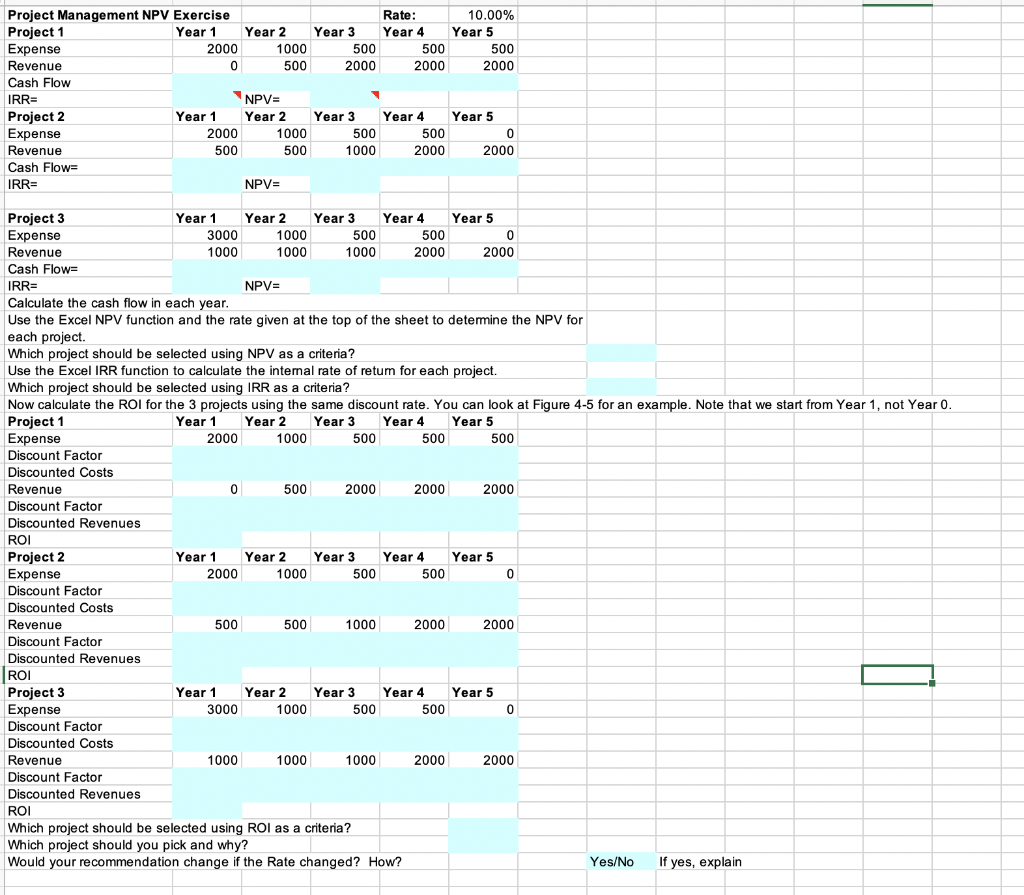
Please find the areas highlighted in blue
Project Management NPV Exercise Rate: 10.00% Project 1 Year 1 Year 2 Year 3 Year 4 Year 5 Expense 2000 1000 500 500 500 Revenue 0 500 2000 2000 2000 Cash Flow IRR= NPV= Project 2 Year 1 Year 2 Year 3 Year 4 Year 5 Expense 2000 1000 500 500 0 Revenue 500 500 1000 2000 2000 Cash Flow= NPV= IRR= Project 3 Year 1 Year 2 Year 3 Year 4 Year 5 Expense 3000 1000 500 500 0 Revenue 1000 1000 1000 2000 2000 Cash Flow= IRR= NPV= Calculate the cash flow in each year. Use the Excel NPV function and the rate given at the top of the sheet to determine the NPV for each project. Which project should be selected using NPV as a criteria? Use the Excel IRR function to calculate the internal rate of retum for each project. Which project should be selected using IRR as a criteria? Now calculate the ROI for the projects using the same discount rate. You can look at Figure 4-5 for an example. Note that we start from Year 1, not Year 0. Project 1 Year 1 Year 2 Year 3 Year 4 Year 5 Expense 2000 1000 500 500 500 Discount Factor Discounted Costs Revenue 0 500 2000 2000 2000 Discount Factor Discounted Revenues ROI Project 2 Year 1 Year 2 Year 3 Year 4 Year 5 Expense 2000 1000 500 500 0 Discount Factor Discounted Costs Revenue 500 500 1000 2000 2000 Discount Factor Discounted Revenues ROI Project 3 Year 1 Year 2 Year 3 Year 4 Year 5 Expense 3000 1000 500 500 0 Discount Factor Discounted Costs Revenue 1000 1000 1000 2000 2000 Discount Factor Discounted Revenues ROI Which project should be selected using ROI as a criteria? Which project should you pick and why? Would your recommendation change if the Rate changed? How? Yes/No If yes, explain Project Management NPV Exercise Rate: 10.00% Project 1 Year 1 Year 2 Year 3 Year 4 Year 5 Expense 2000 1000 500 500 500 Revenue 0 500 2000 2000 2000 Cash Flow IRR= NPV= Project 2 Year 1 Year 2 Year 3 Year 4 Year 5 Expense 2000 1000 500 500 0 Revenue 500 500 1000 2000 2000 Cash Flow= NPV= IRR= Project 3 Year 1 Year 2 Year 3 Year 4 Year 5 Expense 3000 1000 500 500 0 Revenue 1000 1000 1000 2000 2000 Cash Flow= IRR= NPV= Calculate the cash flow in each year. Use the Excel NPV function and the rate given at the top of the sheet to determine the NPV for each project. Which project should be selected using NPV as a criteria? Use the Excel IRR function to calculate the internal rate of retum for each project. Which project should be selected using IRR as a criteria? Now calculate the ROI for the projects using the same discount rate. You can look at Figure 4-5 for an example. Note that we start from Year 1, not Year 0. Project 1 Year 1 Year 2 Year 3 Year 4 Year 5 Expense 2000 1000 500 500 500 Discount Factor Discounted Costs Revenue 0 500 2000 2000 2000 Discount Factor Discounted Revenues ROI Project 2 Year 1 Year 2 Year 3 Year 4 Year 5 Expense 2000 1000 500 500 0 Discount Factor Discounted Costs Revenue 500 500 1000 2000 2000 Discount Factor Discounted Revenues ROI Project 3 Year 1 Year 2 Year 3 Year 4 Year 5 Expense 3000 1000 500 500 0 Discount Factor Discounted Costs Revenue 1000 1000 1000 2000 2000 Discount Factor Discounted Revenues ROI Which project should be selected using ROI as a criteria? Which project should you pick and why? Would your recommendation change if the Rate changed? How? Yes/No If yes, explainStep by Step Solution
There are 3 Steps involved in it
1 Expert Approved Answer
Step: 1 Unlock

Question Has Been Solved by an Expert!
Get step-by-step solutions from verified subject matter experts
Step: 2 Unlock
Step: 3 Unlock