







Question: Please finish the codes for me!!! I keep getting errors, i know I have to do the print statements!! Topics: class, object, instantiation, print Problem
Please finish the codes for me!!! I keep getting errors, i know I have to do the print statements!!
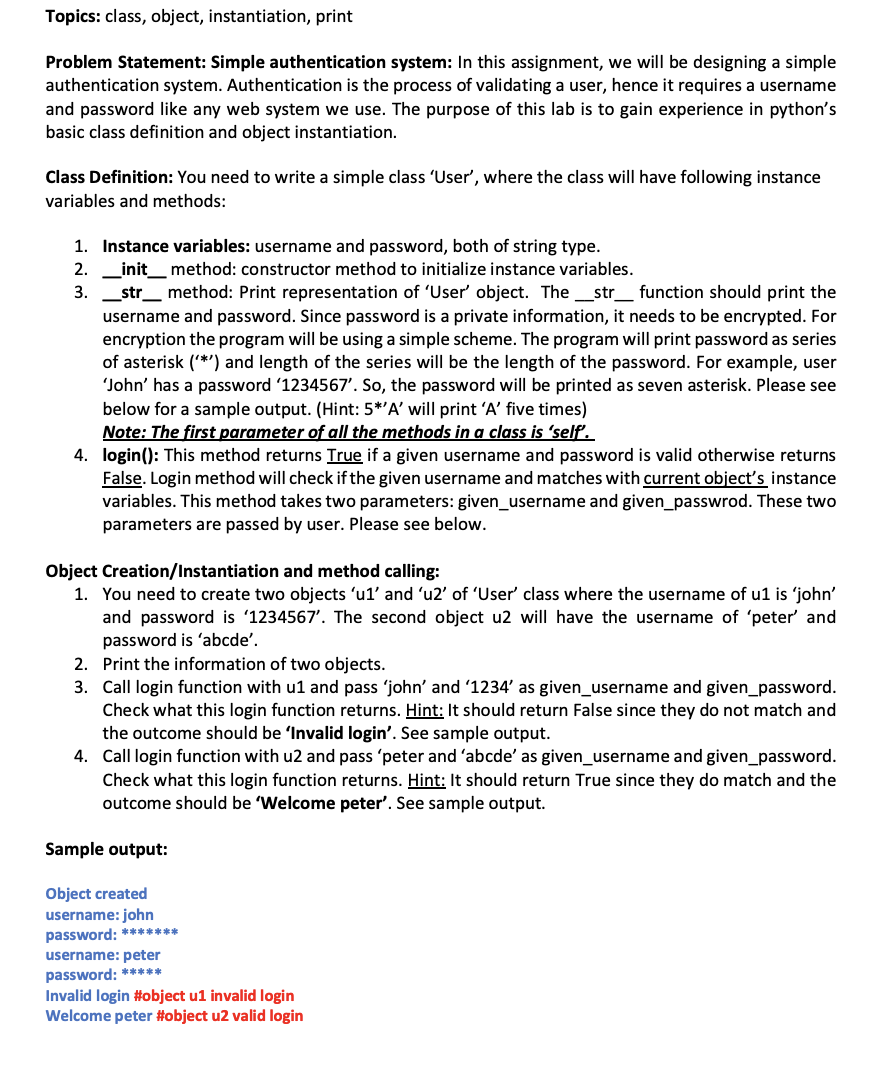
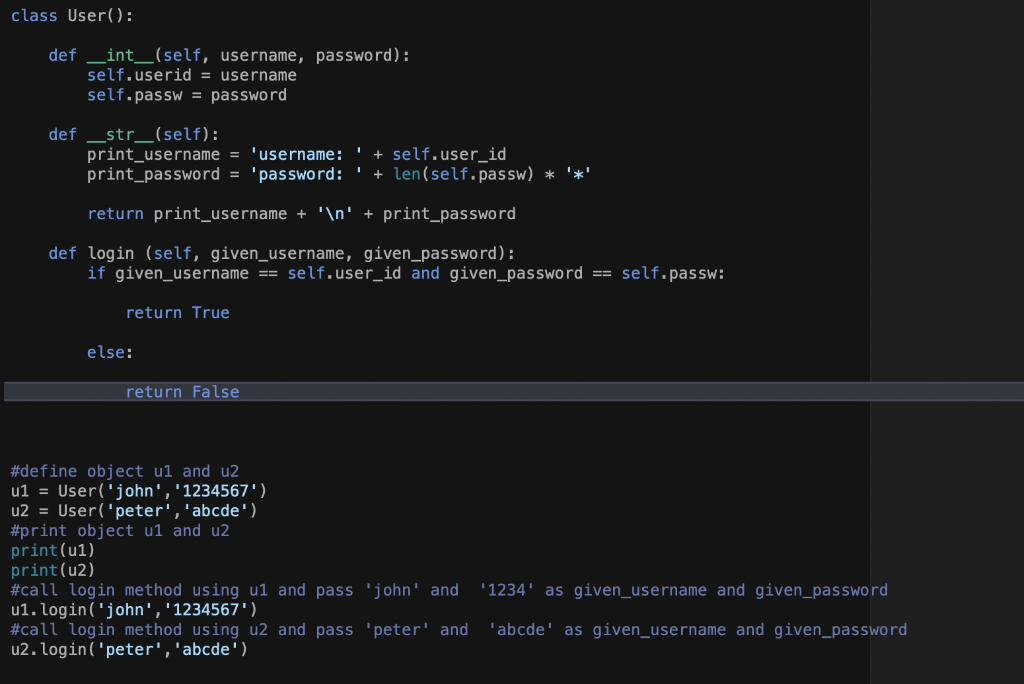
Topics: class, object, instantiation, print Problem Statement: Simple authentication system: In this assignment, we will be designing a simple authentication system. Authentication is the process of validating a user, hence it requires a username and password like any web system we use. The purpose of this lab is to gain experience in python's basic class definition and object instantiation. Class Definition: You need to write a simple class 'User', where the class will have following instance variables and methods: 1. Instance variables: username and password, both of string type. 2. _init_method: constructor method to initialize instance variables. 3._str_ method: Print representation of 'User' object. The str_function should print the username and password. Since password is a private information, it needs to be encrypted. For encryption the program will be using a simple scheme. The program will print password as series of asterisk (***) and length of the series will be the length of the password. For example, user 'John' has a password '1234567'. So, the password will be printed as seven asterisk. Please see below for a sample output. (Hint: 5*'A' will print 'A' five times) Note: The first parameter of all the methods in a class is 'self. 4. login(): This method returns True if a given username and password is valid otherwise returns False. Login method will check if the given username and matches with current object's instance variables. This method takes two parameters: given_username and given_passwrod. These two parameters are passed by user. Please see below. Object Creation/Instantiation and method calling: 1. You need to create two objects 'ul' and 'ul' of 'User' class where the username of u1 is 'john' and password is '1234567'. The second object u2 will have the username of 'peter' and password is 'abcde'. 2. Print the information of two objects. 3. Call login function with u1 and pass 'john' and '1234' as given_username and given_password. Check what this login function returns. Hint: It should return false since they do not match and the outcome should be 'Invalid login'. See sample output. 4. Call login function with u2 and pass 'peter and 'abcde' as given_username and given_password. Check what this login function returns. Hint: It should return True since they do match and the outcome should be 'Welcome peter'. See sample output. Sample output: Object created username: john password: ******* username: peter password: ***** Invalid login #object u1 invalid login Welcome peter #object u2 valid login class User(): def _int__(self, username, password): self.userid = username self.passw = password def _str__(self): print_username = 'username: ' + self.user_id print_password = 'password: ' + len(self.passw) * '*' return print_username + ' ' + print_password def login (self, given_username, given_password): if given_username == self.user_id and given_password == self.passw: return True else: return false #define object ul and u2 u1 = User('john', '1234567') u2 = User('peter', 'abcde') #print object ul and u2 print(1) print(u2) #call login method using u1 and pass 'john' and ul. login('john', '1234567') #call login method using u2 and pass 'peter' and u2. login('peter', 'abcde') '1234' as given_username and given_password 'abcde' as given_username and given_password
Step by Step Solution
There are 3 Steps involved in it

Get step-by-step solutions from verified subject matter experts
 Study Help