







Question: PLEASE FIX CODE !!! Please fix this code so that the message show's all the entered course details with the average and maximum course enrollment
PLEASE FIX CODE !!!
Please fix this code so that the message show's all the entered course details with the average and maximum course enrollment at the end after entering all the course details. THe code which I put below only shows the message after each course information is entered.
import javax.swing.JOptionPane;
public class PA2CourseRegistrationPortal { private static int maxEnrollment = 30; private static int totalEnrollment = 0; private static int totalCourses = 6;
public static void main(String[] args) { for (int i = 1; i
// print course details JOptionPane.showMessageDialog(null,"Course Details: " + "Course Number: " + courseNumber + " Course Name: " + courseName + " Credit Hour: " + creditHour + " Current Enrollment: " + enrollment);
// check if all courses have been entered if (totalCourses == 6) { // calculate average enrollment and print double avgEnrollment = (double) totalEnrollment / totalCourses; System.out.println("Maximum Enrollment: " + maxEnrollment); System.out.println("Average Enrollment: " + avgEnrollment); } } }
public static String getCourseNumber() { String courseNumber = JOptionPane.showInputDialog("Enter course number (5 characters):"); while (courseNumber.length() != 5) { JOptionPane.showMessageDialog(null, "Error: Course number must be 5 characters long."); courseNumber = JOptionPane.showInputDialog("Enter course number (5 characters):"); } return courseNumber; }
public static String getCourseName() { String courseName = JOptionPane.showInputDialog("Enter course name:"); while (courseName.isEmpty()) { JOptionPane.showMessageDialog(null, "Error: Course name cannot be empty."); courseName = JOptionPane.showInputDialog("Enter course name:"); } return courseName; }
public static int getCreditHour() { int creditHour = 0; boolean validInput = false; while (!validInput) { String creditHourString = JOptionPane.showInputDialog("Enter credit hour (maximum 4):"); try { creditHour = Integer.parseInt(creditHourString); if (creditHour > 0 && creditHour
public static int getEnrollment() { int enrollment = 0; boolean validInput = false; while (!validInput) { String enrollmentString = JOptionPane.showInputDialog("Enter current enrollment:"); try { enrollment = Integer.parseInt(enrollmentString); if (enrollment > 0 && enrollment
the output message could look like this. please fix my code to match this! ONLY USE JOP not SYS.OUT!! and NO ARRAYS!!!
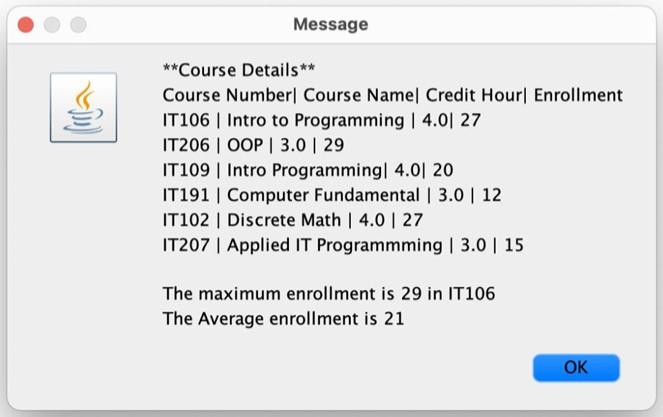
Course Details Course Number| Course Name| Credit Hour| Enrollment IT106 | Intro to Programming | 4.0| 27 IT206 | OOP | 3.029 IT109 | Intro Programming| 4.0| 20 IT191 | Computer Fundamental | 3.0 | 12 IT102 | Discrete Math | 4.0 | 27 IT207 | Applied IT Programmming | 3.0 | 15 The maximum enrollment is 29 in IT106 The Average enrollment is 21 Course Details Course Number| Course Name| Credit Hour| Enrollment IT106 | Intro to Programming | 4.0| 27 IT206 | OOP | 3.029 IT109 | Intro Programming| 4.0| 20 IT191 | Computer Fundamental | 3.0 | 12 IT102 | Discrete Math | 4.0 | 27 IT207 | Applied IT Programmming | 3.0 | 15 The maximum enrollment is 29 in IT106 The Average enrollment is 21
Step by Step Solution
There are 3 Steps involved in it

Get step-by-step solutions from verified subject matter experts
 Study Help