







Question: please focus well. i want the same design using CSS ITEC 229 - LAB 4 - Using Internal CSS For Lab 4 you should create
please focus well. i want the same design using CSS
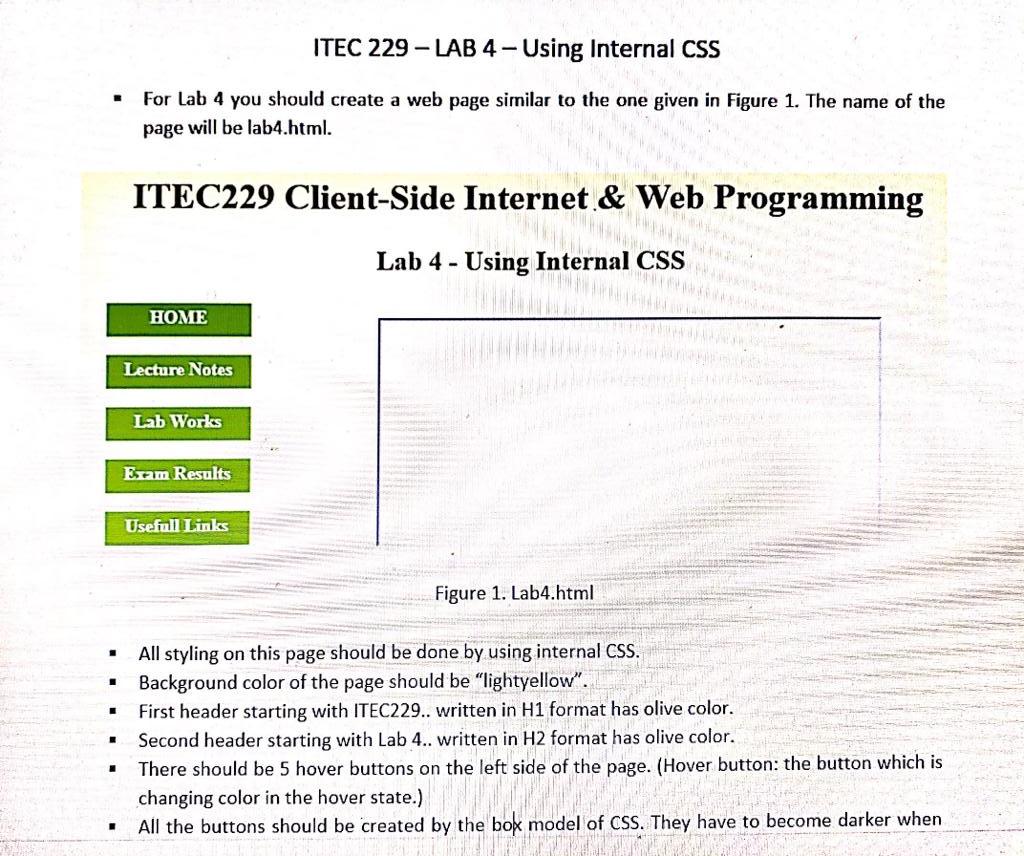
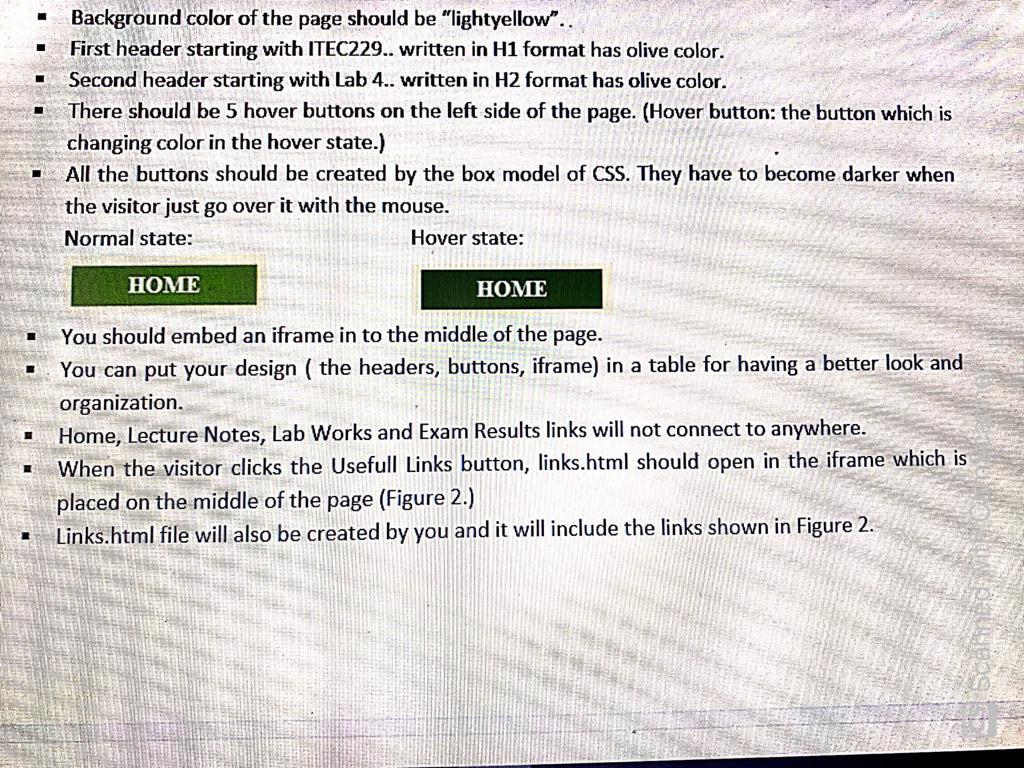
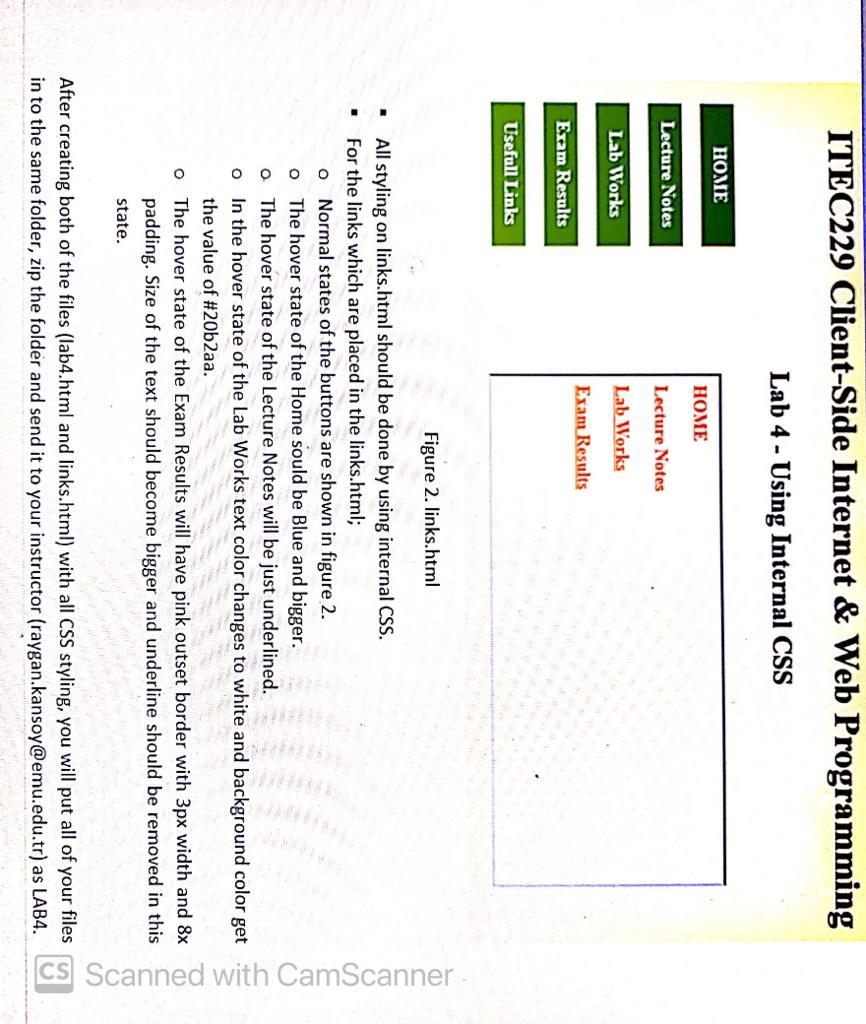
ITEC 229 - LAB 4 - Using Internal CSS For Lab 4 you should create a web page similar to the one given in Figure 1. The name of the page will be lab4.html. ITEC229 Client-Side Internet & Web Programming Lab 4 - Using Internal CSS HOME Lecture Notes Lab Works Eram Results Usefull Links Figure 1. Lab4.html . All styling on this page should be done by using internal CSS. Background color of the page should be "lightyellow". First header starting with ITEC229.. written in H1 format has olive color. Second header starting with Lab 4.. written in H2 format has olive color. There should be 5 hover buttons on the left side of the page. (Hover button: the button which is changing color in the hover state.) All the buttons should be created by the box model of CSS. They have to become darker when Leave a com . Background color of the page should be "lightyellow". First header starting with ITEC229.. written in H1 format has olive color. Second header starting with Lab 4.. written in H2 format has olive color. There should be 5 hover buttons on the left side of the page. (Hover button: the button which is changing color in the hover state.) All the buttons should be created by the box model of CSS. They have to become darker when the visitor just go over it with the mouse. Normal state: Hover state: HOME HOME You should embed an iframe in to the middle of the page. You can put your design ( the headers, buttons, iframe) in a table for having a better look and organization. Home, Lecture Notes, Lab Works and Exam Results links will not connect to anywhere. When the visitor clicks the Usefull Links button, links.html should open in the iframe which is placed on the middle of the page (Figure 2.) Links.html file will also be created by you and it will include the links shown in Figure 2. 1 ITEC229 Client-Side Internet & Web Programming Lab 4 - Using Internal CSS HOME HOME Lecture Notes Lecture Notes Lab Works Lab Works Exam Results Exam Results Usefull Links Figure 2. links.html o All styling on links.html should be done by using internal CSS. For the links which are placed in the links.html; o Normal states of the buttons are shown in figure 2. The hover state of the Home sould be Blue and bigger. o The hover state of the Lecture Notes will be just underlined. o In the hover state of the Lab Works text color changes to white and background color get the value of #20b2aa. The hover state of the Exam Results will have pink outset border with 3px width and 8x padding. Size of the text should become bigger and underline should be removed in this state. CS Scanned with CamScanner O After creating both of the files (lab4.html and links.html) with all CSS styling, you will put all of your files in to the same folder, zip the folder and send it to your instructor (raygan.kansoy@emu.edu.tr) as LAB4
Step by Step Solution
There are 3 Steps involved in it

Get step-by-step solutions from verified subject matter experts
 Study Help