







Question: please follow the instructions provided on the excel spreadsheet. Make sure to include the cell number and formulas required to yield the answers to part
please follow the instructions provided on the excel spreadsheet. Make sure to include the cell number and formulas required to yield the answers to part one and two. 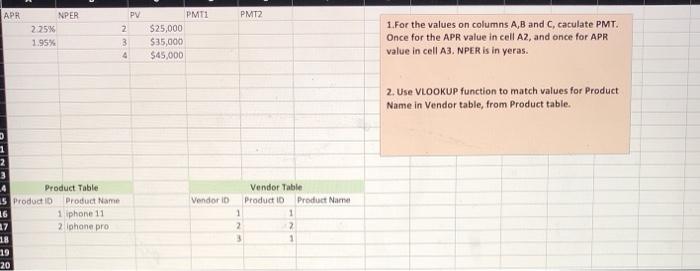
APR PMT2 NPER 225% 1.95% PV 2 3 4 PMT1 $25,000 $35,000 $45,000 1.For the values on columns A,B and C, caculate PMT. Once for the APR value in cell A2, and once for APR value in cell A3, NPER is in yeras. 2. Use VLOOKUP function to match values for Product Name in Vendor table, from Product table. Vendor ID 1 2 3 Product Table 5 Product ID Product Name 16 1 iphone 11 27 2 iphone pro 18 19 20 Vendor Table Product 10 Product Name 1 1 2 2 3 1
Step by Step Solution
There are 3 Steps involved in it
1 Expert Approved Answer
Step: 1 Unlock

Question Has Been Solved by an Expert!
Get step-by-step solutions from verified subject matter experts
Step: 2 Unlock
Step: 3 Unlock
 Study Help