







Question: Please follow the instructions that I wrote and write code with Python. If possible, add comments that explain the code which you created. You can
Please follow the instructions that I wrote and write code with Python. If possible, add comments that explain the code which you created.
You can obtain the dataset here: Statistics Canada. (Jan 2 2023). [webpage] Retrieved on January 2,2023
https://open.canada.ca/data/en/dataset/d32a60af-68bc-4a40-9b9e-1b82db338308
You need to review the Open Government License, which is found here:
http://open.canada.ca/en/open-government-licence-canada
It is your responsibility to attribute the data set source as per the Open Government License within your program source code and project documentation.
Additional Information The dataset file is named "32100358.csv"
While the file will open by default in MS Excel, it is actually only a text file, use a text editor like Notepad++ or Visual Studio Code to review it.
Notes The demonstration program(s) provided use a data set from a previous run of this course i.e. Canadian Cheeses, and are provided to show case a non-layered program similar to assignment 1, which is then refactored most of the way into a layered program (assignment 2). You are required to use the data set assigned above (32100358.csv) for your programming work in this course, do not use Cheeses.
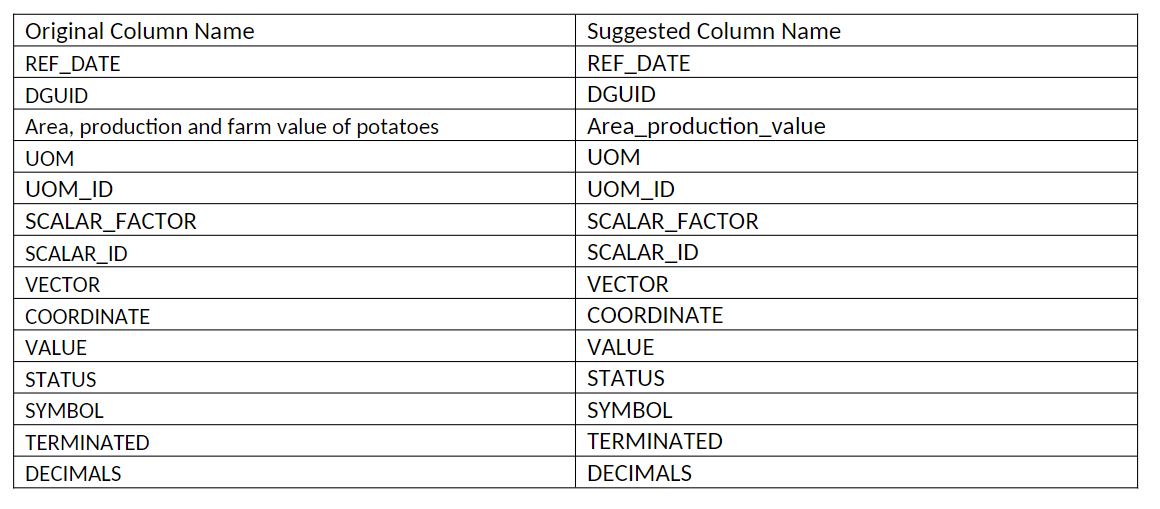
List of Columns to use: You are required to use all columns for the purposes of Create, Read, Update, Delete functionality in your program:
 What is a Dataset?
Within the context of this course, a data set is a collection of information stored as records with a known sequence of columns. A CSV file is a plain text file that has records stored as lines of text, corresponding to the records of a data set. Each line in the file represents one record, each record's fields are separated by comma characters. While Microsoft Excel is associated with *.csv file extension by the operating system, and will be the program opened if you double-click on the *.csv file, it is important to open the *.csv file in a text editor to see the actual structure. The dataset provided has the column titles (field names) provided as the first line of text in the file. The second line of text might be data, or could be the column names in French. The remaining lines of text in the file are the records. Typically a program will read in the lines of text, parse the text using the comma as a delimiter character to split the fields before storing the records into some sort of data structure and then manipulating the data further. It's recommended to use a CSV API library instead of writing your own customized code, as text enclosed in double quotes may have commas intended to be included as part of the data can be mistaken for delimiters, and there can be other issues as well that a CSV API will know how to handle. Writing your own code can work, but may need to be extensively tested as well as maintained frequently. Lastly, and importantly, your program code needs to be based on the dataset. You are obligated to use the data set column names in your code to indicate to a reviewer that your program was custom made for this dataset. Highly abstract programs that can process any data set, and have none of the column names from this dataset within the code, are subject to a loss of marks.
Practical Project Part 1 - Project Proof of Concept
Refer to the Course Section Information (CSI) document posted in Blackboard under Course Information for additional requirements common to all assessments as well as details on the required use of the data set specified for the course.
Refer to the documents in the dataset area in Brightspace for the list of dataset columns to use, note that all listed columns need to be used, and need to be present within your source code to verify you are using the dataset provided. The first record in the data set may contain the column names, if so you may skip over this record when reading in and parsing the data set data.
You may use your previous work in this course as a reference / starting-point but I expect modifications, i.e. passing in older work again with none to very small changes will not earn marks. Tasks
Create a project, in your language of study that meets the following requirements:
o Create a record object (also known as entity object, data-transfer object) that uses the column names from the dataset as part of the source code, e.g. variable names, accessors/mutators names, or constants.
o Use File-IO on startup to open and read the dataset, initializing a few record objects with data parsed from the first few records in the csv file. The record objects should be stored in a simple data structure (array or a list), use exception handling in case the file is missing or not available.
o Loop over the data structure, and output the record data on screen. o Displays your full name on screen so it remains visible at all times.
Take a screen shot of your program performing each task above, ensuring your full name is within each screen shot.
Comment your source code file using documentation comments (docstrings in Python, XML-document in C# or VB.Net, JSDoc for server-side JavaScript etc.)
Your program should use the following programming concepts: variables, methods, a loop structure, File- IO reading from the dataset, exception handling, use of an API library, an array (or similar data structure).
You must indicate clearly to your professor that you can identify what parts of your code illustrate and match to each programming concept.
Heading with name "Program Demonstration via Screen Shots" o Include screen shots of your running program; I should see records from the data set displayed on screen. As well as your full name.
Heading with name "Source Code Commenting Example"
o Copy and paste all of the source code, including programmer comments, from one source code file from your project to demonstrate you can write documentation-comments. Use a font size of 10 point, with a monospaced font of your choosing.
o Note: Some frameworks generate many code files, which you never edit yourself. Only include a source code file you created or edited directly.
Do not copy and paste code from the web into your demonstration program, it must be your own work. In other words, even properly cited and referenced code copied from a website will not earn marks, as you must provide your own work. Your professor while grading your submission will make this determination.
\begin{tabular}{|l|l|} \hline Original Column Name & Suggested Column Name \\ \hline REF_DATE & REF_DATE \\ \hline DGUID & DGUID \\ \hline Area, production and farm value of potatoes & Area_production_value \\ \hline UOM & UOM \\ \hline UOM_ID & UOM_ID \\ \hline SCALAR_FACTOR & SCALAR_FACTOR \\ \hline SCALAR_ID & SCALAR_ID \\ \hline VECTOR & VECTOR \\ \hline COORDINATE & COORDINATE \\ \hline VALUE & VALUE \\ \hline STATUS & STATUS \\ \hline SYMBOL & SYMBOL \\ \hline TERMINATED & TERMINATED \\ \hline DECIMALS & DECIMALS \\ \hline \end{tabular}
Step by Step Solution
There are 3 Steps involved in it

Get step-by-step solutions from verified subject matter experts
 Study Help