Question: Please guide me through the Transactions progress on page 3 and Bank Reconciliation on page 4. Thank you. I get stuck on some parts on
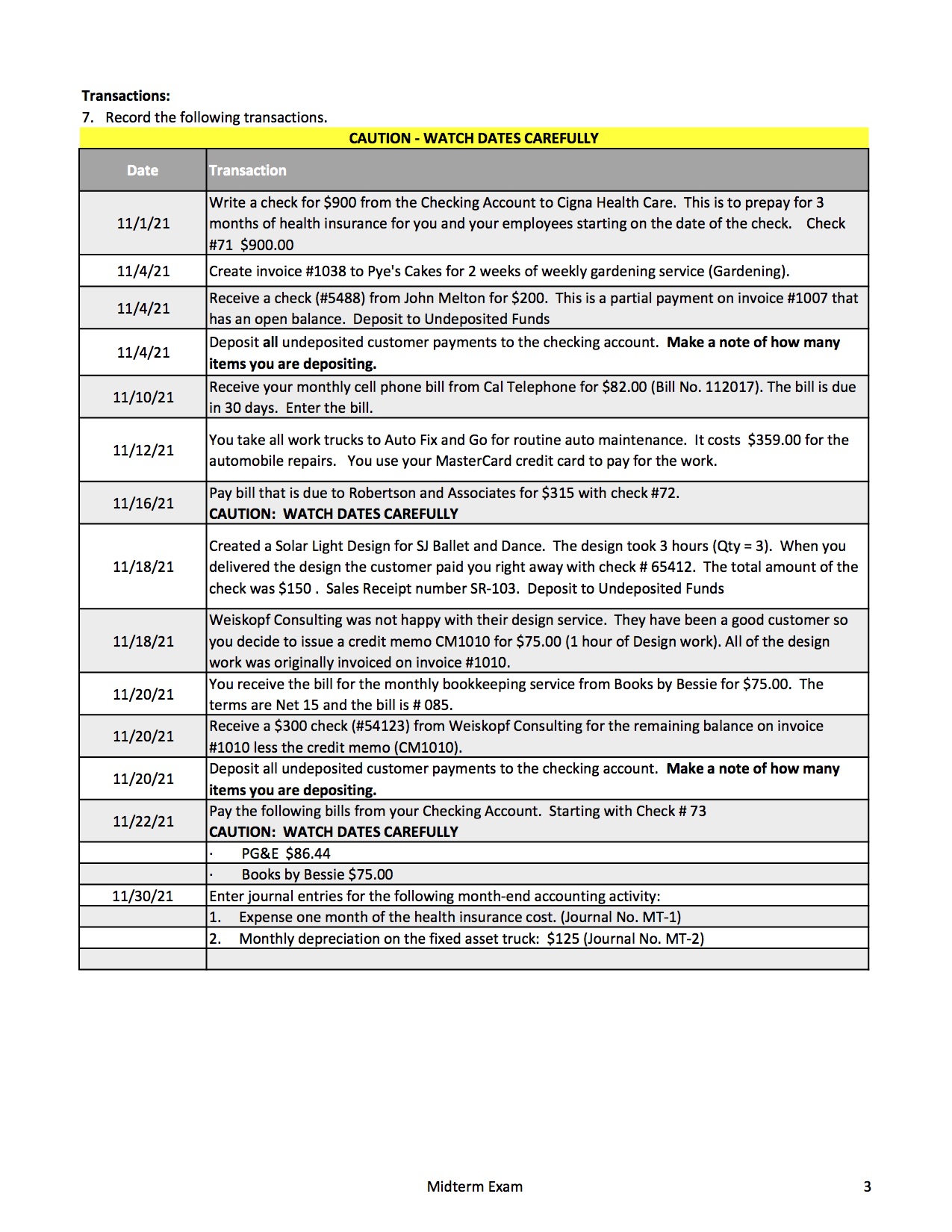
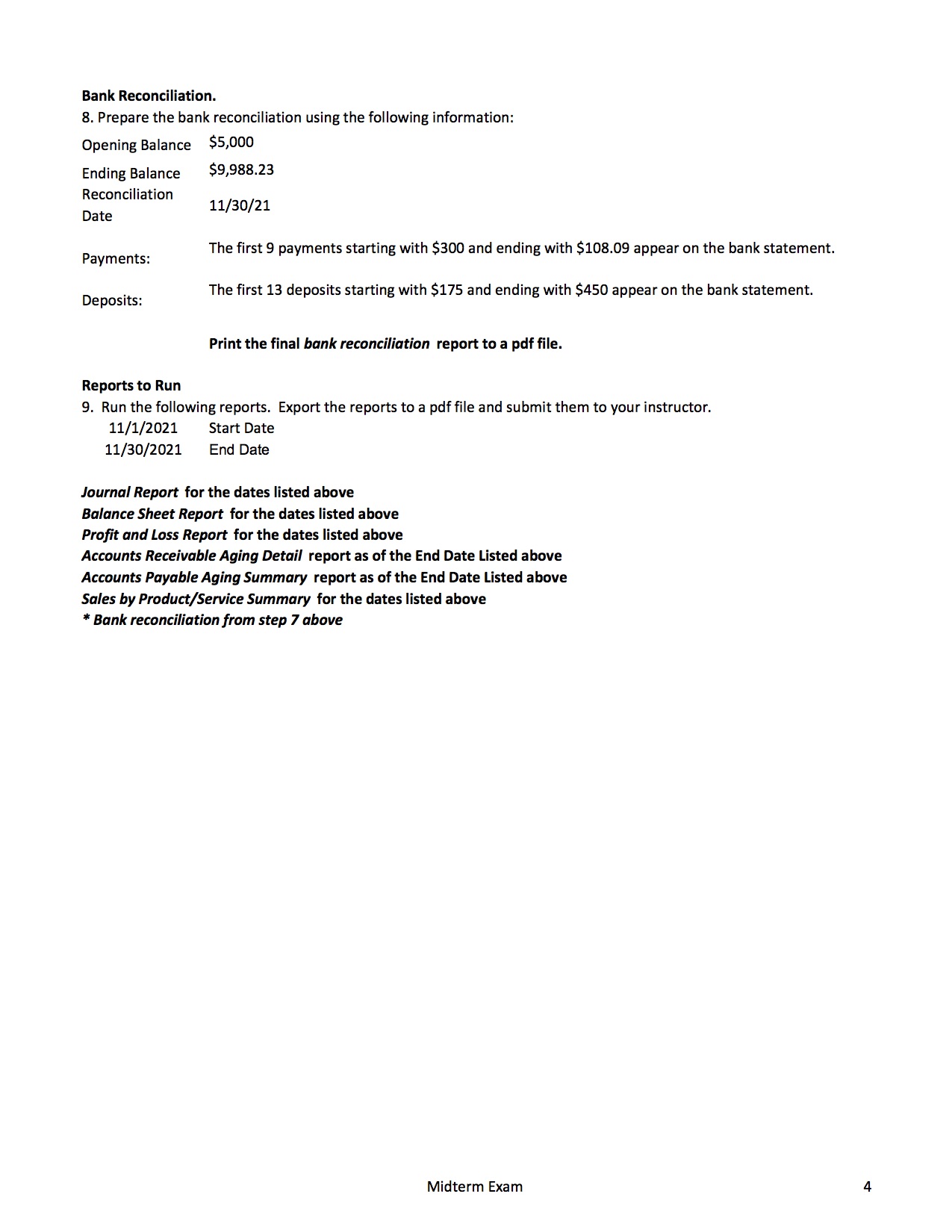
Please guide me through the Transactions progress on page 3 and Bank Reconciliation on page 4. Thank you.
I get stuck on some parts on page 3 that I need your help with. The reason I send all the information to you is so that you know how to start or help with it. If I send only the question then you keep asking me to update more information or not enough information.
For example,
on the 1st transaction 11/1/21: I use insurance -expense in Category or I should add new: Health insurance?
11/4/21: Create invoice for 2 weeks of Landscaping & Gardening so I change the quantity is 2 and rate 30 and Amount 60
111/4/21: There are 3 customers in Bank Deposit that is Cool cars, Freeman sporting Goods, and John melton. Total amount : 2,262.52. How many items are depositing? Are there 3 items?
And so on, Please help guide me through the whole transaction. Thank you
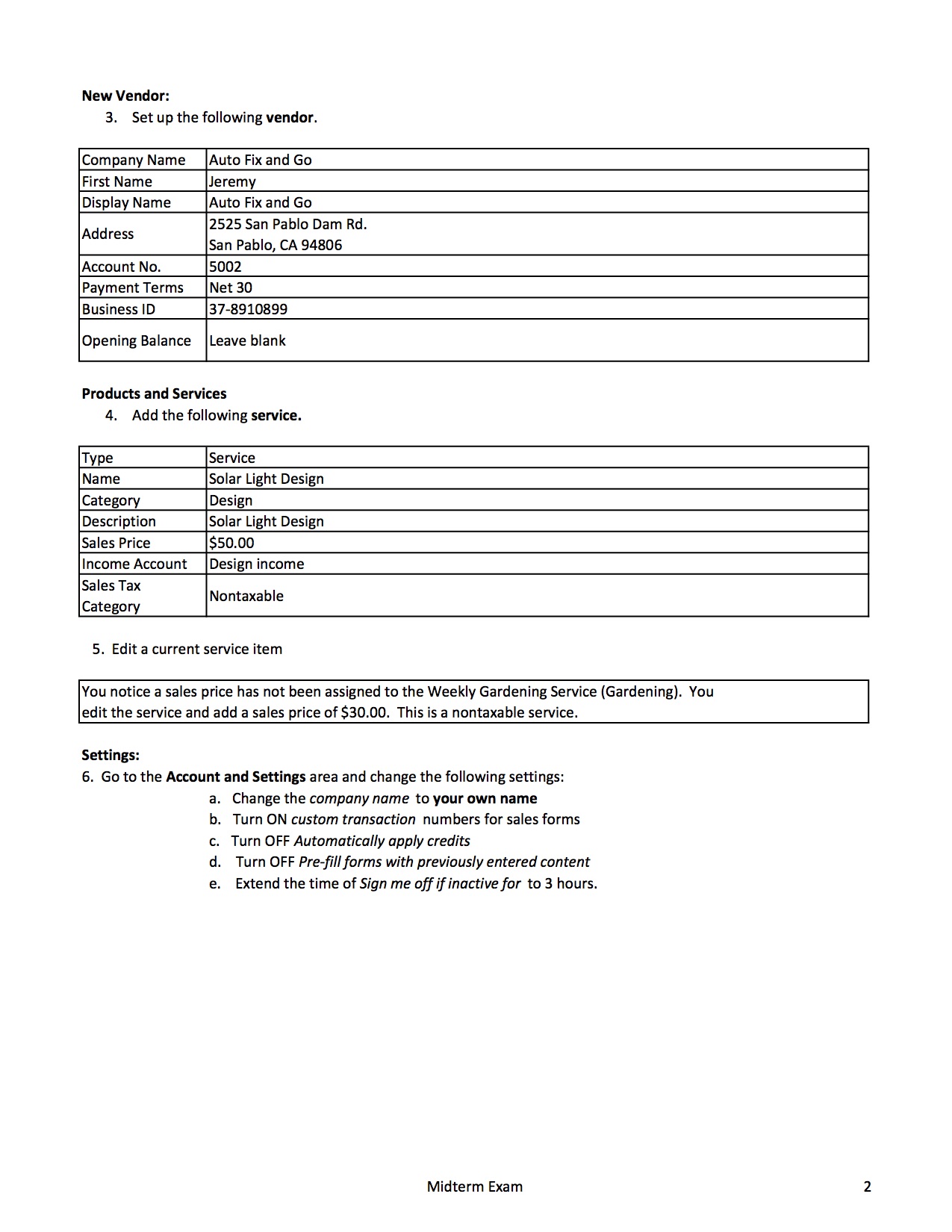
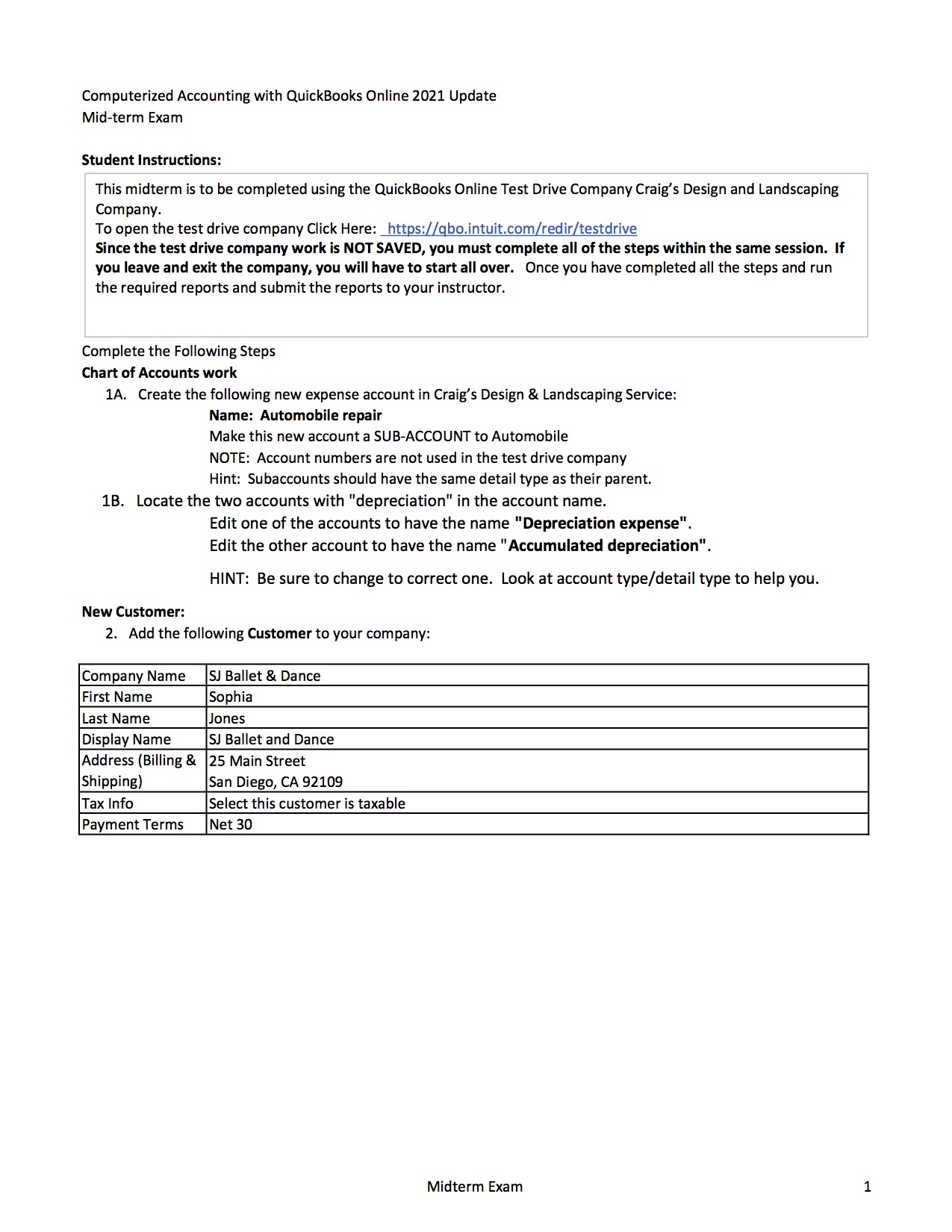
New Vendor: 3. Set up the following vendor. Company Name Auto Fix and Go Display Name Auto Fix and Go 2525 San Pablo Dam Rd. Address San Pablo, CA 94806 _ _ 3-7 8910899 Opening Balance Leave blank Products and Services 4. Add the following service. _ _ Sales Tax Nontaxable Category 5. Edit a current service item You notice a sales price has not been assigned to the Weekly Gardening Service (Gardening). You edit the service and add a sales price of $30.00. This is a nontaxable service. Settings: 6. Go to the Account and Settings area and change the following settings: a. Change the company name to your own name b. Turn ON custom transaction numbers for sales forms c. Turn OFF Automaticaiiy appiy credits d. Turn OFF Pre-fiii forms with previously entered content e. Extend the time of Sign me off if inactive for to 3 hours. Midterm Exam 2 Transactions: 7. Record the following transactions. CAUTION - WATCH DATES CAREFULLY Date Transaction Write a check for $900 from the Checking Account to Cigna Health Care. This is to prepay for 3 11/1/21 months of health insurance for you and your employees starting on the date of the check. Check #71 $900.00 11/4/21 Create invoice #1038 to Pye's Cakes for 2 weeks of weekly gardening service (Gardening). 11/4121 Receive a check (#5488) from John Melton for $200. This is a partial payment on invoice #1007 that has an open balance. Deposit to Undeposited Funds 11/4121 Deposit all undeposited customer payments to the checking account. Make a note of how many items you are depositing. Receive your monthly cell phone bill from Cal Telephone for $82.00 {Bill No. 112017]. The bill is due 11/10/21 . . In 30 days. Enter the bill. You take all work trucks to Auto Fix and Go for routine auto maintenance. It costs $359.00 for the automobile repairs. You use your MasterCard credit card to pay for the work. 11/15/21 Pay bill that is due to Robertson and Associates for $315 with check #72. CAUTION: WATCH DATES CAREFULLY Created a Solar Light Design for S] Ballet and Dance. The design took 3 hours (Qty = 3}. When you 11/18/21 delivered the design the customer paid you right away with check it 55412. The total amount of the check was 5150. Sales Receipt number SR-103. Deposit to Undeposited Funds 11/12/21 Weiskopf Consulting was not happy with their design service. They have been a good customer so 11/18/21 you decide to issue a credit memo CM1010 for $75.00 (1 hour of Design work]. All of the design work was originally invoiced on invoice #1010. You receive the bill for the monthly bookkeeping service from Books by Bessie for $75.00. The terms are Net 15 and the bill is if 085. Receive a $300 check (#54123) from Weiskopf Consulting for the remaining balance on invoice #1010 less the credit memo {CM1010}. Deposit all undeposited customer payments to the checking account. Make a note of how many items ou are de . ositin : . Pay the following bills from your Checking Account. Starting with Check ti 73 CAUTION: WATCH DATES CAREFULLY - PG&E $86.44 - Books by Bessie $75.00 nter journal entries for the following month-end accounting activity: . Expense one month of the health insurance cost. {Journal No. NIT-1) . Monthly depreciation on the fixed asset truck: $125 (Journal No. MT-2) 11/20/21 11/20121 11/20/21 11/22/21 11/30/21 Midterm Exam 3 Bank Reconciliation. 8. Prepare the bank reconciliation using the following information: Opening Balance $5,000 Ending Balance $9,988.23 Reconciliation Date 11/30/21 The first 9 payments starting with $300 and ending with $108.09 appear on the bank statement. Payments: Deposits: The first 13 deposits starting with $175 and ending with $450 appear on the bank statement. Print the final bank reconciliation report to a pdf file. Reports to Run 9. Run the following reports. Export the reports to a pdf file and submit them to your instructor. 11/1/2021 Start Date 11/30/2021 End Date Journal Report for the dates listed above Balance Sheet Report for the dates listed above Profit and Loss Report for the dates listed above Accounts Receivable Aging Detail report as of the End Date Listed above Accounts Payable Aging Summary report as of the End Date Listed above Sales by Product/Service Summary for the dates listed above * Bank reconciliation from step 7 above Midterm ExamComputerized Accounting with QuickBooks Online 2021 Update Mid-term Exam Student Instructions: This midterm is to be completed using the QuickBooks Online Test Drive Company Craig' 5 Design and Landscaping Company. To open the test drive company Click Here: httpsqbo.intuit.comfredir/testdrive Since the test drive company work is NOT SAVED, you must complete all of the steps within the same session. If you leave and exit the company, you will have to start all over. Once you have completed all the steps and run the required reports and submit the reports to your instructor. Complete the Following Steps Chart of Accounts work 1A. Create the following new expense account in Craig's Design & Landscaping Service: Name: Automobile repair Make this new account a SUB-ACCOUNT to Automobile NOTE: Account numbers are not used in the test drive company Hint: Subaccounts should have the same detail type as their parent. 1B. Locate the two accounts with "depreciation" in the account name. Edit one of the accounts to have the name "Depreciation expense\". Edit the other account to have the name \" Accumulated depreciation". HINT: Be sure to change to correct one. Look at account type/detail type to help you. New Customer: 2. Add the following Customer to your company: Company Name SJ Ballet 8: Dance First Name Display Name SJ Ballet and Dance Address (Billing 81 25 Main Street Shipping] San Diego, CA 92109 Tax Info Select this customer is taxable Payment Terms Midterm Exam 1
Step by Step Solution
There are 3 Steps involved in it
1 Expert Approved Answer
Step: 1 Unlock
Question Has Been Solved by an Expert!
Get step-by-step solutions from verified subject matter experts
Step: 2 Unlock
Step: 3 Unlock
Students Have Also Explored These Related Accounting Questions!









 Study Help