







Question: Please help. a. Select Gear icon > Recurring Transactions > New b. Select Transaction Type: Expense > OK c. Enter Template Name: Contractors Expense d.
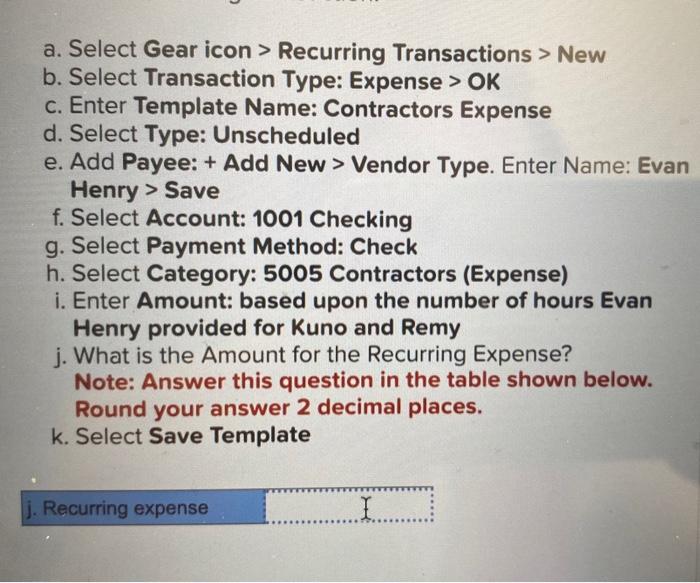
a. Select Gear icon > Recurring Transactions > New b. Select Transaction Type: Expense > OK c. Enter Template Name: Contractors Expense d. Select Type: Unscheduled e. Add Payee: + Add New > Vendor Type. Enter Name: Evan Henry > Save f. Select Account: 1001 Checking g. Select Payment Method: Check h. Select Category: 5005 Contractors (Expense) i. Enter Amount: based upon the number of hours Evan Henry provided for Kuno and Remy j. What is the Amount for the Recurring Expense? Note: Answer this question in the table shown below. Round your answer 2 decimal places. k. Select Save Template j. Recurring expense I a. Select Gear icon > Recurring Transactions > New b. Select Transaction Type: Expense > OK c. Enter Template Name: Contractors Expense d. Select Type: Unscheduled e. Add Payee: + Add New > Vendor Type. Enter Name: Evan Henry > Save f. Select Account: 1001 Checking g. Select Payment Method: Check h. Select Category: 5005 Contractors (Expense) i. Enter Amount: based upon the number of hours Evan Henry provided for Kuno and Remy j. What is the Amount for the Recurring Expense? Note: Answer this question in the table shown below. Round your answer 2 decimal places. k. Select Save Template j. Recurring expense
Step by Step Solution
There are 3 Steps involved in it

Get step-by-step solutions from verified subject matter experts
 Study Help