







Question: Please help above is what I need my code to do and below is my code. The bolded part is the code i attempted to
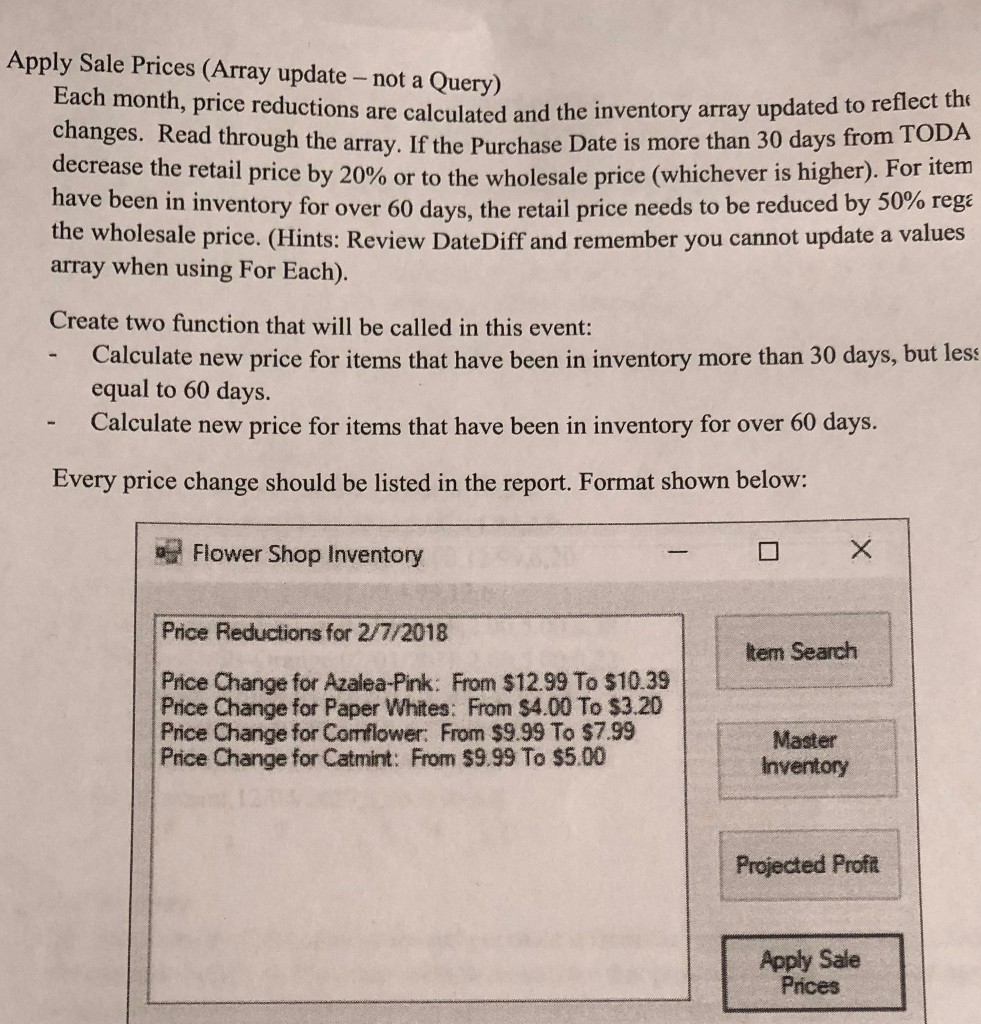
Please help above is what I need my code to do and below is my code. The bolded part is the code i attempted to create to accomplish what the picture is asking, however It does not work. I am getting an error with the For Each loop. Can somone help me fix this please.
Public Class frmFlowerShop Structure Shop Dim ProductNumber, ProductDescription As String Dim PurchaseDate As Date Dim WholesailPrice, RetailPrice As Double Dim ReOrderLevel, AvailableQty As Integer End Structure
Dim flowerShop() As Shop 'Array of Structures 'Form load Private Sub frmFlowerShop_Load(sender As Object, e As EventArgs) Handles MyBase.Load
'inventory array Dim records() As String = IO.File.ReadAllLines("FlowerShop.txt")
ReDim flowerShop(records.Count - 1)
Dim line As String Dim data() As String 'might add a six between the ()
For i As Integer = 0 To records.Count - 1 line = records(i) data = line.Split(","c) flowerShop(i).ProductNumber = data(0) flowerShop(i).ProductDescription = data(1) flowerShop(i).PurchaseDate = CDate(data(2)) flowerShop(i).WholesailPrice = CDbl(data(3)) flowerShop(i).RetailPrice = CDbl(data(4)) flowerShop(i).ReOrderLevel = CInt(data(5)) flowerShop(i).AvailableQty = CInt(data(6)) Next End Sub 'Button to search Private Sub btnSearch_Click(sender As Object, e As EventArgs) Handles btnSearch.Click 'Come back to Dim item As String = InputBox("Enter the item you're looking for") lstOutput.Items.Clear()
'Fix unavalible option For i As Integer = 0 To flowerShop.Count - 1 If (flowerShop(i).ProductDescription) = item Then lstOutput.Items.Add("Item " & item & " is in our inventory;") lstOutput.Items.Add("Quantity currently in stock is " & flowerShop(i).AvailableQty & ".") End If Next End Sub 'Need to add space still 'List all inventory items in product number order Private Sub btnInventory_Click(sender As Object, e As EventArgs) Handles btnInventory.Click Dim query = From product In flowerShop Order By product.ProductNumber Ascending Select product.ProductNumber & " " & product.ProductDescription & ":" & " " & product.AvailableQty & " @ " & product.RetailPrice
lstOutput.Items.Clear() lstOutput.Items.Add("Inventory List by Departments") lstOutput.Items.Add("")
For Each line In query lstOutput.Items.Add(line) Next End Sub 'Need to still add total projected profits 'Projected Profit Private Sub btnPP_Click(sender As Object, e As EventArgs) Handles btnPP.Click Dim profitQuery = From product In flowerShop Order By product.ProductDescription Ascending Let theProfit = Profit(product.RetailPrice, product.WholesailPrice, product.AvailableQty) Let results = product.ProductNumber & " " & product.ProductDescription & ":" & " " & theProfit.ToString("c2") Select results 'Set up listbox lstOutput.Items.Clear() lstOutput.Items.Add("Projected Profits") lstOutput.Items.Add("")
'Loop through the query and display the... For Each product In profitQuery lstOutput.Items.Add(product) Next lstOutput.Items.Add("") lstOutput.Items.Add("Total projected profits ") End Sub 'Working Function Profit(retail As Double, whole As Double, qty As Integer) As Double Return (retail * qty) - (whole * qty) End Function
Private Sub btnApply_Click(sender As Object, e As EventArgs) Handles btnApply.Click 'Place code here flowerShop = PlusThirty(flowerShop) For Each item As Shop In flowerShop lstOutput.Items.Add("Price Change for " & item.ProductDescription) Next End Sub
Function PlusThirty(thirty() As Integer) As Shop() For i As Integer = 0 To thirty.Count - 1 If flowerShop(i).PurchaseDate > Today Then If flowerShop(i).RetailPrice
Function PlusSixty(sixty() As Shop) As Shop() 'Place code here End Function End Class
Apply Sale Prices (Array update - not a Query) Each month, price reductions are calculated and the i changes. Read through the array. If the Purchase Date is decrease the retail pr nventory array updated to reflect the more than 30 days from TODA r is higher). For item have been in inventory for over 60 days, the retail price needs to be reduced by 50% rege the wholesale price. (Hints: Review DateDiff and remember you cannot update a values array when using For Each). Create two function that will be called in this event: Calculate new price for items that have been in inventory more than 30 days, but less equal to 60 days. Calculate new price for items that have been in inventory for over 60 days. Every price change should be listed in the report. Format shown below: Flower Shop Inventory Price Reductions for 2/7/2018 tem Search Price Change for Azalea-Pink: From $12.99 To $10.39 Price Change for Paper Whites: From $4.00 To $3.20 Price Change for Comflower: From $9.99 To $7.99 Price Change for Catmint: From $9.99 To $5.00 Master Inventory Projected Proft Apply Sale Prices
Step by Step Solution
There are 3 Steps involved in it

Get step-by-step solutions from verified subject matter experts
 Study Help